How to work with a CRM - a guide for salespeople
Checked on 23 November 2026 · published 23 November 2026
How to log conversations, plan follow-ups, work from one workspace and hand clients over so that a year later a new salesperson knows the whole story.
A CRM only works when salespeople use it - every day, not once a month before a report. Below we describe how to run a client in a CRM so that nothing gets lost: how to log conversations, how to plan the next step, how to hand clients over when a salesperson leaves, and how to come back to a client who said "no" a year or two ago. At the end there is a list of features worth checking when you choose a system, and what EU law says about keeping contact persons' data.
Why a CRM, when there is a spreadsheet and an inbox
A spreadsheet of clients and an inbox are enough while one person sells and remembers everything. The trouble starts when:
- two salespeople call the same company, because nobody knows who spoke to it last;
- what was agreed in a call lives only in one person's head or notebook;
- a deal goes quiet, because nobody planned the next call;
- a salesperson leaves, and their clients are left without a history.
A CRM solves these problems on one condition: everything that happens with a client goes into one place - with the company and with the specific deal.
Log every action - straight away and briefly
Every call, email, meeting, presentation or note is an activity you log on the deal. A good activity answers three questions: who, when and what was agreed. The type (call, meeting) and the date are usually filled in by the system - your part is the content.
Compare two notes from the same call:
- bad: "Call with the client, interested.";
- good: "Call with the purchasing manager. Budget approved for Q1, decision after the board meeting on 12 February. They want to compare us with their current supplier - she asks for an offer with roll-out in two branches. Concern: time to train their people."
A few rules that work in practice:
- log it straight after the call - the details fade with every hour;
- write for whoever replaces you - no abbreviations only you understand;
- log what did not work out, too: a refusal, a postponed decision, an objection - that is the most valuable knowledge when you come back to the client;
- do not copy whole emails - what follows from them is enough.
Every open deal has a next step
A follow-up is a planned next contact with a date. The rule is simple: no open deal is left without a next step. If you do not know what comes next, that is a decision too - then the deal should be closed as lost, with a reason.
A good next step is specific and checkable:
- bad: "get back to the client";
- good: "Tuesday 10:00 - call the purchasing manager: has the board approved the budget; if so, book a presentation for the two branches".
When the date passes and the step has not been done, do not keep moving it to "tomorrow". Check what has changed: maybe the client has not answered three attempts and it is time for another channel, or maybe the deal has died. Deals with an overdue next step are the first thing a sales manager looks at.
A salesperson's day on one screen
A salesperson should not start the day by searching through five tabs. A good CRM gives them a workspace: one screen with the company they are working with right now, its deals, its latest activities and what it bought before, plus their own to-do list - across all clients at once.
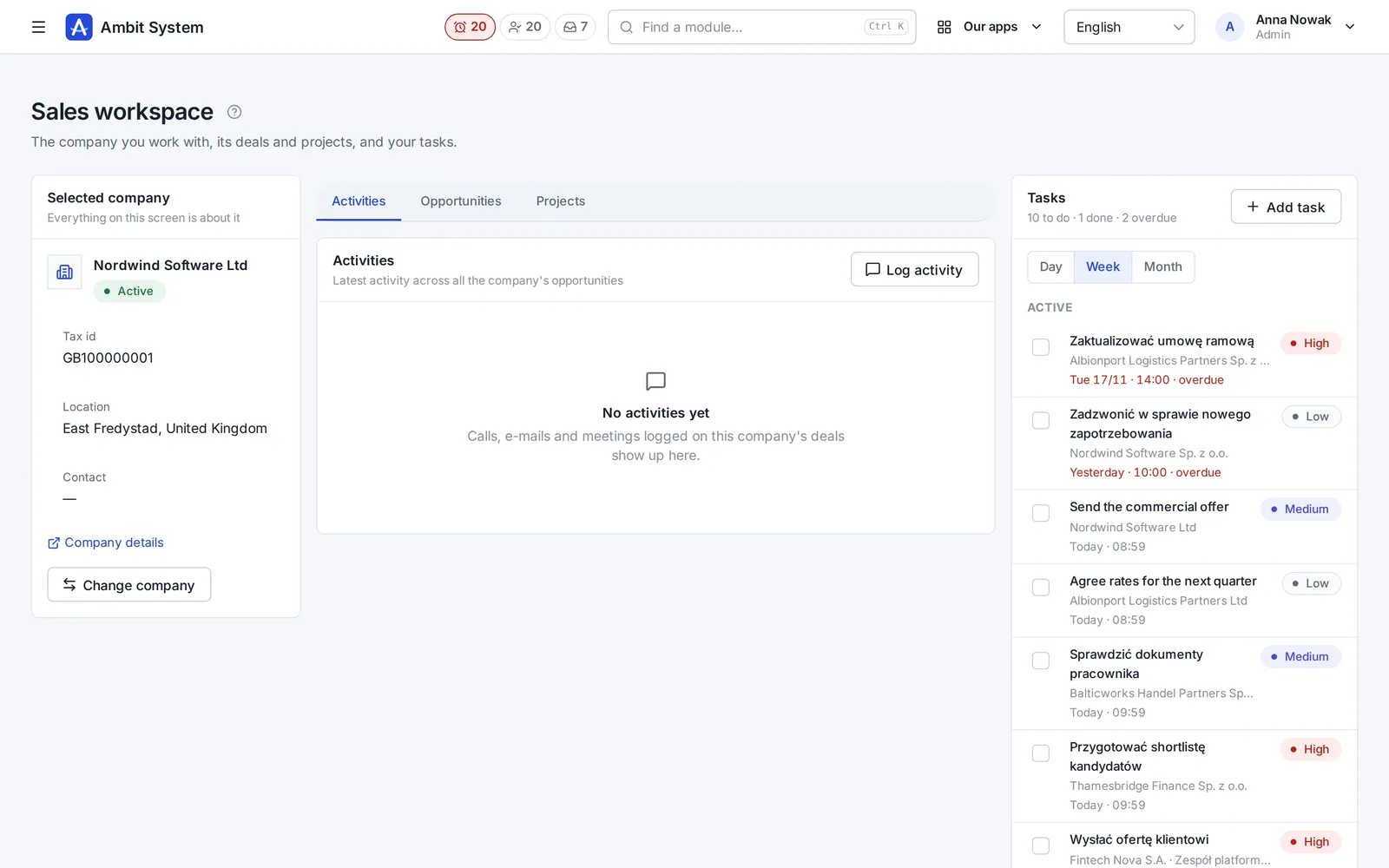
Working from the workspace looks like this:
- in the morning, the list of tasks and next steps for today;
- from each task, one click to the company and the deal it is about;
- after a call, a note and a new next step straight away;
- at the end of the day, nothing is left without a date.
Calendar: plan in days, weeks and months
B2B sales often run in cycles of weeks or months. That is why next steps need to be seen over time, not just as a list:
- day - today's calls and meetings;
- week - who is waiting for an offer, who you are meeting, whom to ask about a decision;
- month - contacts planned far ahead, e.g. "get back after their budget year closes".
A distant date matters as much as tomorrow's. A contact planned six months ahead, with a note on why, is often the only reason anyone ever comes back to that client.
The salesperson leaves, the client stays
People change jobs, move to other teams, go on leave. The client and its history should stay with the company. When a deal passes to another person, its owner changes - and the history stays: every conversation, offer, next step, and a record of who handed the client over and when.
Before handing clients over, go through a short list:
- every open deal has a current stage and a dated next step;
- the latest activity says where things stand - including what the client is worried about;
- the contact persons at the client are up to date;
- lost deals have their reason filled in.
The new owner starts by reading the history, not by calling to ask "so where did we leave off?".
Coming back to a client after a year or two
A lost deal is not the end of the relationship. The client chose another supplier, had no budget or postponed the project - a year or two later things may have changed: the contract with a competitor is ending, there is a new board, the budget has been found.
Such a comeback works when everything you need to know has stayed in the CRM. A new salesperson who opens the old deal sees:
- who talked to the client and to whom on their side;
- what we proposed - the scope, the value, the offer;
- why we lost - the reason recorded when the deal was closed;
- the history of changes - stages, owners and dates.
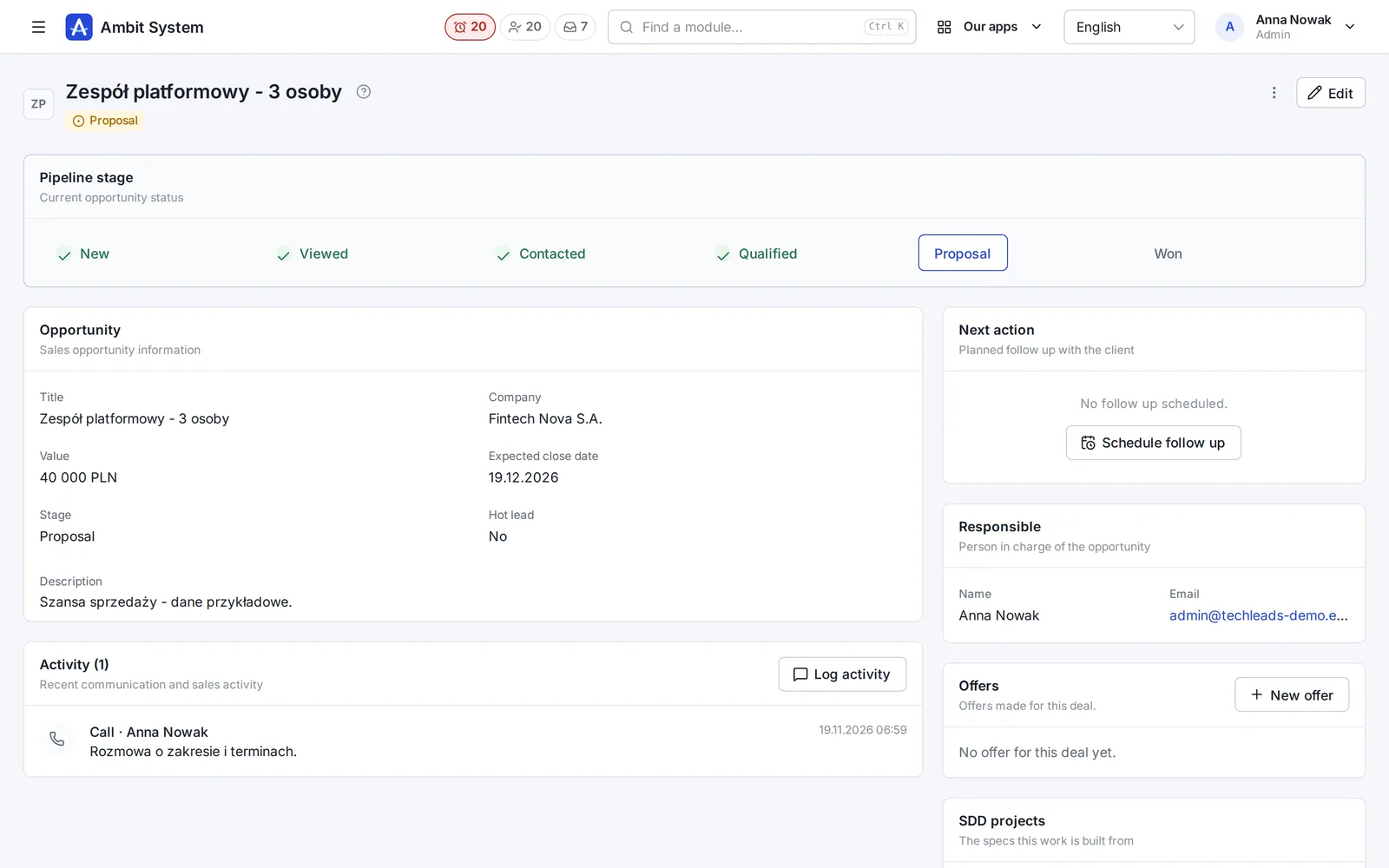
How to prepare for such a comeback:
- read the reason for the loss and the latest notes - that is your starting point for the conversation;
- check whether the contact persons still work at the client;
- start by asking what has changed, not with the old offer;
- reopen the old deal or create a new one for the same client - so that the history stays in one place.
It is best to plan the comeback when you close the deal: if the client says "in a year", a next step dated a year ahead stays in the system.
Contact persons' data: how long and on what basis
A CRM holds personal data - names, phone numbers and emails of people on the client's side. Keeping them for years has to be justified.
- Legal basis. Processing is lawful, among other cases, when it is necessary for the purposes of the legitimate interests pursued by the controller (Article 6(1)(f) GDPR). Recital 47 of the GDPR says that processing personal data for direct marketing purposes may be regarded as carried out for a legitimate interest.
- Storage limitation. Personal data are kept for no longer than is necessary for the purposes for which they are processed (Article 5(1)(e) GDPR). So it is worth deciding in your company after how long since the last contact the contact persons' data are deleted - and sticking to it.
- Information duty. Where the data have not been obtained from the person - e.g. from a business card a colleague passed on, or from the company's website - the GDPR sets out what information that person must be given (Article 14 GDPR).
- Objection. A person may object at any time to the processing of their data for direct marketing; after that, their data may no longer be processed for that purpose (Article 21(2) and (3) GDPR). They must be explicitly told about this right at the latest at the time of the first communication (Article 21(4) GDPR). Record an objection in the CRM so that a new salesperson can see it.
- Consent for sales contact. Under the ePrivacy Directive, automated calling and communication systems, fax or email may be used for direct marketing only to subscribers or users who have given their prior consent (Article 13(1)), with an exception for a company's own customers and its similar products, provided they can object easily and free of charge (Article 13(2)). These rules apply to natural persons; how companies as recipients are protected is set by each member state's law (Article 13(5)). Before you call or write with an offer a year later, check the rules in the recipient's country and whether the consent is recorded in the CRM.
What a good CRM should have
When you choose a system, check whether it:
- logs activities on the deal and the company - calls, emails, meetings, notes - with author and date;
- enforces a next step, or at least shows deals with no planned contact and with an overdue date;
- has a salesperson's workspace - one screen for the working day instead of many tabs;
- shows tasks over time - day, week, month;
- records the history of changes - who changed the stage, value or owner and when - and does not allow it to be edited;
- requires a reason when a deal is closed as lost;
- lets you hand clients over to another person without losing the history;
- has a pipeline with values - how many deals are at each stage and what they are worth;
- issues an offer from the deal, so that amounts and scope do not live in separate files;
- syncs with email and calendar, if your team needs it - a convenience, not a requirement, because a good note after a call is needed anyway;
- lets you export the data - clients and their history belong to your company, not to the system's vendor.
No system replaces the habit. A CRM with a note and a next step after every conversation is enough for a new salesperson to know as much about a client in two years as their predecessor did.
Sources
- GDPR - Regulation (EU) 2016/679 on EUR-Lex
- ePrivacy Directive 2002/58/EC, consolidated text on EUR-Lex
This is not legal advice. The article describes the law as it stood on the day we checked it and gives its sources - for your own case, read them or ask an adviser.