Business operating system

Your entire company. One connected system.

Manage people, customers, operations, equipment, documents and processes in one platform. Start with what you need. Expand when your business grows.

No sign-up and no password. A sample company, ready data, every module.

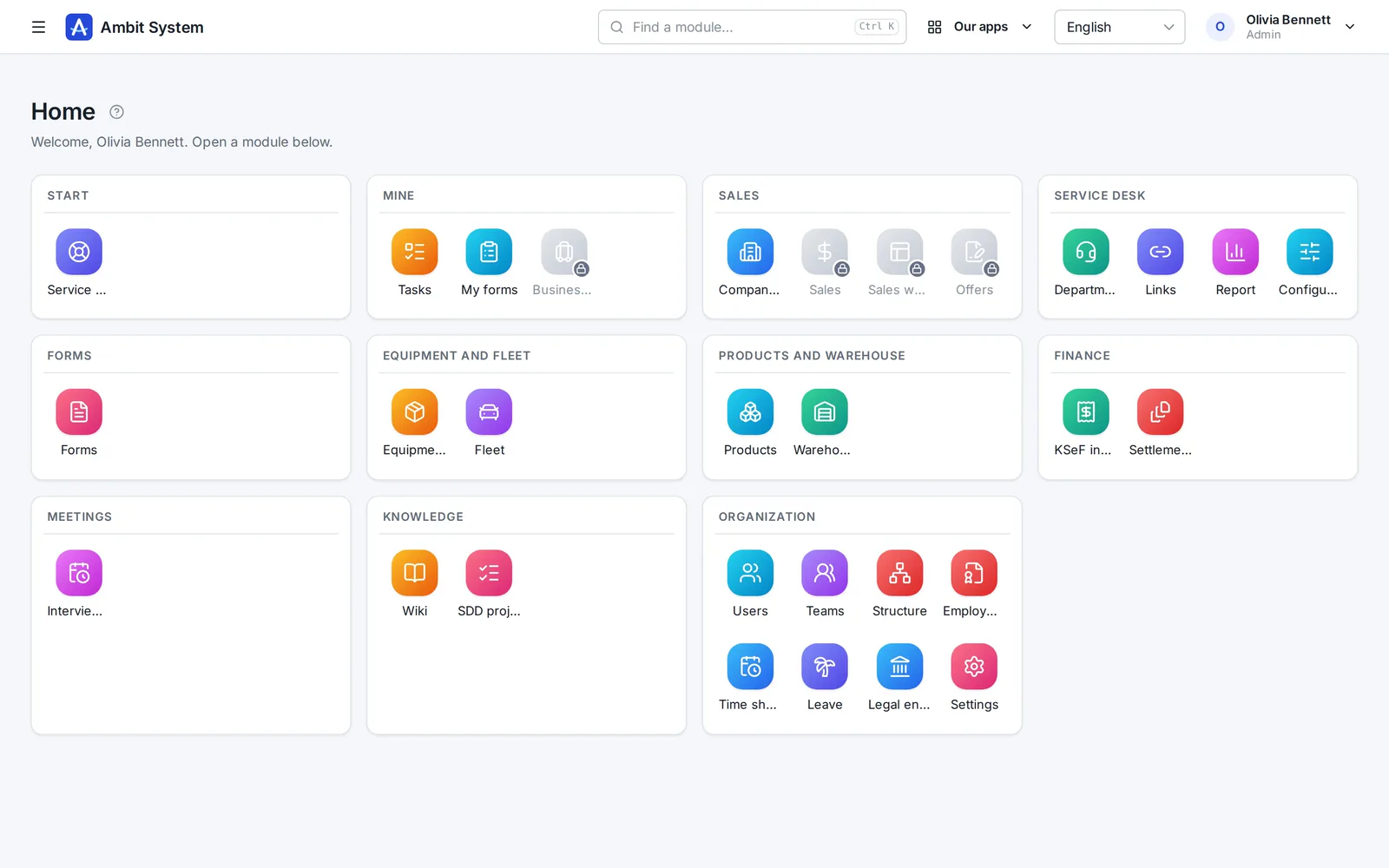
The home screen of the Ambit System panel: module tiles grouped by area - sales, service desk, forms, equipment and fleet, products and warehouse, finance, knowledge and organization.
The real panel on sample data
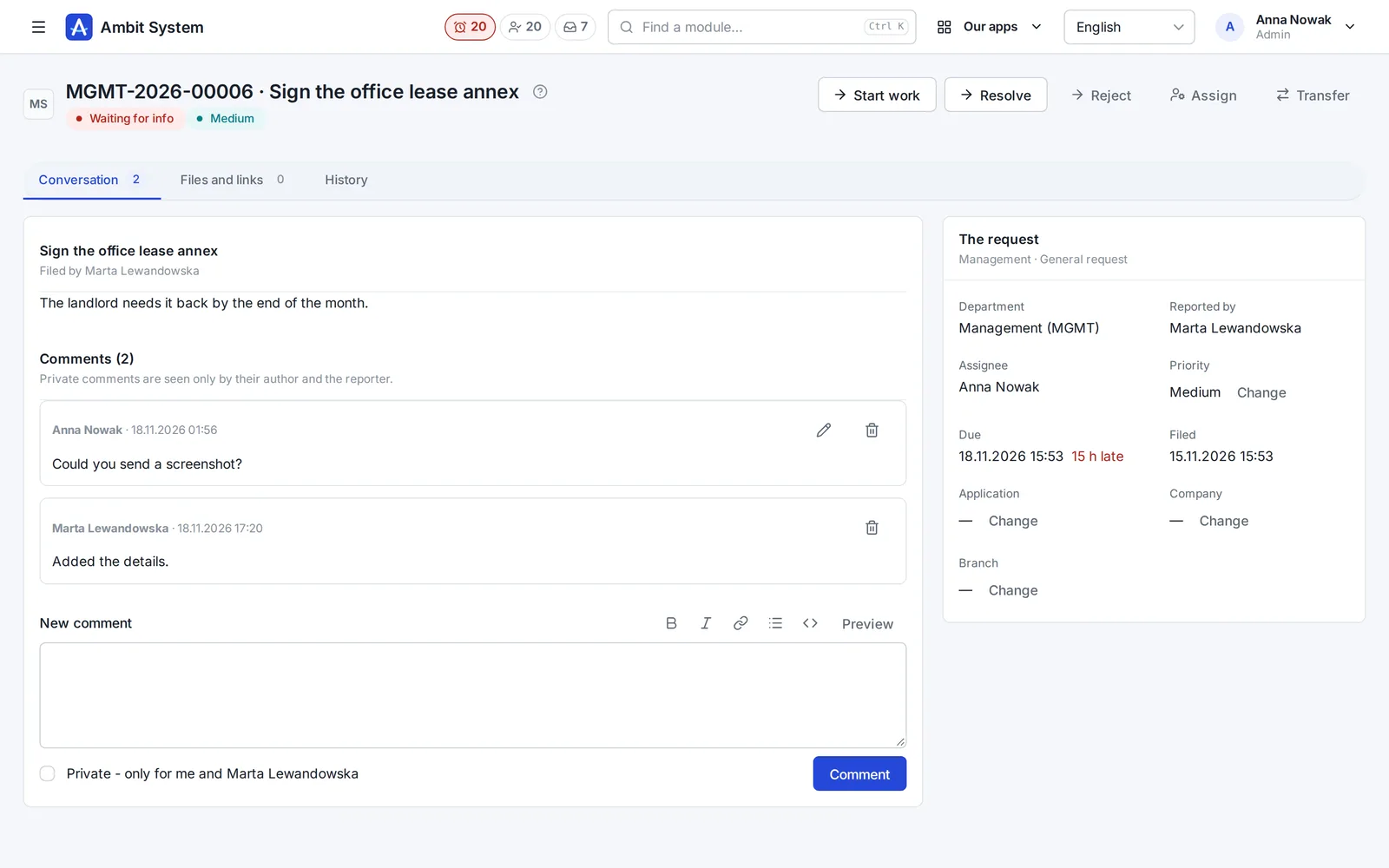
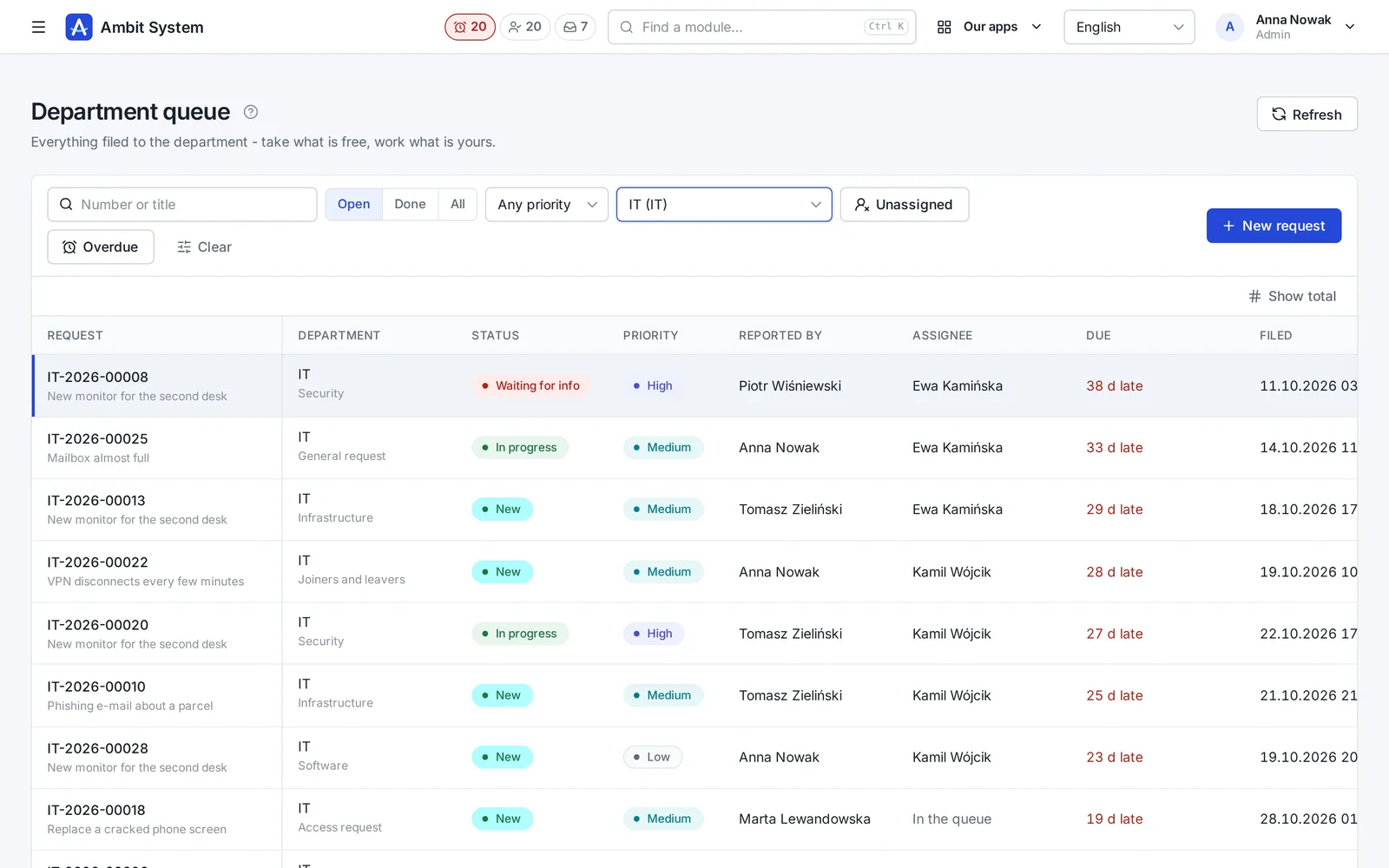
The Service Desk's department queue with request numbers, statuses and due times.
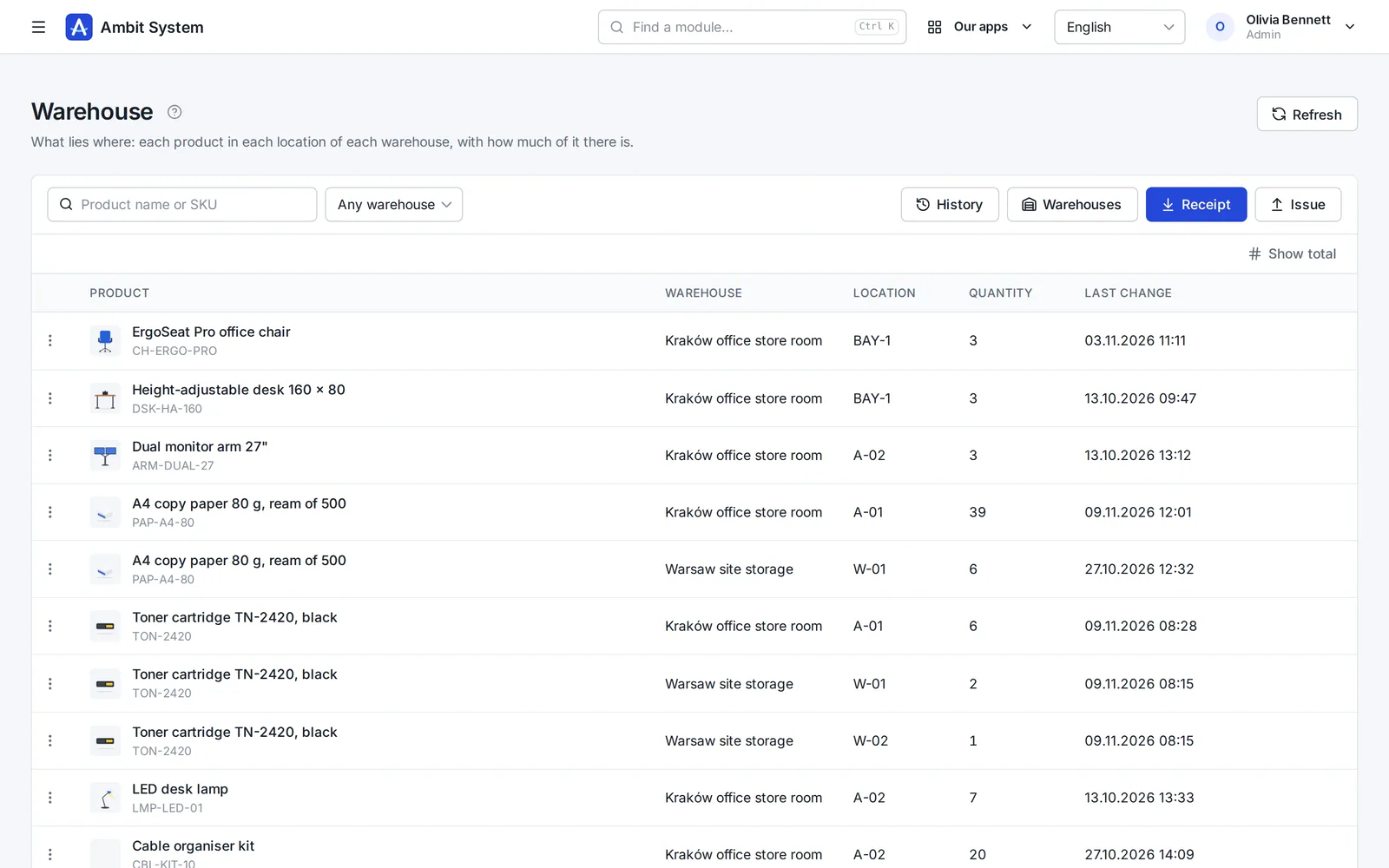
Warehouse stock: products per location with their quantities.
  • 5,000users in one organization
  • 1 priceper company, not per user
  • EUdata in a Warsaw data centre
  • 4interface languages: EN, PL, DE, FR
  • Livedemo, no sign-up

Why one system

Ten tools cost more than their invoices.

What happens in a company that runs on separate apps and spreadsheets - and what changes when the same data serves every team.

With separate toolsWith Ambit System
DataThe same people and clients typed into each app; nobody knows which list is current.One organization: users, departments and client companies shared by every module.
History“Who changed this?” - and no trace of it.Every change stored with its author and time, and never overwritten.
Hand-offsRequests and approvals forwarded by e-mail and chat.The org chart names the head: a request reaches the department's queue, hours reach the right approver.
AppsA separate login, set of roles and export for every tool.One sign-in with two-factor codes, one set of roles, one export of everything.
CostA fee per seat that grows with every hire.One price for the organization, up to 5,000 users - only modules change it.

One platform

Modules on shared data, not separate products.

Every module works inside the same organization: the same people, roles, departments and history. Adding one moves no data.

The product

Real screens, real modules.

Each module on a screenshot of the panel as it is today. Open its page for every screen, or try it in the demo.

  1. Organization

    Your company's shape - and its people's hours

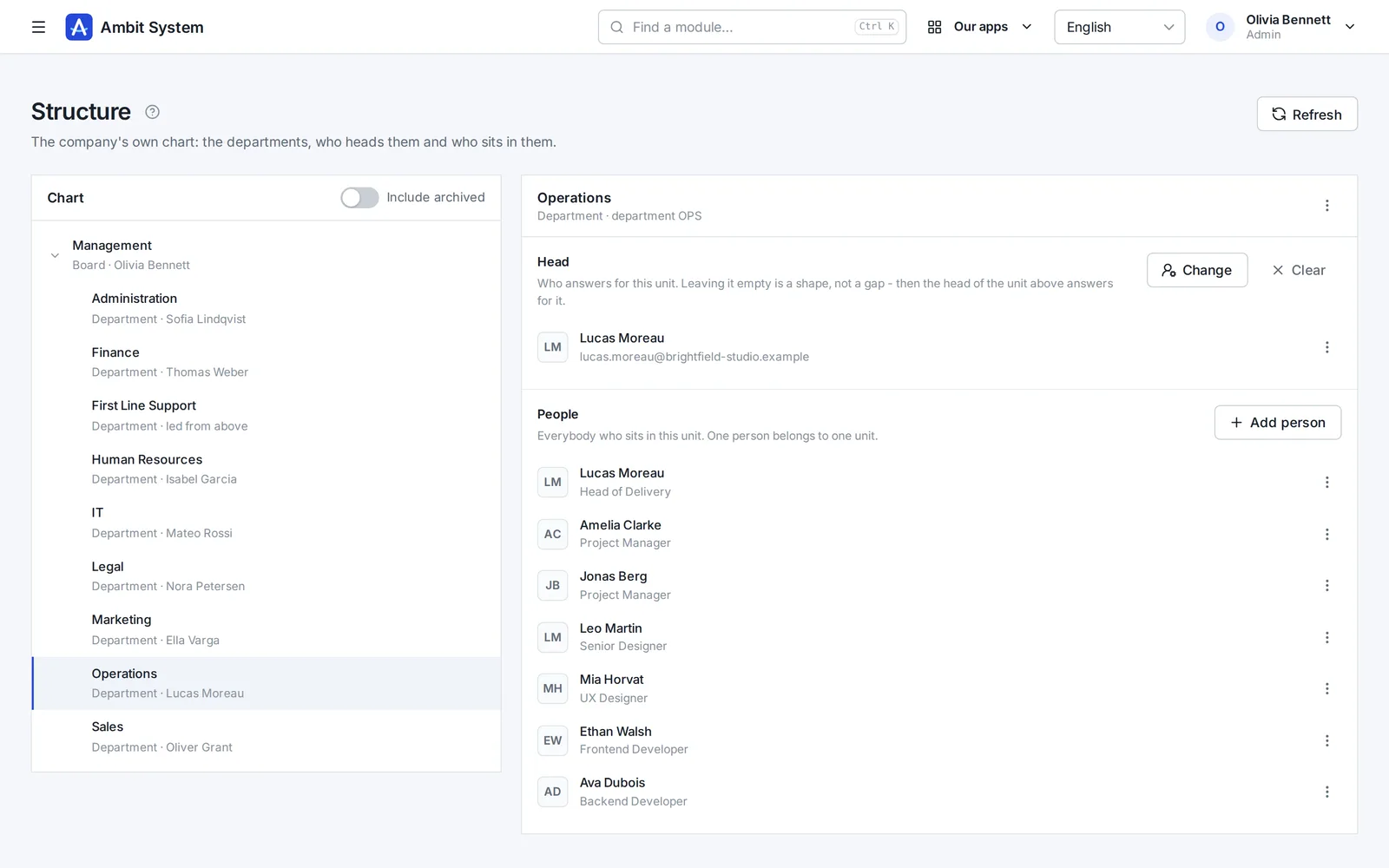
    The org chart, the people and their access, the companies you trade through, and working time approved by the head the chart names.

    • An org chart of departments and sections, each with its head
    • Users with roles and teams, imported from a spreadsheet
    • Monthly time sheets approved by the person's head, ready for payroll
    The org chart: departments and sections with their heads and people.
    Sample data
  2. Service Desk

    Requests that reach the right desk - and get done

    No more "I sent you an e-mail last week". Every request to IT, HR, finance or the office has a number, a person who has it and a due time.

    • A portal where staff pick what they need and answer a few questions
    • A queue per department: unassigned, overdue, due within 12 hours
    • A conversation, files and the full history on the request itself
    The Service Desk's department queue: requests with number, status, priority and due time.
    Sample data
  3. Sales

    Every deal on one board - and the next step always planned

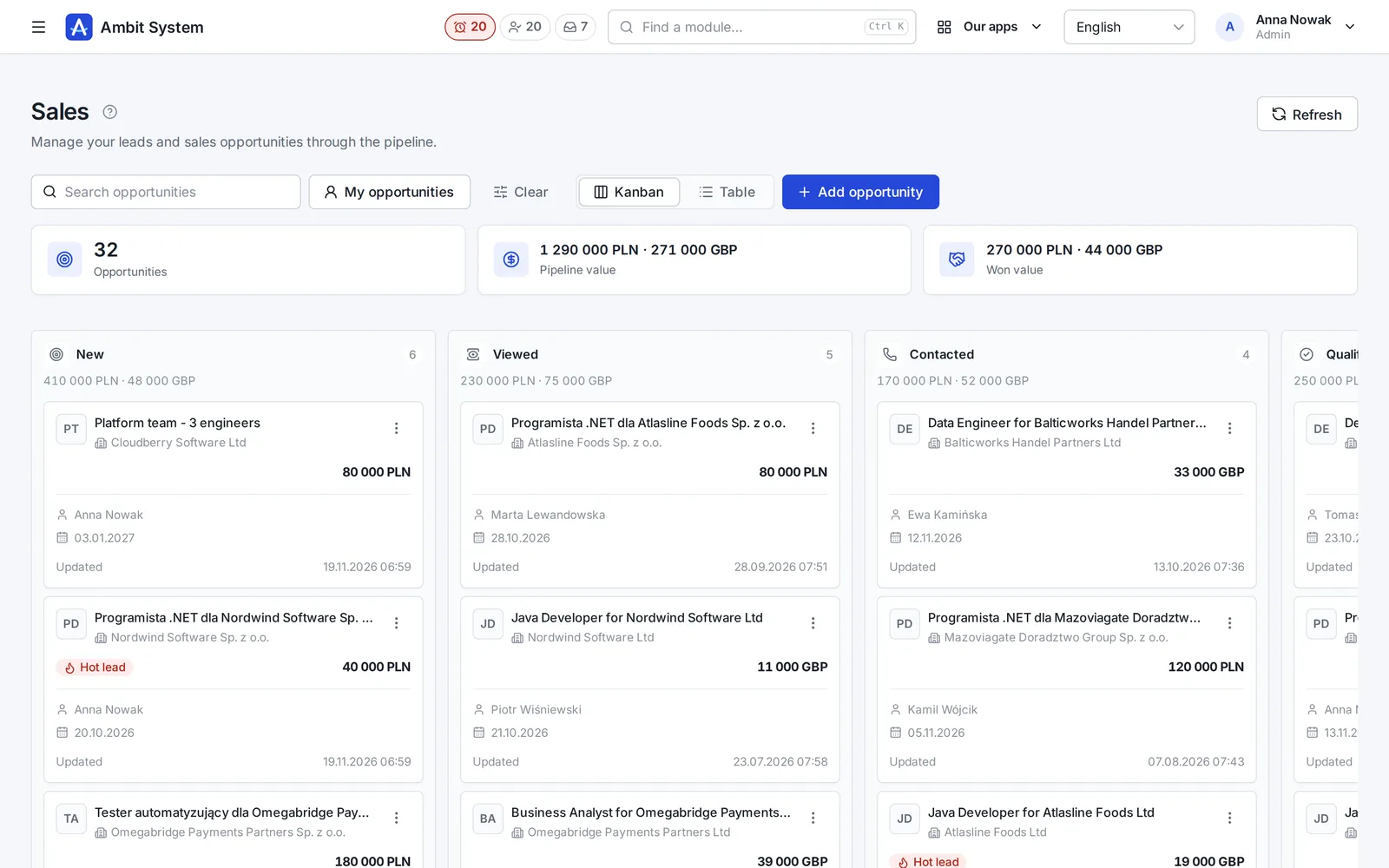
    Clients and tasks come with every plan. The Sales module adds the pipeline: deals with their value, activities, the next step and the offers made for them.

    • A pipeline board from New to Won, with the value of every column
    • Calls, e-mails and meetings logged on the deal
    • Offers with a number and a PDF, made from the deal
    The sales pipeline board: deals in stages with their value and close date.
    Sample data
  4. Products and Warehouse

    What you keep, where it lies, and how much of it is left

    A product catalogue of your own, and a simple warehouse on top of it: every receipt, issue, transfer and correction saved with who, when and the quantity before and after.

    • Products with SKU, brand, manufacturer, weight and pictures
    • Stock per warehouse and location, never below zero
    • A history nobody edits, and a check that rebuilds the stock from it
    Warehouse stock: products per location with quantities.
    Sample data
  5. Equipment and Fleet

    Know who has which laptop - and which car

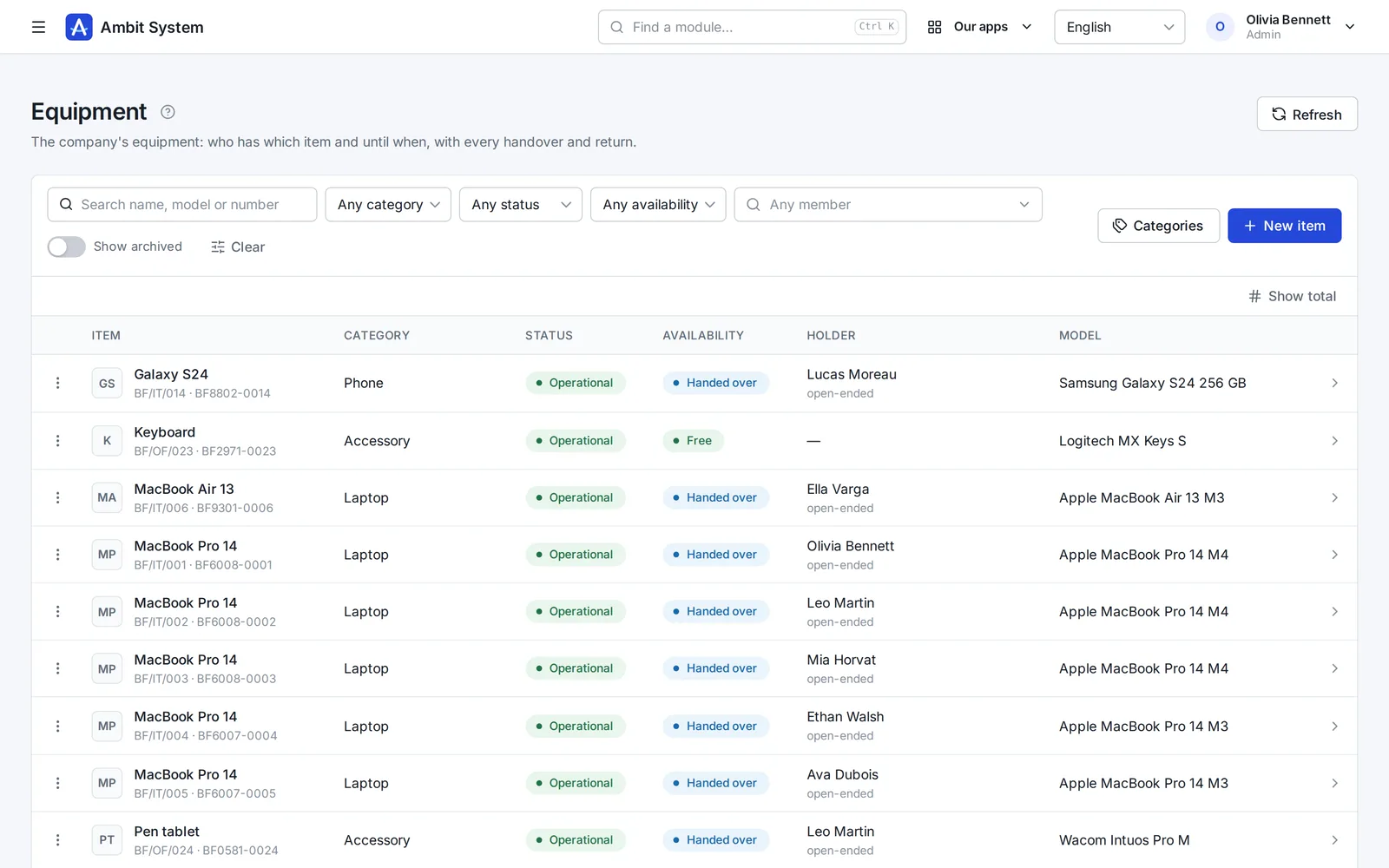
    The company's things one piece at a time and its cars, each with its status, holder and the history of every handover.

    • Laptops, phones, tools and clothing with serial and inventory numbers
    • Company cars with their status, repair shop and leasing
    • Handovers and returns, with the condition, mileage and fuel on record
    The equipment register: items with category, status and holder.
    Sample data
  6. KSeF and settlement documents

    Every cost in one place - from KSeF and from outside it

    Purchase invoices arrive from KSeF on their own; foreign invoices, policies and bills go next to them, each with its due date.

    • Purchase invoices fetched from KSeF every 3 hours, with the original XML
    • Costs outside KSeF with their files, due dates and a paid flag
    • A reminder the day before a payment is due
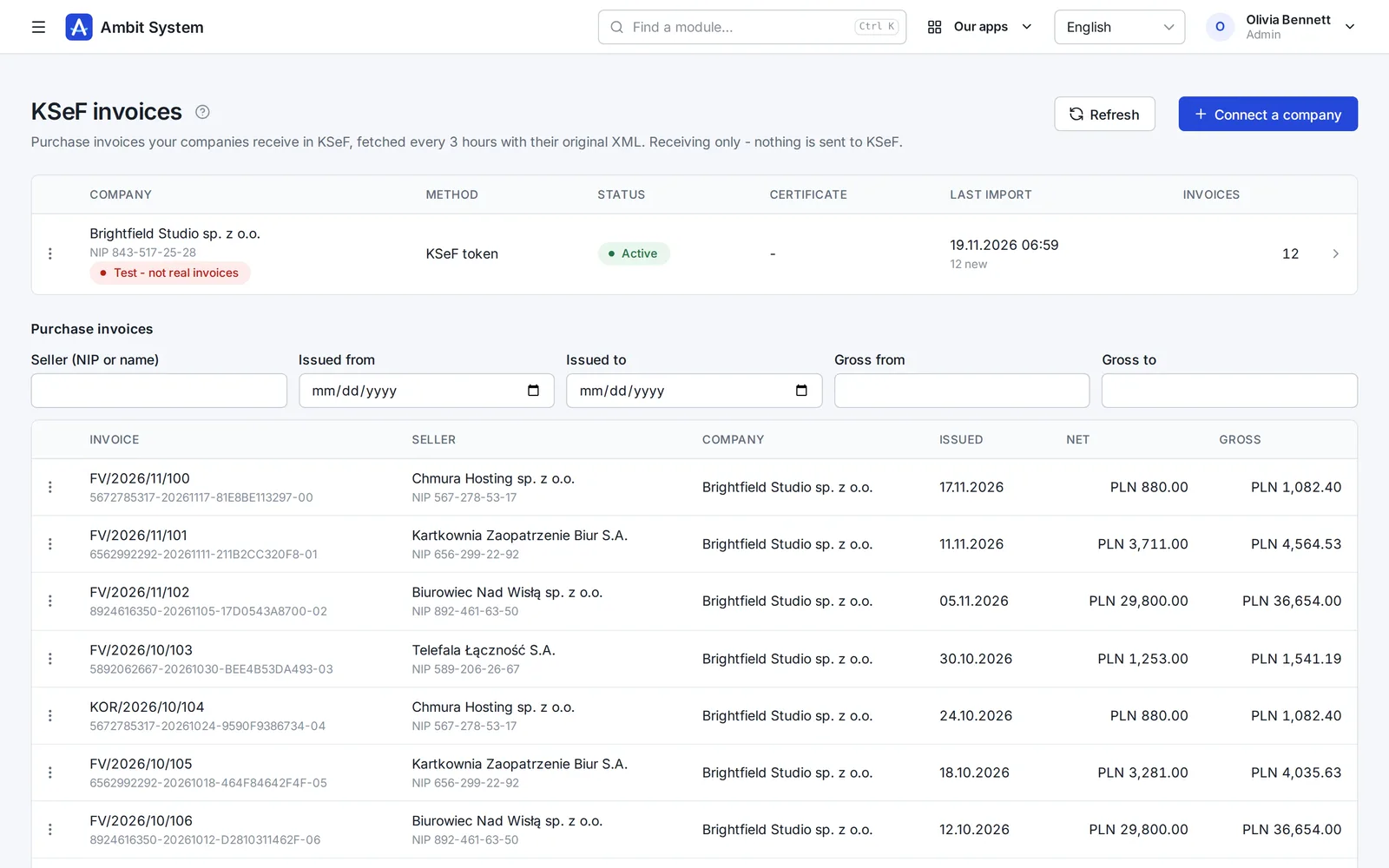
    KSeF purchase invoices fetched for a company, with amounts and dates.
    Sample data
  7. Forms

    Surveys and requests your people fill in themselves

    Build a form in the panel, publish it, and every member of your organization finds it under My forms.

    • Pages, ten kinds of question and the rules for each answer
    • Filled in by each person, or for them by Admin or HR
    • Every response in one list, kept with the version it was given to
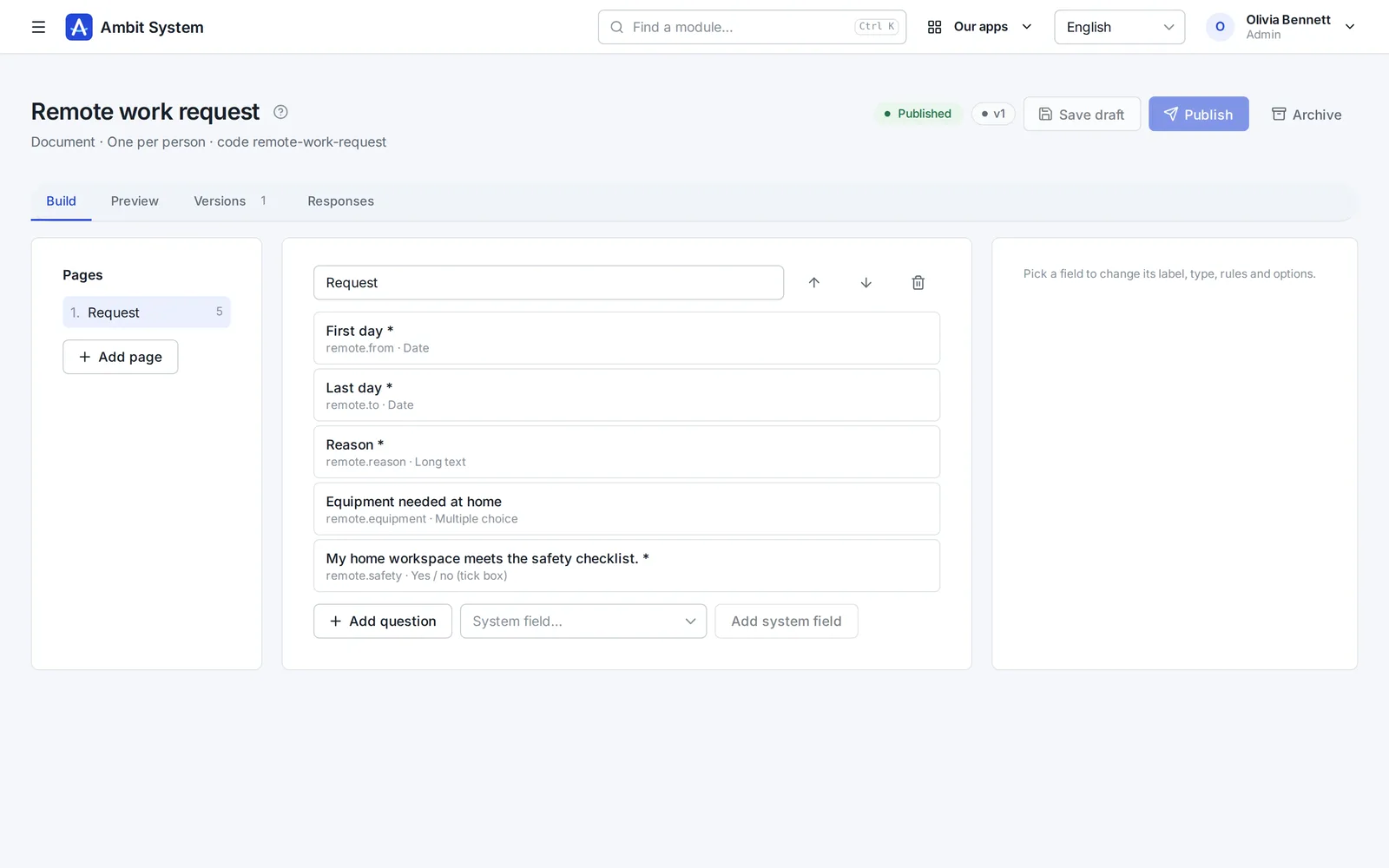
    The form builder: pages and questions of a form.
    Sample data
  8. Time tracking

    Hours recorded monthly, approved by the right head

    Employment and monthly time sheets for your own people. The supervisor comes from the org chart - nobody types one in.

    • Employment with its type, hours and rates
    • A month's time sheet filled in day by day
    • Approval by the person's head from the org chart
    • A payroll list for the month and an export of the settled month
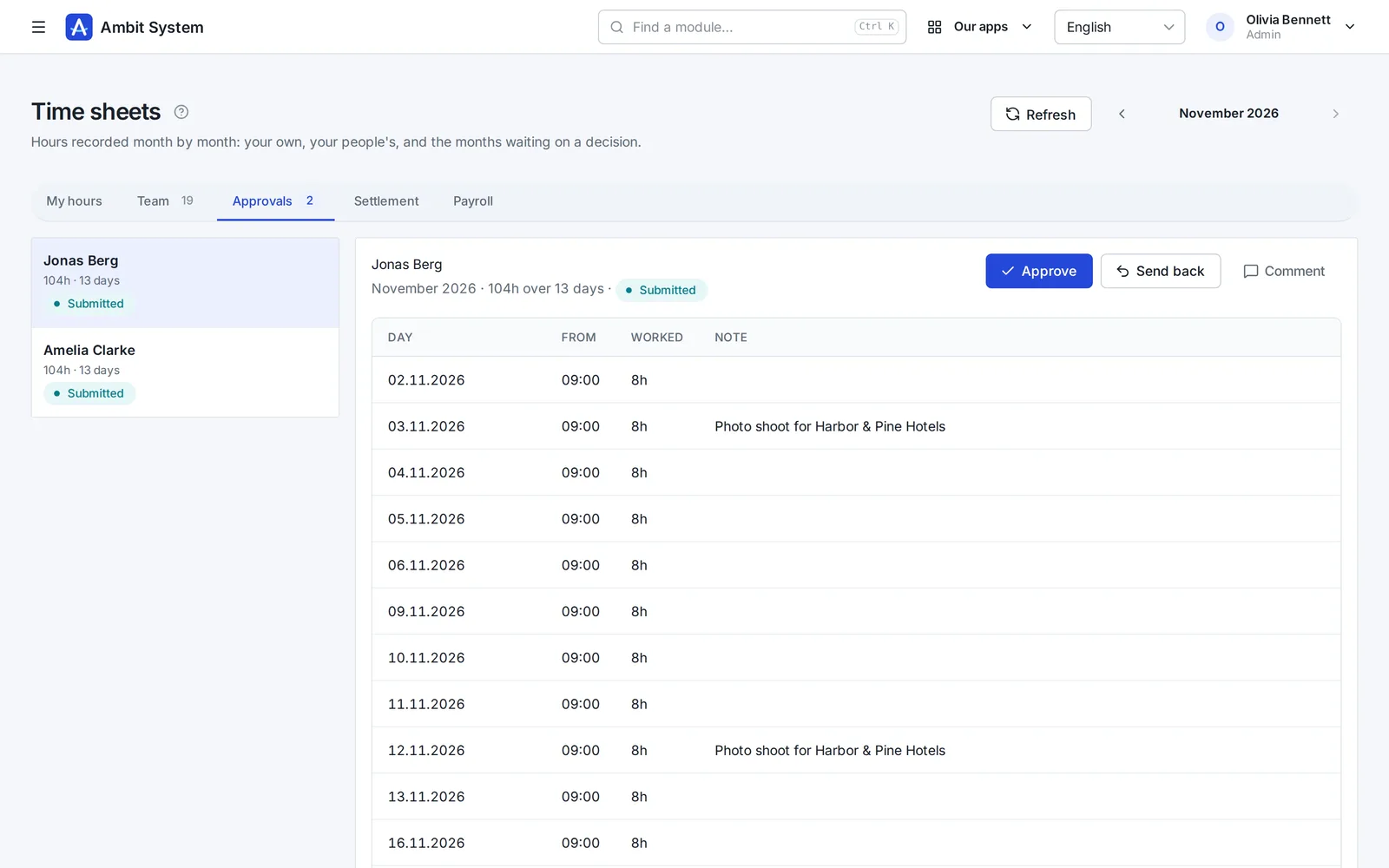
    Time sheets waiting for the head's approval.
    Sample data

Modules working together

One request, four modules, one history.

An example of how a laptop reaches a new employee. Every screen below exists today; the steps between them are done by people, in one system instead of five.

  1. Service Desk

    The employee files a request

    On the portal: “Request hardware”, what is needed and why. It gets a number and lands in the IT queue.

  2. Service Desk

    The department decides

    The IT queue's people take it, ask questions in the conversation and set its status. The decision stays on the request.

  3. Warehouse

    The warehouse issues the item

    An issue from a location, with the request's number as its document number. Stock before and after is recorded.

  4. Equipment

    The item is handed over

    The laptop is handed to the employee with a planned return date. It shows under their equipment.

  5. History

    Everything stays on record

    Request, movement and handover - each with who and when, in the same organization.

Fill in with AI

A first draft of the offer, written for you to check.

In a sales offer's draft one button writes the introduction, the terms and proposed lines - name, unit and quantity - from the client, the deal and a few words about what the client needs. In the HR version it also drafts job posts and job descriptions and translates posts. In the wiki it writes or improves a page from your notes, and in SDD it drafts a spec's scope and acceptance criteria.

What it does

  • Fills an empty draft or improves what is already written; Undo puts back what you had
  • What it writes lands in the form for you to read and correct - nothing is saved until you save
  • 1 to 3 credits a fill, by the length of what it writes; a refused or empty answer costs nothing
  • Credits from the monthly AI pack, or from packs bought once that never expire

What it never does

  • Sets no prices, VAT rates or discounts - a line with a price stays as you wrote it
  • Reads no candidates' or employees' data - only the record you fill in - the client and the deal, the wiki page or the SDD project - and your note
  • Is not a chat: one button, one form, one answer

Pricing

One price per company. Not per user.

10 people or 5,000 - the amount stays the same. It changes only when you add modules, and you see it before you talk to anyone.

  • Up to 5,000 users and 5 million CRM clients
  • Monthly, or yearly at a discount
  • No fixed term, cancel any time, export all your data

BASIC from

…/ month net

  • 10 users…
  • 100 users…
  • 1,000 users…
  • 5,000 users…

Security

Your data is protected at every step.

A selection of what is built in - the full list, described the way it works, is on the security page.

  • Two-factor sign-in
  • Single sign-on
  • Switching an account off works at once
  • Permissions by role
  • Every organization's data is kept apart
  • Candidates' data under the GDPR
  • Export of all data
  • The event log
  • Data in the European Union
  • Service status in public
  • SLA: a critical failure fixed within 3 hours
  • A daily database backup
Security and continuity

Two versions

For any company - and a version of its own for staffing agencies.

The same platform, the same security and one price per company. The HR version adds what an agency needs.

Ambit System

Service companies, production and firms with a fleet: start with BASIC and add the modules you need.

  • The org chart, people and time tracking
  • Requests, equipment, cars and the warehouse
  • CRM, offers, KSeF invoices
Explore modules

Ambit HR for agencies

Staffing and recruitment agencies: from the client and recruitment through postings, housing and hours to the pro forma - every module included.

  • Recruitment, candidates and interviews
  • Projects, workers, postings and housing
  • Hours at clients and pro formas
See the HR version
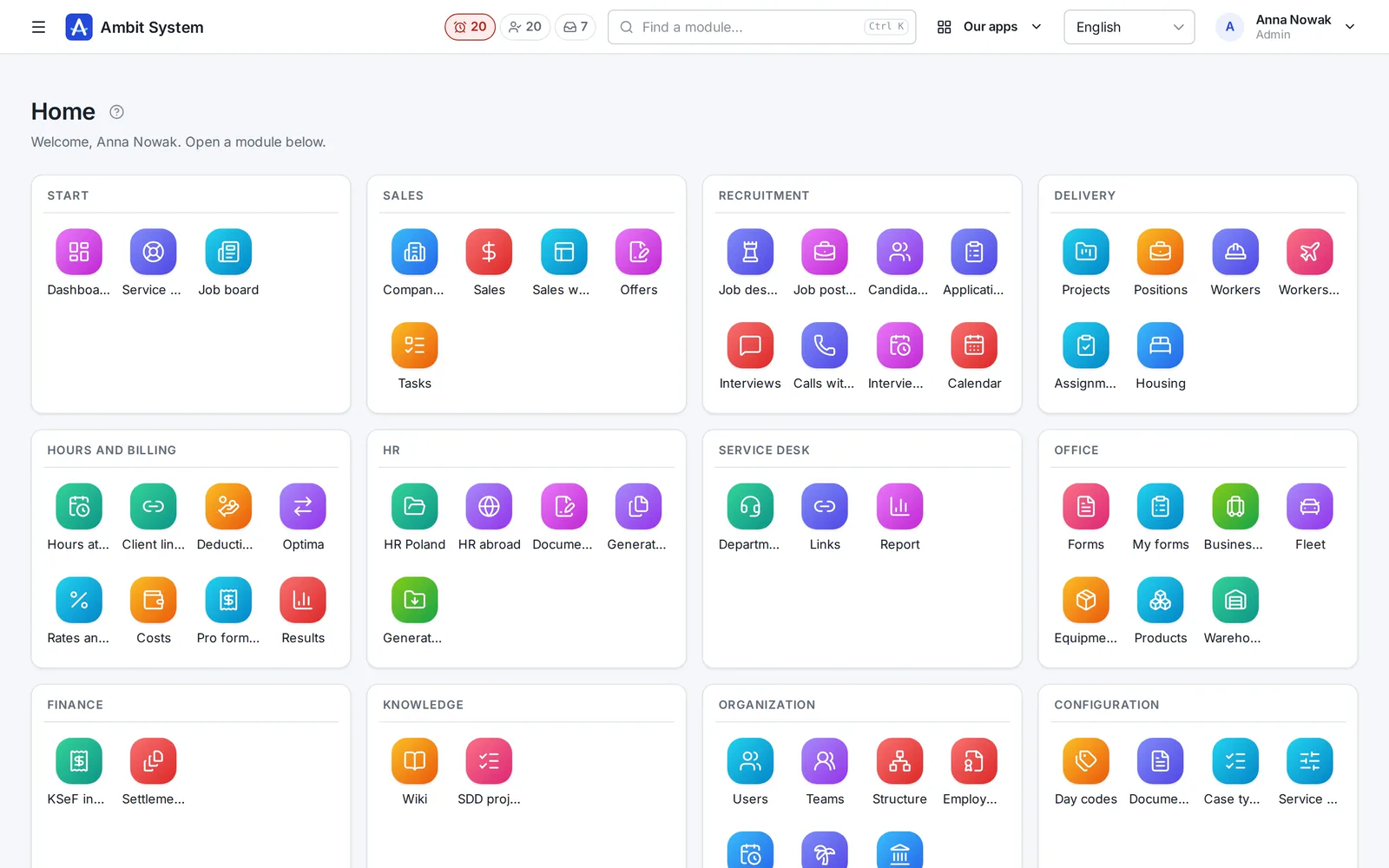
The home screen of the HR version with recruitment, projects, workers and housing modules.

Questions

Before you ask

Do I pay for every user?

No. The price is for the whole organization: up to 5,000 users and 5 million CRM clients.

Which currency do I pay in?

Companies in Poland pay in złoty, companies in every other country in euro. Paddle issues the invoice with your country's VAT.

What is Paddle.com and how does paying work?

Paddle.com is the company that sells our system on our behalf - many software companies use it. Paying is possible only through Paddle.com - we do not sign separate contracts or issue our own invoices. You pay there by card, PayPal, Apple Pay or Google Pay, and your organization is ready as soon as the payment goes through. Paddle issues the invoice with your country's VAT. The subscription renews by itself every month or every year until you cancel it: use the link in Paddle's e-mail or write to us, and the system keeps working until the end of the period you paid for.

Which languages is the system in?

The panel your team works in is in English, Polish, German and French. This page is in your language to make getting to know it easier.

Where is my data?

In the European Union, in a data centre in Warsaw.

Is there a data processing agreement (GDPR)?

Yes. The data processing agreement is part of the terms (section 12) and applies from the purchase, with nothing separate to sign. Your data is in the European Union, in a data centre in Warsaw.

Can I add a module later?

Yes. Add modules at any time; your organization and its data stay where they are.

Can we have our own separate environment?

No. Every organization works on the shared platform, with its data kept apart from everybody else's.

What happens to our data if you stop running Ambit System?

Your administrator can ask for an export at any time. We prepare everything the organization holds - the history of every change, the current records and the files - as one ZIP file in an open format (JSON), and e-mail a link to download it. Nothing locks you in.

Do you have SSO, an SLA or a certification such as ISO 27001?

An SLA, yes: a critical failure - the system unavailable, or a key function not working for everybody - is fixed within 3 hours (8:00-22:00 Polish time), and one from the night in the morning, by 11:00. Every day, weekends and holidays included. It is in the terms (section 10), not a promise on a web page. We check the system from outside every minute, and its state is public at status.ambitsys.eu. SSO, yes: your people can sign in with Microsoft 365, Google Workspace or Keycloak (see the next question). ISO 27001 we do not have yet, and we do not pretend otherwise - it is on the roadmap on the Security and continuity page.

We have no company e-mail domain - can we still use it?

No. You register with your company e-mail address and your people sign in with addresses in that domain. No domain of your own yet? We will help you set one up. Write to us

Can my team sign in with Microsoft 365 or Google Workspace?

Yes. An administrator connects your company's own sign-in - Microsoft 365, Google Workspace, Keycloak or another OpenID Connect provider - in Settings, without our help; the steps for each provider are on the page. Your people sign in at your organization's own link with their work account. Only people you added get in, unless you let an account be created at the first sign-in for addresses in your company's e-mail domains.

How do AI credits work?

"Fill in with AI" costs 1 to 3 credits a fill, by the length of what it writes; an answer the AI refused, or one with nothing usable, costs nothing. Credits come two ways: the monthly AI pack adds 100 every month, and what is left expires at the end of that month; packs of 100 bought once in the panel never expire, on any plan, the HR version included. The monthly credits are used first. An administrator sees the balance and the last 30 days' use on the plan page.
See what your company can run on one system.

The demo opens at once: a sample company with data in every module. No sign-up, no password.