Yrityksen käyttöjärjestelmä

Koko yrityksesi. Yksi yhtenäinen järjestelmä.

Hallitse ihmisiä, asiakkaita, toimintoja, laitteita, asiakirjoja ja prosesseja yhdellä alustalla. Aloita siitä, mitä tarvitset, ja laajenna yrityksen kasvaessa.

Ei rekisteröitymistä eikä salasanaa. Esimerkkiyritys, valmiit tiedot, kaikki moduulit.

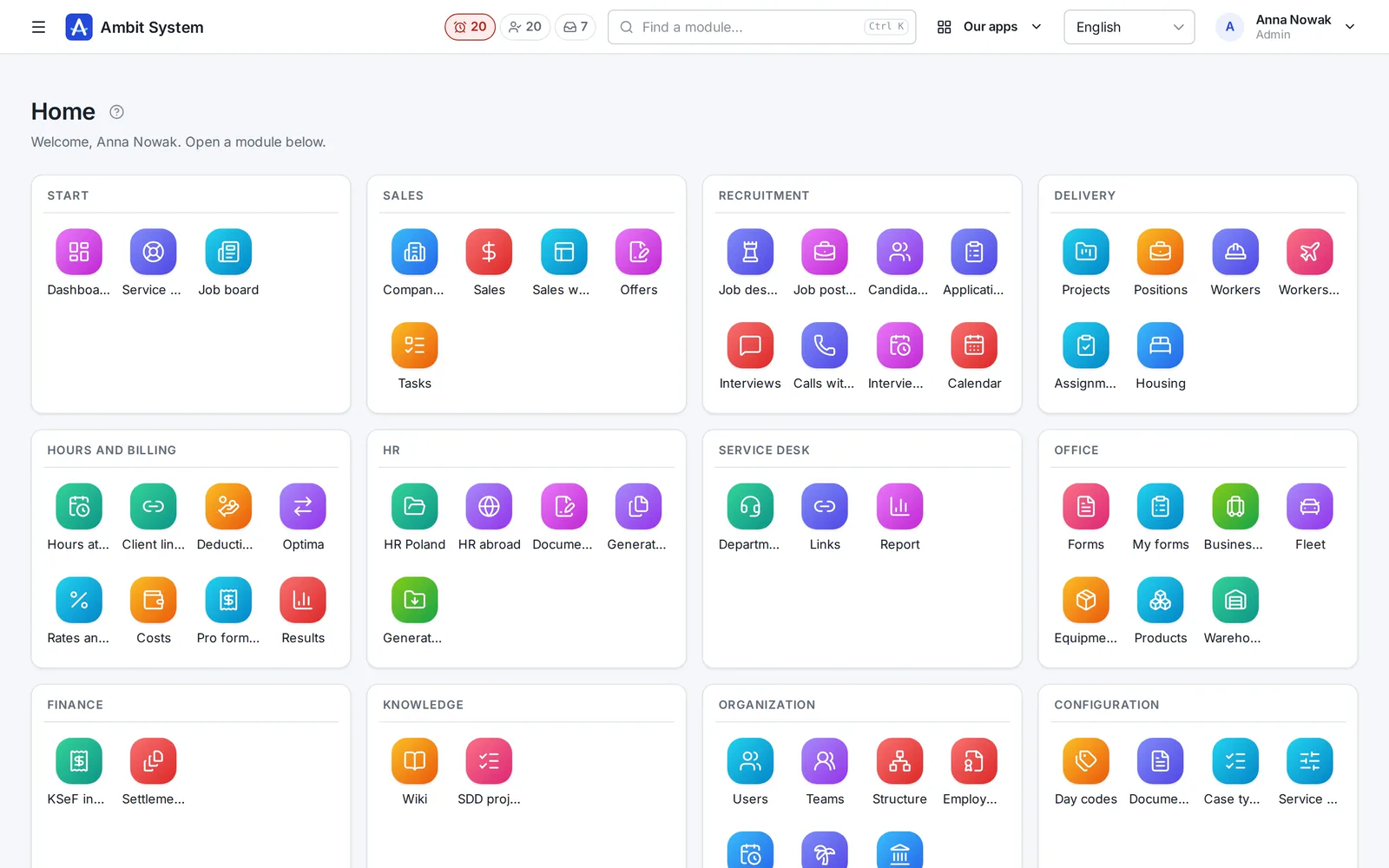
Ambit System -paneelin aloitusnäkymä: moduulien ruudut alueittain ryhmiteltyinä - myynti, Service Desk, lomakkeet, laitteet ja autot, tuotteet ja varasto, talous, tieto ja organisaatio.
The real panel on sample data
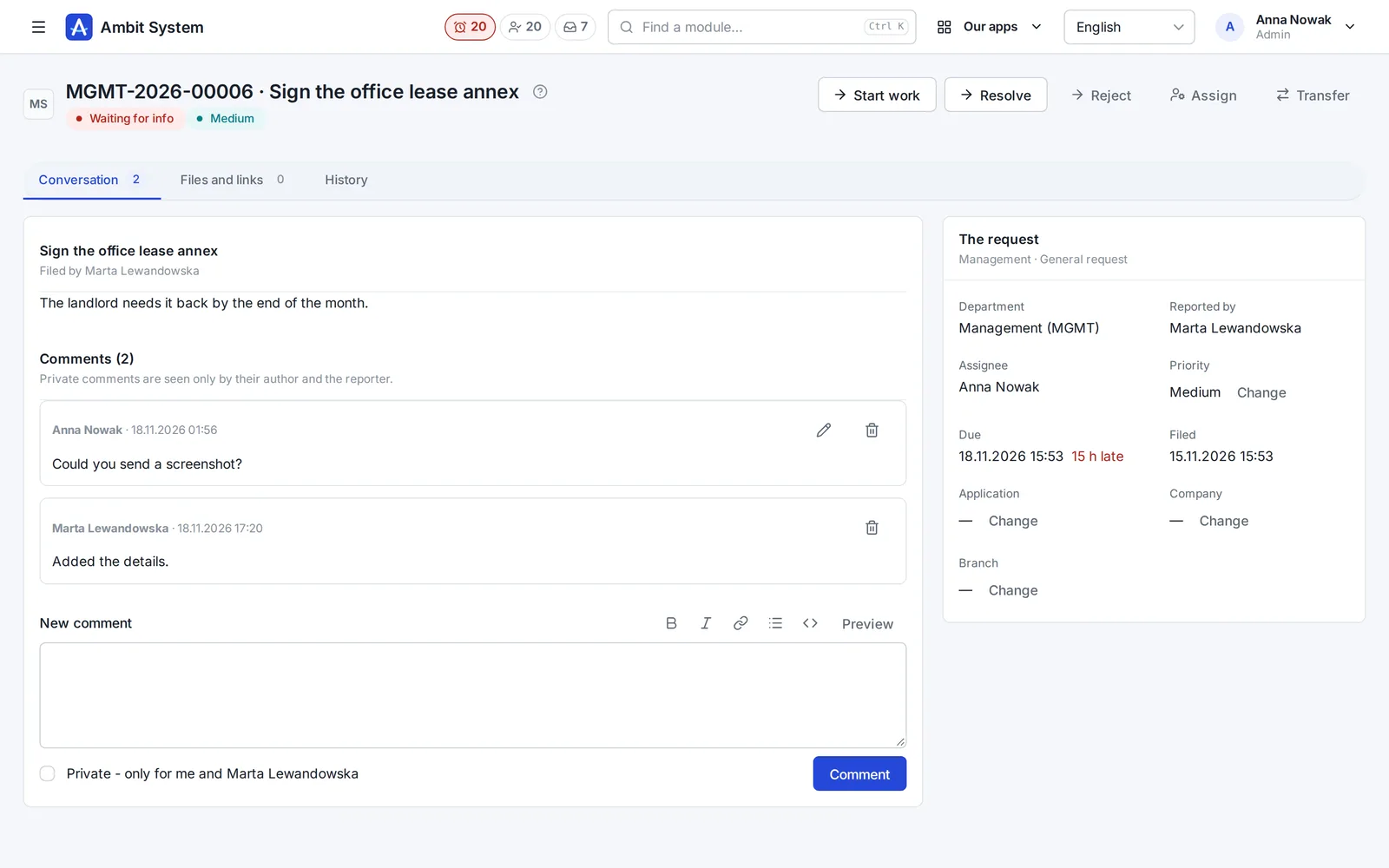
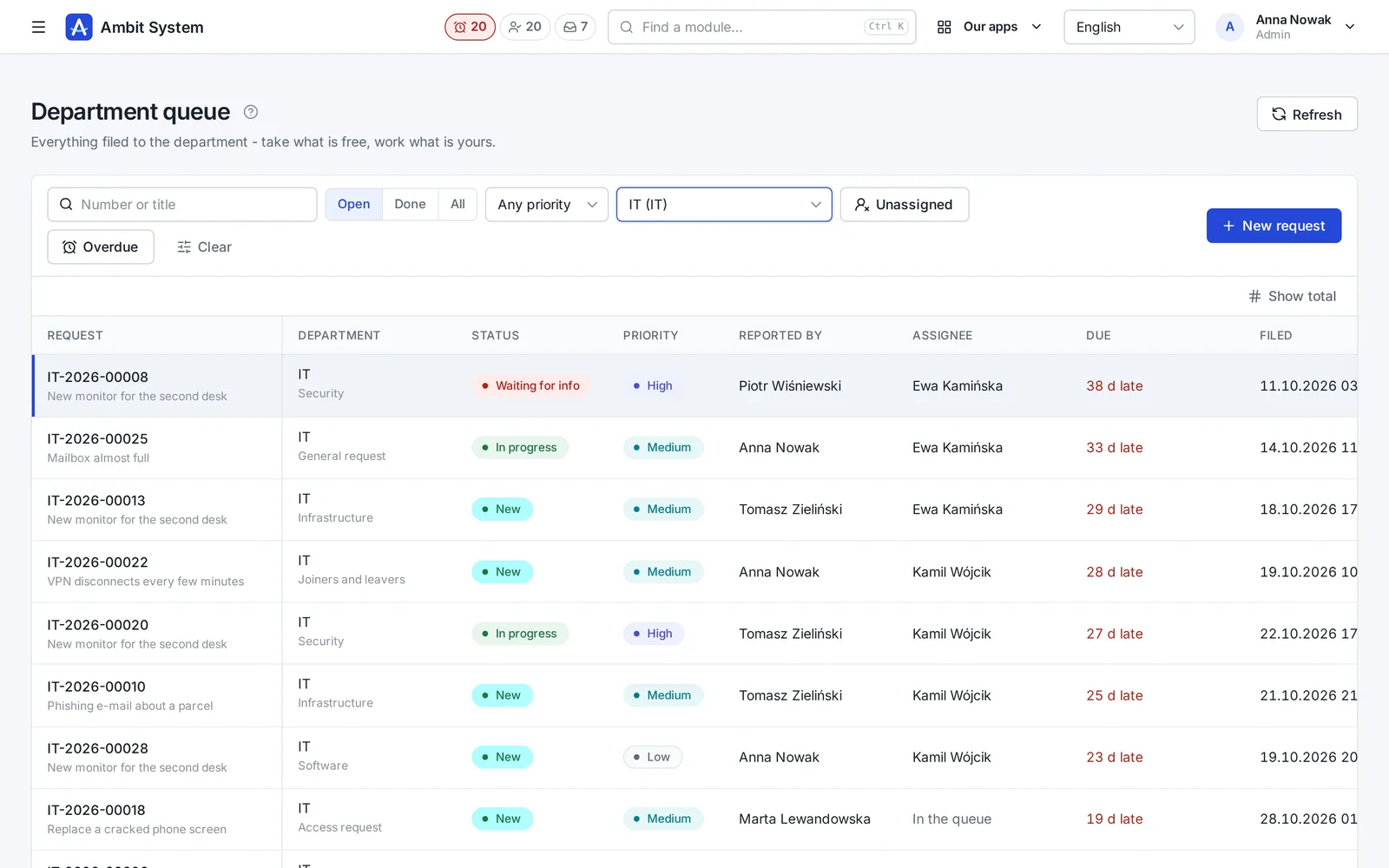
The Service Desk's department queue with request numbers, statuses and due times.
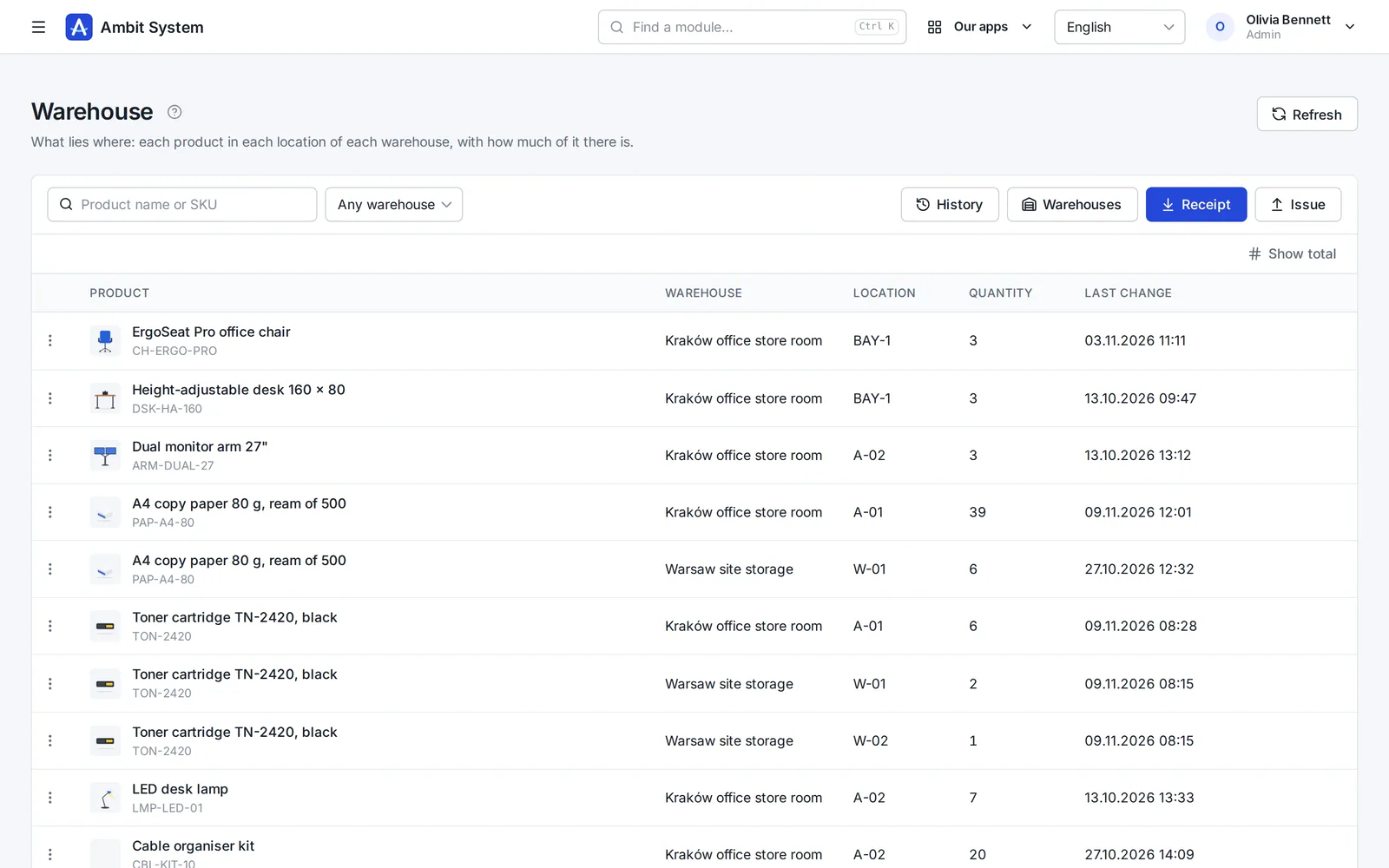
Warehouse stock: products per location with their quantities.
  • 5,000users in one organization
  • 1 priceper company, not per user
  • EUdata in a Warsaw data centre
  • 4interface languages: EN, PL, DE, FR
  • Livedemo, no sign-up

Why one system

Ten tools cost more than their invoices.

What happens in a company that runs on separate apps and spreadsheets - and what changes when the same data serves every team.

With separate toolsWith Ambit System
DataThe same people and clients typed into each app; nobody knows which list is current.One organization: users, departments and client companies shared by every module.
History“Who changed this?” - and no trace of it.Every change stored with its author and time, and never overwritten.
Hand-offsRequests and approvals forwarded by e-mail and chat.The org chart names the head: a request reaches the department's queue, hours reach the right approver.
AppsA separate login, set of roles and export for every tool.One sign-in with two-factor codes, one set of roles, one export of everything.
CostA fee per seat that grows with every hire.One price for the organization, up to 5,000 users - only modules change it.

One platform

Modules on shared data, not separate products.

Every module works inside the same organization: the same people, roles, departments and history. Adding one moves no data.

The product

Real screens, real modules.

Each module on a screenshot of the panel as it is today. Open its page for every screen, or try it in the demo.

  1. Organization

    Your company's shape - and its people's hours

    The org chart, the people and their access, the companies you trade through, and working time approved by the head the chart names.

    • An org chart of departments and sections, each with its head
    • Users with roles and teams, imported from a spreadsheet
    • Monthly time sheets approved by the person's head, ready for payroll
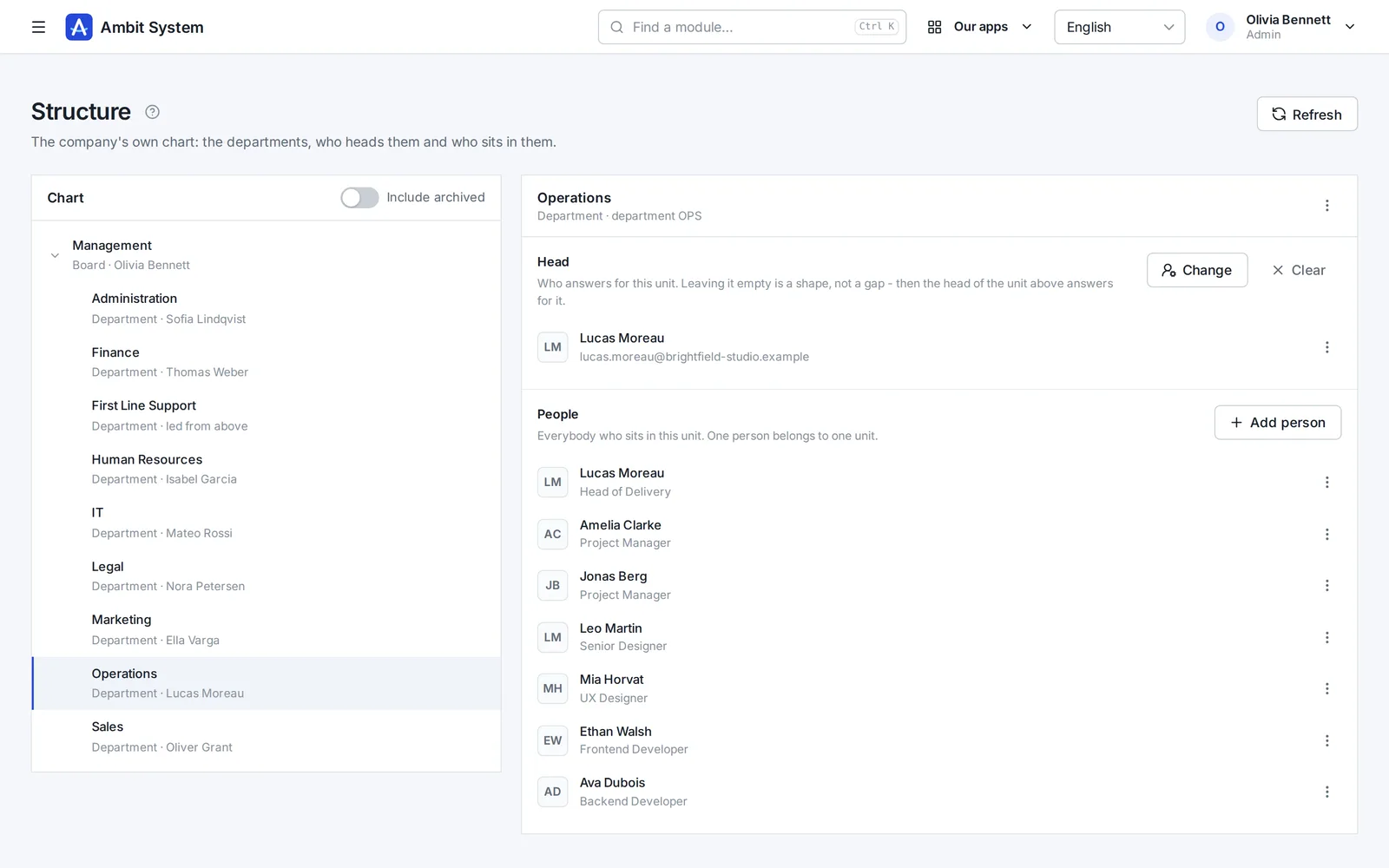
    The org chart: departments and sections with their heads and people.
    Sample data
  2. Service Desk

    Requests that reach the right desk - and get done

    No more "I sent you an e-mail last week". Every request to IT, HR, finance or the office has a number, a person who has it and a due time.

    • A portal where staff pick what they need and answer a few questions
    • A queue per department: unassigned, overdue, due within 12 hours
    • A conversation, files and the full history on the request itself
    The Service Desk's department queue: requests with number, status, priority and due time.
    Sample data
  3. Sales

    Every deal on one board - and the next step always planned

    Clients and tasks come with every plan. The Sales module adds the pipeline: deals with their value, activities, the next step and the offers made for them.

    • A pipeline board from New to Won, with the value of every column
    • Calls, e-mails and meetings logged on the deal
    • Offers with a number and a PDF, made from the deal
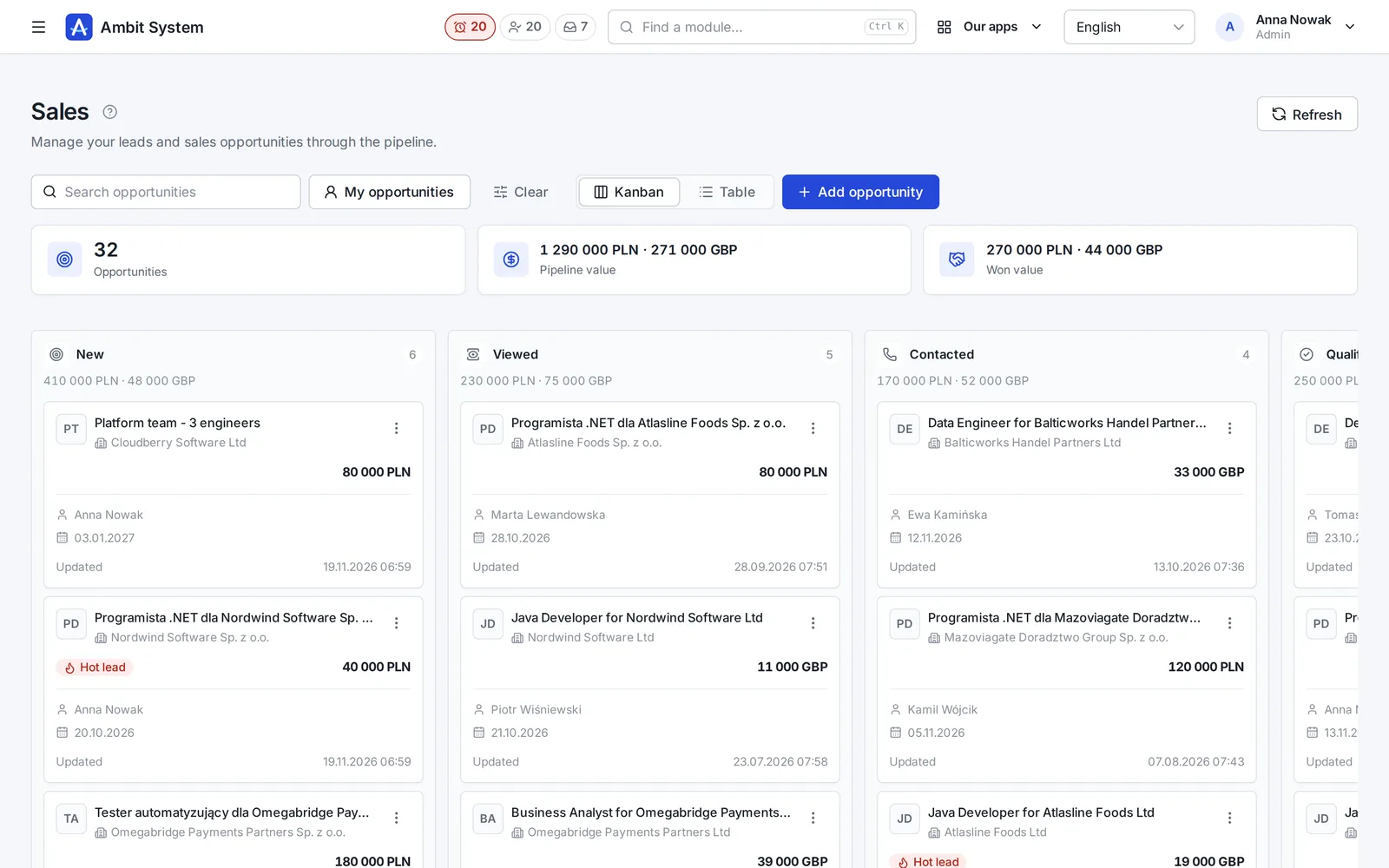
    The sales pipeline board: deals in stages with their value and close date.
    Sample data
  4. Products and Warehouse

    What you keep, where it lies, and how much of it is left

    A product catalogue of your own, and a simple warehouse on top of it: every receipt, issue, transfer and correction saved with who, when and the quantity before and after.

    • Products with SKU, brand, manufacturer, weight and pictures
    • Stock per warehouse and location, never below zero
    • A history nobody edits, and a check that rebuilds the stock from it
    Warehouse stock: products per location with quantities.
    Sample data
  5. Equipment and Fleet

    Know who has which laptop - and which car

    The company's things one piece at a time and its cars, each with its status, holder and the history of every handover.

    • Laptops, phones, tools and clothing with serial and inventory numbers
    • Company cars with their status, repair shop and leasing
    • Handovers and returns, with the condition, mileage and fuel on record
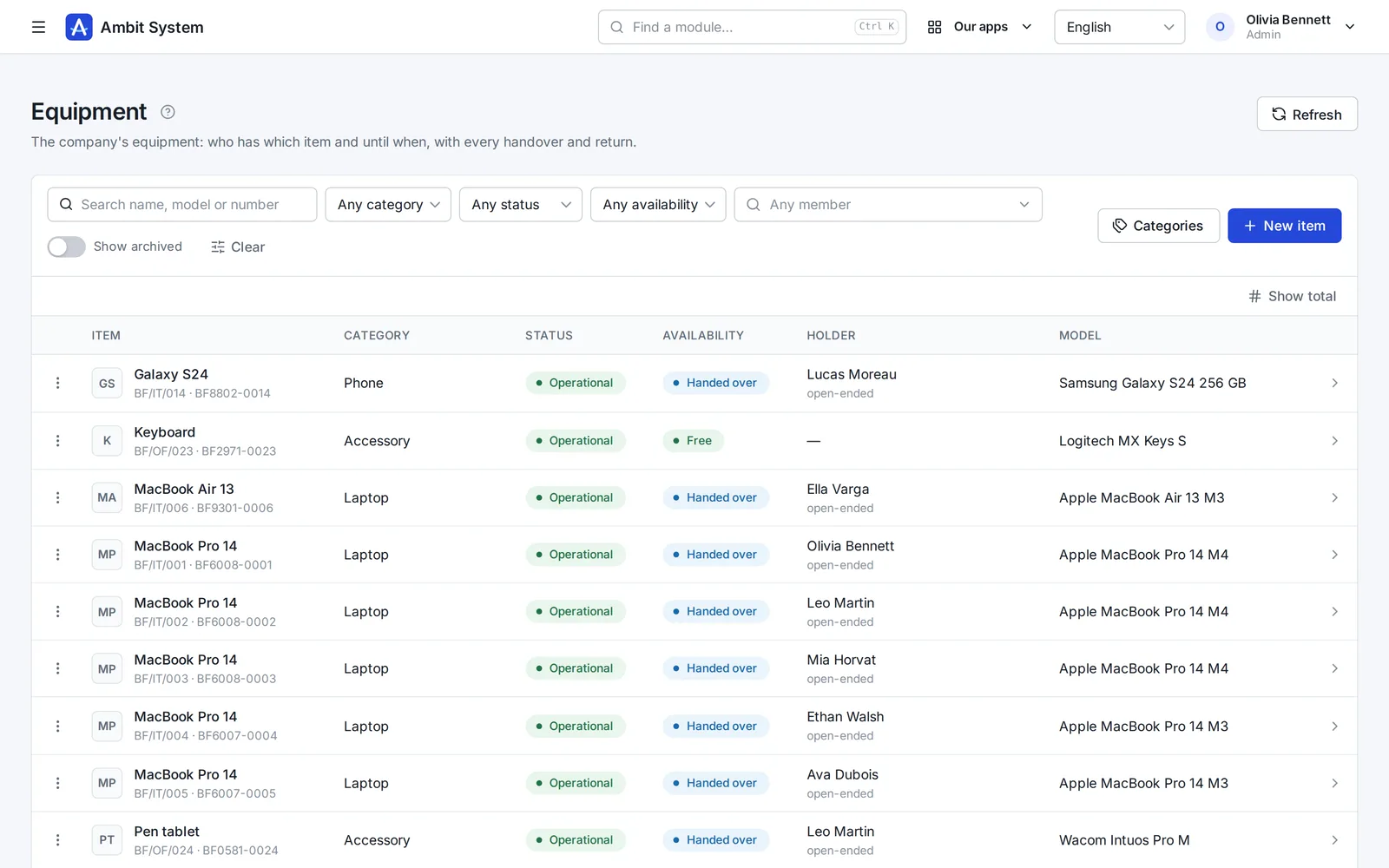
    The equipment register: items with category, status and holder.
    Sample data
  6. KSeF and settlement documents

    Every cost in one place - from KSeF and from outside it

    Purchase invoices arrive from KSeF on their own; foreign invoices, policies and bills go next to them, each with its due date.

    • Purchase invoices fetched from KSeF every 3 hours, with the original XML
    • Costs outside KSeF with their files, due dates and a paid flag
    • A reminder the day before a payment is due
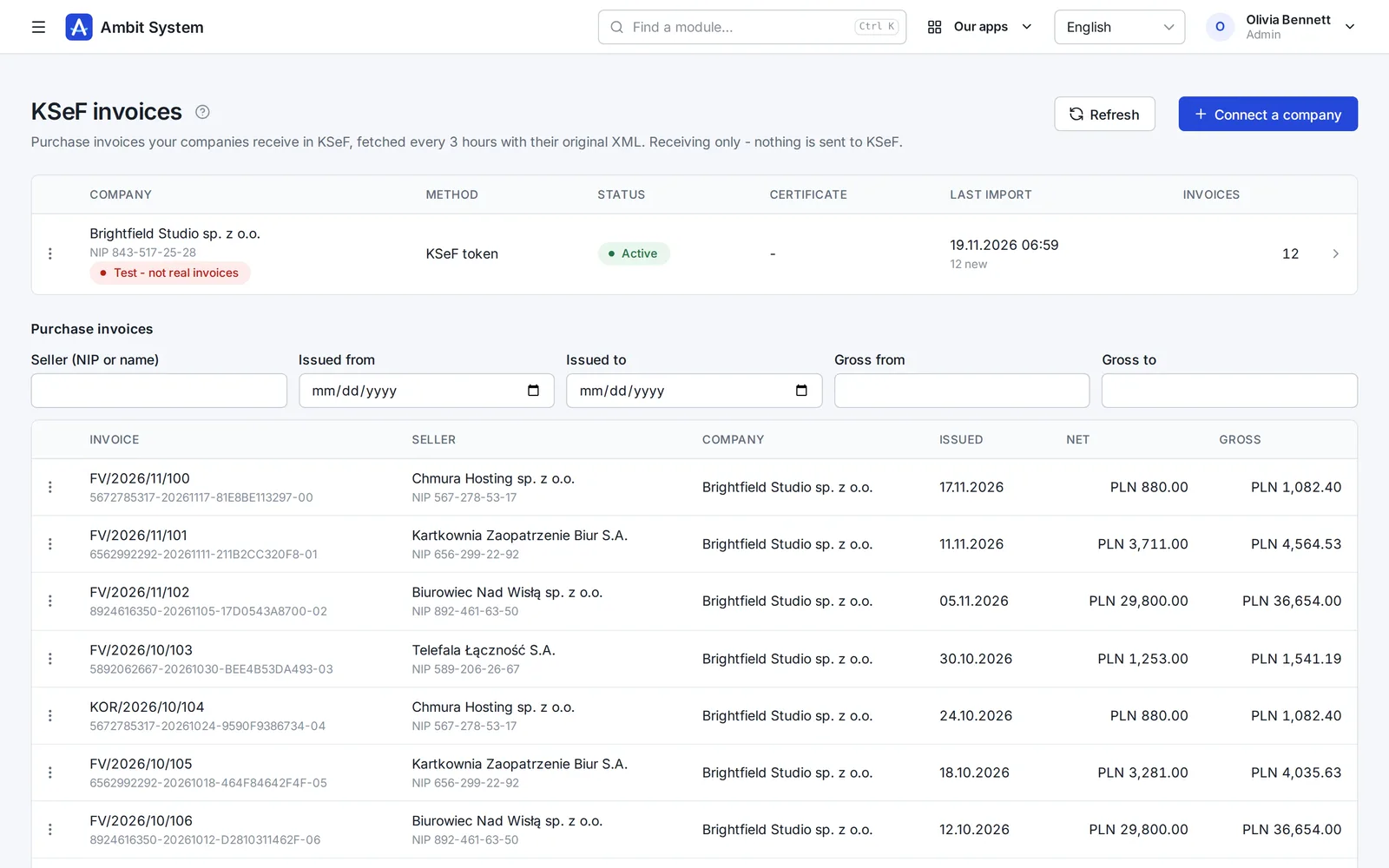
    KSeF purchase invoices fetched for a company, with amounts and dates.
    Sample data
  7. Forms

    Surveys and requests your people fill in themselves

    Build a form in the panel, publish it, and every member of your organization finds it under My forms.

    • Pages, ten kinds of question and the rules for each answer
    • Filled in by each person, or for them by Admin or HR
    • Every response in one list, kept with the version it was given to
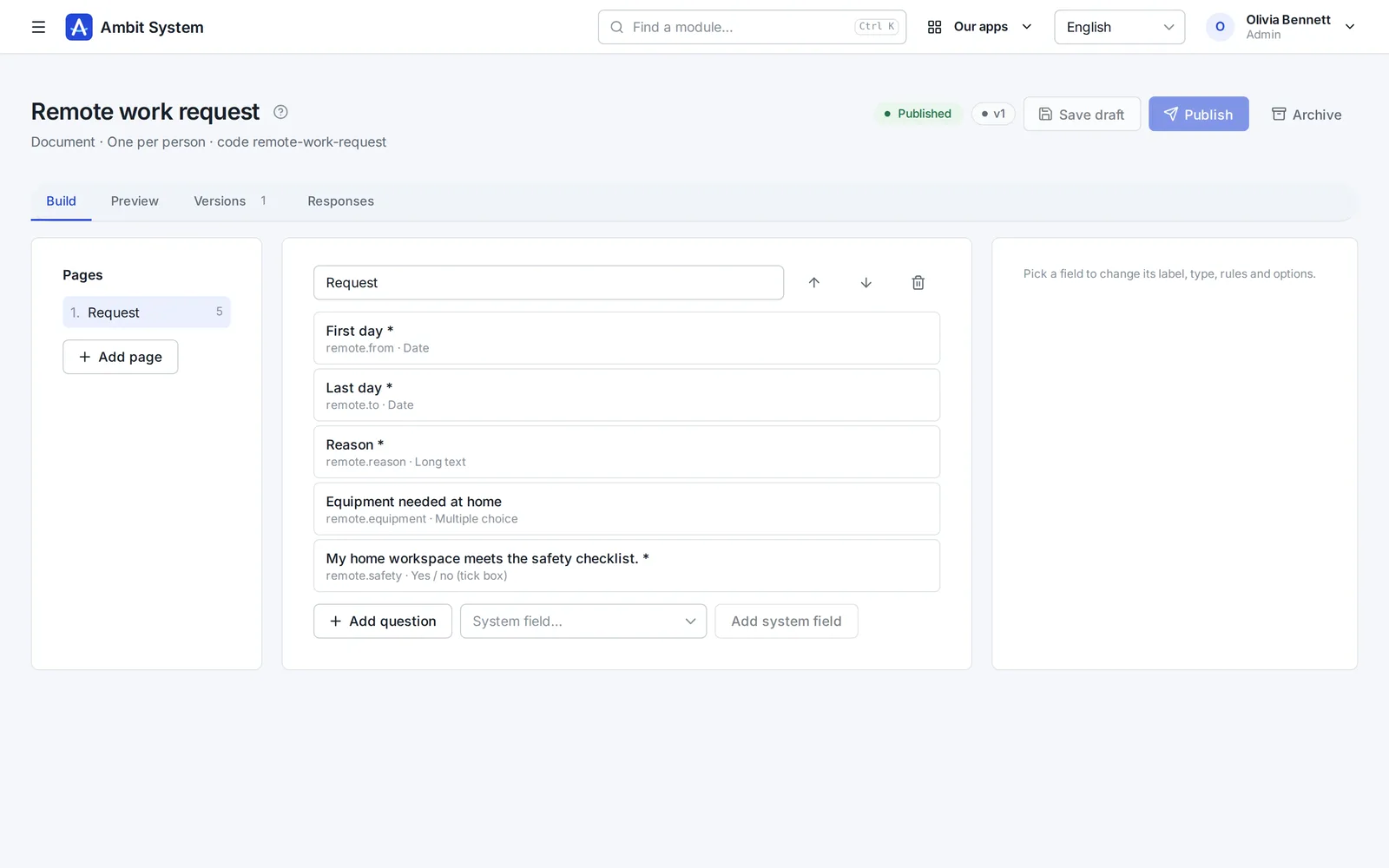
    The form builder: pages and questions of a form.
    Sample data
  8. Time tracking

    Hours recorded monthly, approved by the right head

    Employment and monthly time sheets for your own people. The supervisor comes from the org chart - nobody types one in.

    • Employment with its type, hours and rates
    • A month's time sheet filled in day by day
    • Approval by the person's head from the org chart
    • A payroll list for the month and an export of the settled month
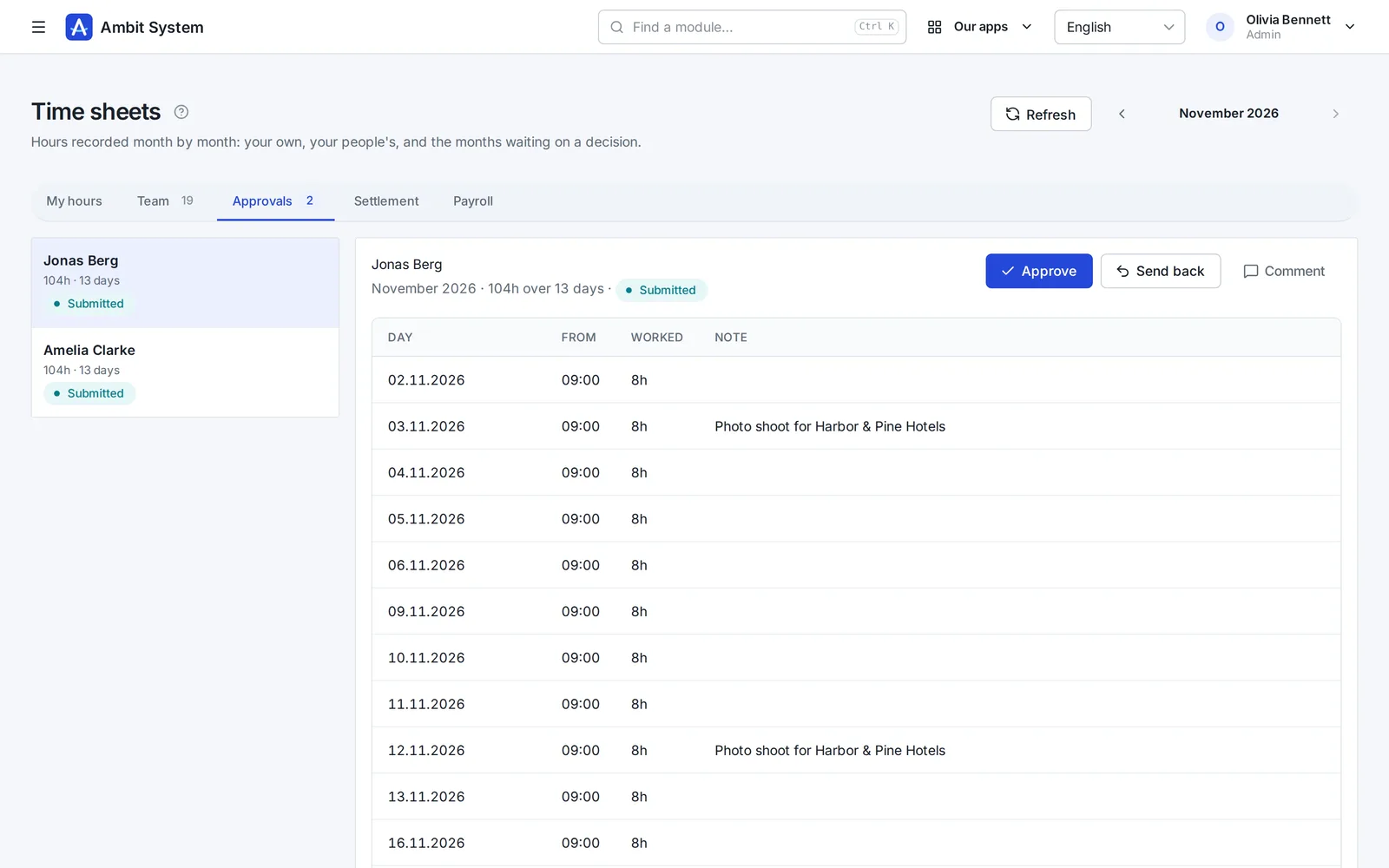
    Time sheets waiting for the head's approval.
    Sample data

Modules working together

One request, four modules, one history.

An example of how a laptop reaches a new employee. Every screen below exists today; the steps between them are done by people, in one system instead of five.

  1. Service Desk

    The employee files a request

    On the portal: “Request hardware”, what is needed and why. It gets a number and lands in the IT queue.

  2. Service Desk

    The department decides

    The IT queue's people take it, ask questions in the conversation and set its status. The decision stays on the request.

  3. Warehouse

    The warehouse issues the item

    An issue from a location, with the request's number as its document number. Stock before and after is recorded.

  4. Equipment

    The item is handed over

    The laptop is handed to the employee with a planned return date. It shows under their equipment.

  5. History

    Everything stays on record

    Request, movement and handover - each with who and when, in the same organization.

Täytä AI:lla

Tarjouksen ensimmäinen versio, kirjoitettu tarkistettavaksi.

Tarjousluonnoksessa yksi painike kirjoittaa johdannon, ehdot ja ehdotetut rivit - nimen, yksikön ja määrän - asiakkaan, myyntimahdollisuuden ja muutaman sanan asiakkaan tarpeesta perusteella. HR-versiossa se kirjoittaa myös työpaikkailmoituksia ja tehtäväkuvauksia sekä kääntää ilmoituksia. Wikissä se kirjoittaa tai parantaa sivun muistiinpanoistasi, ja SDD:ssä se luonnostelee määrittelyn laajuuden ja hyväksymiskriteerit.

Mitä se tekee

  • Täyttää tyhjän luonnoksen tai parantaa jo kirjoitettua; Kumoa palauttaa aiemman
  • Sen kirjoittama teksti tulee lomakkeelle luettavaksi ja korjattavaksi - mitään ei tallenneta ennen kuin tallennat
  • 1-3 krediittiä täyttöä kohden pituuden mukaan; hylätty tai tyhjä vastaus ei maksa mitään
  • Krediitit kuukausittaisesta AI-paketista tai kerran ostetuista paketeista, jotka eivät vanhene

Mitä se ei koskaan tee

  • Ei aseta hintoja, arvonlisäverokantoja eikä alennuksia - hinnallinen rivi pysyy sellaisena kuin se kirjoitettiin
  • Ei lue hakijoiden eikä työntekijöiden tietoja - vain sen, mitä täytät - asiakkaan ja myyntimahdollisuuden, wikisivun tai SDD-projektin - ja muistiinpanosi
  • Ei ole chat: yksi painike, yksi lomake, yksi vastaus

Pricing

One price per company. Not per user.

10 people or 5,000 - the amount stays the same. It changes only when you add modules, and you see it before you talk to anyone.

  • Up to 5,000 users and 5 million CRM clients
  • Monthly, or yearly at a discount
  • No fixed term, cancel any time, export all your data

BASIC from

…/ kuukausi alv 0 %

  • 10 käyttäjää…
  • 100 käyttäjää…
  • 1 000 käyttäjää…
  • 5 000 käyttäjää…

Security

Your data is protected at every step.

A selection of what is built in - the full list, described the way it works, is on the security page.

  • Two-factor sign-in
  • Single sign-on
  • Switching an account off works at once
  • Permissions by role
  • Every organization's data is kept apart
  • Candidates' data under the GDPR
  • Export of all data
  • The event log
  • Data in the European Union
  • Service status in public
  • SLA: a critical failure fixed within 3 hours
  • A daily database backup
Security and continuity

Two versions

For any company - and a version of its own for staffing agencies.

The same platform, the same security and one price per company. The HR version adds what an agency needs.

Ambit System

Service companies, production and firms with a fleet: start with BASIC and add the modules you need.

  • The org chart, people and time tracking
  • Requests, equipment, cars and the warehouse
  • CRM, offers, KSeF invoices
Explore modules

Ambit HR for agencies

Staffing and recruitment agencies: from the client and recruitment through postings, housing and hours to the pro forma - every module included.

  • Recruitment, candidates and interviews
  • Projects, workers, postings and housing
  • Hours at clients and pro formas
See the HR version
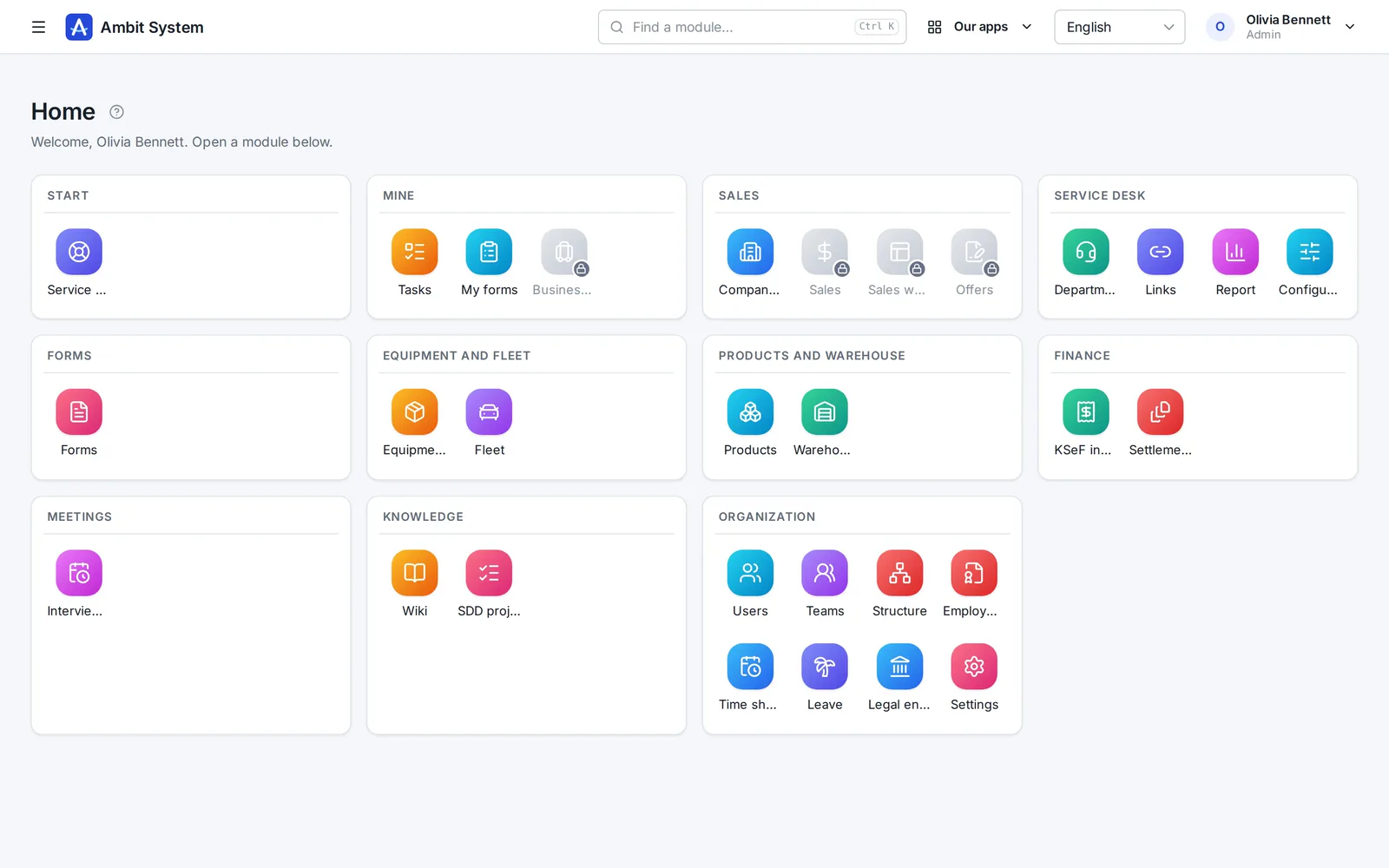
The home screen of the HR version with recruitment, projects, workers and housing modules.

Kysymykset

Ennen kuin kysyt

Maksanko jokaisesta käyttäjästä?

Et. Hinta koskee koko organisaatiota: enintään 5 000 käyttäjää ja 5 miljoonaa asiakasta CRM:ssä.

Missä valuutassa maksan?

Puolalaiset yritykset maksavat zlotyinä, kaikkien muiden maiden yritykset euroina. Laskun maasi arvonlisäverolla lähettää Paddle.

Mikä on Paddle.com ja miten maksaminen toimii?

Paddle.com on yritys, joka myy järjestelmäämme puolestamme - monet ohjelmistoyritykset käyttävät sitä. Maksaminen onnistuu vain Paddle.comin kautta - emme tee erillisiä sopimuksia emmekä lähetä omia laskuja. Maksat siellä kortilla, PayPalilla, Apple Paylla tai Google Paylla, ja organisaatiosi on valmis heti maksun jälkeen. Laskun maasi arvonlisäverolla antaa Paddle. Tilaus uusiutuu itsestään joka kuukausi tai joka vuosi, kunnes perut sen: Paddlen sähköpostin linkillä tai kirjoittamalla meille, ja järjestelmä toimii maksetun jakson loppuun.

Millä kielillä järjestelmä on?

Paneeli, jossa tiimisi työskentelee, on englanniksi, puolaksi, saksaksi ja ranskaksi. Tämä sivu on sinun kielelläsi, jotta siihen on helpompi tutustua.

Missä tietoni ovat?

Euroopan unionissa, datakeskuksessa Varsovassa.

Onko henkilötietojen käsittelysopimus (GDPR)?

On. Käsittelysopimus on osa käyttöehtoja (kohta 12) ja on voimassa ostosta lähtien, eikä mitään tarvitse allekirjoittaa erikseen. Tietosi ovat EU:ssa, datakeskuksessa Varsovassa.

Voinko lisätä moduulin myöhemmin?

Voit. Moduuleja lisäät milloin tahansa; organisaatiosi ja sen tiedot pysyvät paikallaan.

Voimmeko saada oman, erillisen ympäristön?

Ei. Jokainen organisaatio toimii yhteisellä alustalla, ja sen tiedot pidetään erillään muiden tiedoista.

Mitä tiedoillemme tapahtuu, jos lopetatte Ambit Systemin?

Ylläpitäjäsi voi milloin tahansa tilata viennin. Valmistelemme kaiken, mitä organisaatiolla on - jokaisen muutoksen historian, nykyiset tiedot ja tiedostot - yhtenä ZIP-tiedostona avoimessa muodossa (JSON) ja lähetämme latauslinkin sähköpostiin. Mikään ei sido sinua.

Onko teillä SSO, SLA tai sertifiointi, kuten ISO 27001?

SLA kyllä: kriittinen vika - järjestelmä ei ole käytettävissä tai keskeinen toiminto ei toimi kenellekään - korjataan 3 tunnissa (klo 8-22 Puolan aikaa), yöllä sattunut vika aamulla klo 11 mennessä. Joka päivä, myös viikonloppuisin ja pyhäpäivinä. Se on kirjattu ehtoihin (kohta 10), ei vain verkkosivulle. Tarkistamme järjestelmän ulkopuolelta joka minuutti, ja sen tila on julkisesti nähtävissä osoitteessa status.ambitsys.eu. SSO kyllä: väkenne voi kirjautua Microsoft 365-, Google Workspace- tai Keycloak-tunnuksella (katso seuraava kysymys). ISO 27001 -sertifiointia meillä ei vielä ole, emmekä väitä muuta - se on tiekartalla sivulla Tietoturva ja jatkuvuus.

Meillä ei ole yrityksen omaa sähköpostidomainia - voimmeko silti käyttää järjestelmää?

Ei. Rekisteröidyt yrityksen sähköpostiosoitteella, ja tiimisi kirjautuu saman verkkotunnuksen osoitteilla. Eikö teillä vielä ole omaa verkkotunnusta? Autamme ottamaan sen käyttöön. Kirjoita meille

Voiko tiimini kirjautua Microsoft 365- tai Google Workspace -tunnuksella?

Kyllä. Pääkäyttäjä liittää itse yrityksenne oman kirjautumisen - Microsoft 365, Google Workspace, Keycloak tai muu OpenID Connect -palveluntarjoaja - Asetuksissa ilman apuamme; kunkin palveluntarjoajan vaiheet ovat sivulla. Väkenne kirjautuu työtilillään organisaationne omasta linkistä. Sisään pääsevät vain lisäämänne henkilöt, ellette salli tilin luomista ensimmäisellä kirjautumisella yrityksenne sähköpostiverkkotunnusten osoitteille.

Miten AI-krediitit toimivat?

"Täytä AI:lla" maksaa 1-3 krediittiä täyttöä kohden sen mukaan, kuinka pitkän tekstin se kirjoittaa; vastaus, jonka AI kieltäytyi antamasta tai jossa ei ole mitään käyttökelpoista, ei maksa mitään. Krediittejä saa kahta kautta: kuukausittainen AI-paketti lisää 100 joka kuukausi, ja jäljelle jääneet vanhenevat kuun lopussa; kerran paneelista ostetut 100 krediitin paketit eivät vanhene koskaan - missä tahansa paketissa, myös HR-versiossa. Kuukauden krediitit käytetään ensin. Ylläpitäjä näkee saldon ja viimeisen 30 päivän käytön suunnitelmasivulla.
See what your company can run on one system.

The demo opens at once: a sample company with data in every module. No sign-up, no password.