Sistema operativo de la empresa

Toda tu empresa. Un sistema conectado.

Gestiona personas, clientes, operaciones, equipos, documentos y procesos en una sola plataforma. Empieza por lo que necesitas y amplía cuando tu empresa crezca.

Sin registro y sin contraseña. Una empresa de ejemplo, datos listos, todos los módulos.

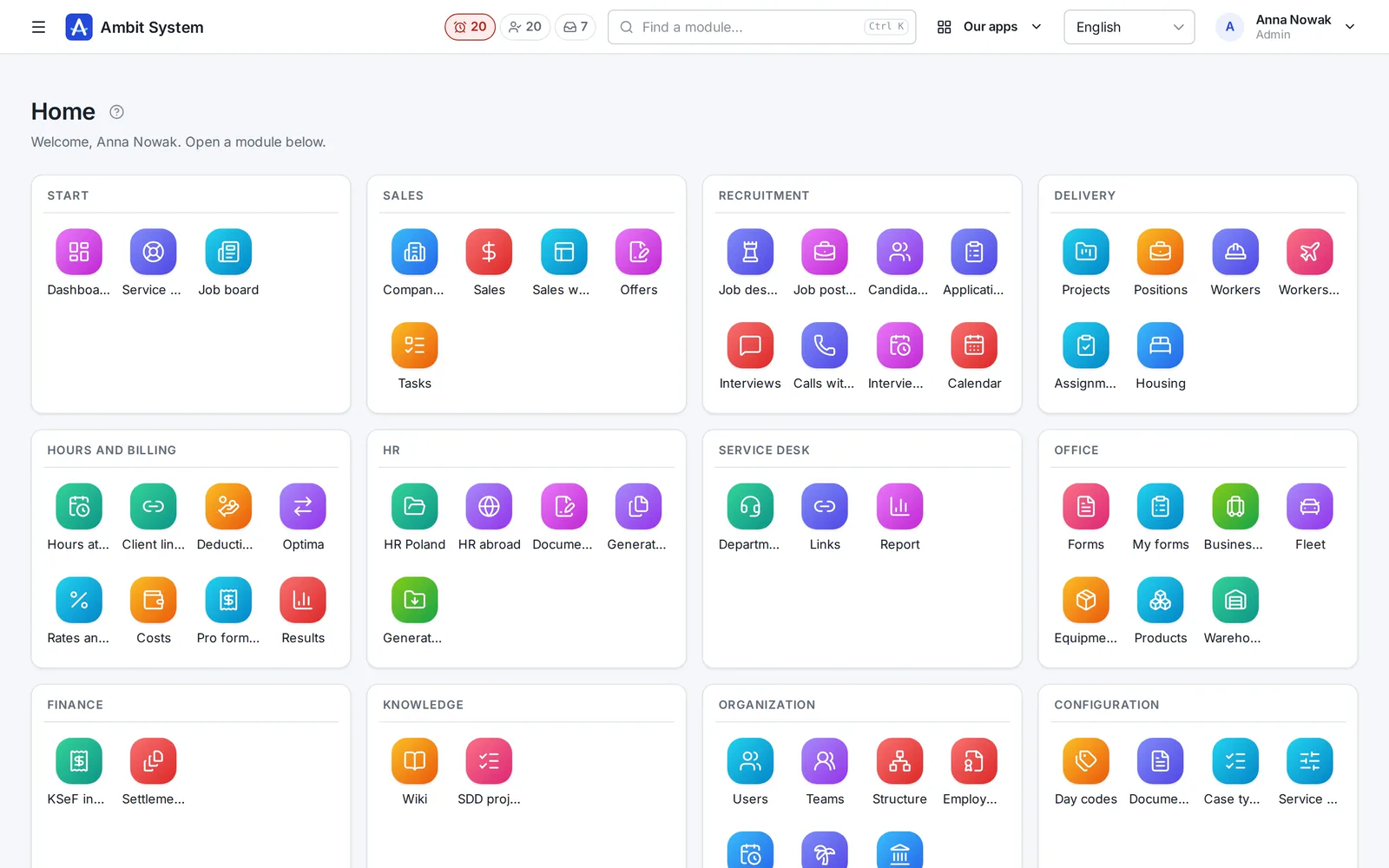
La pantalla de inicio del panel de Ambit System: los mosaicos de los módulos agrupados por área - ventas, Service Desk, formularios, equipos y flota, productos y almacén, finanzas, conocimiento y organización.
The real panel on sample data
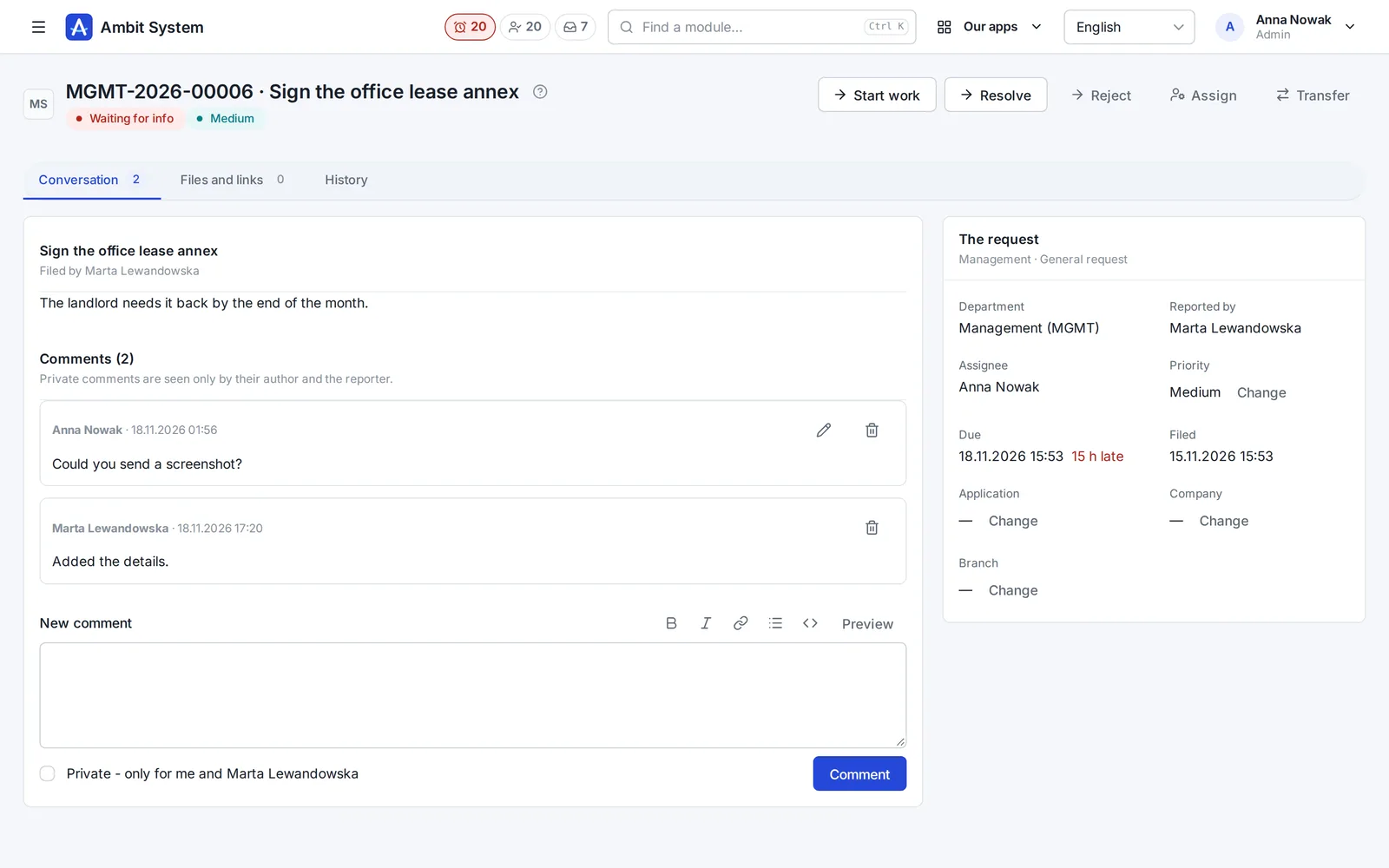
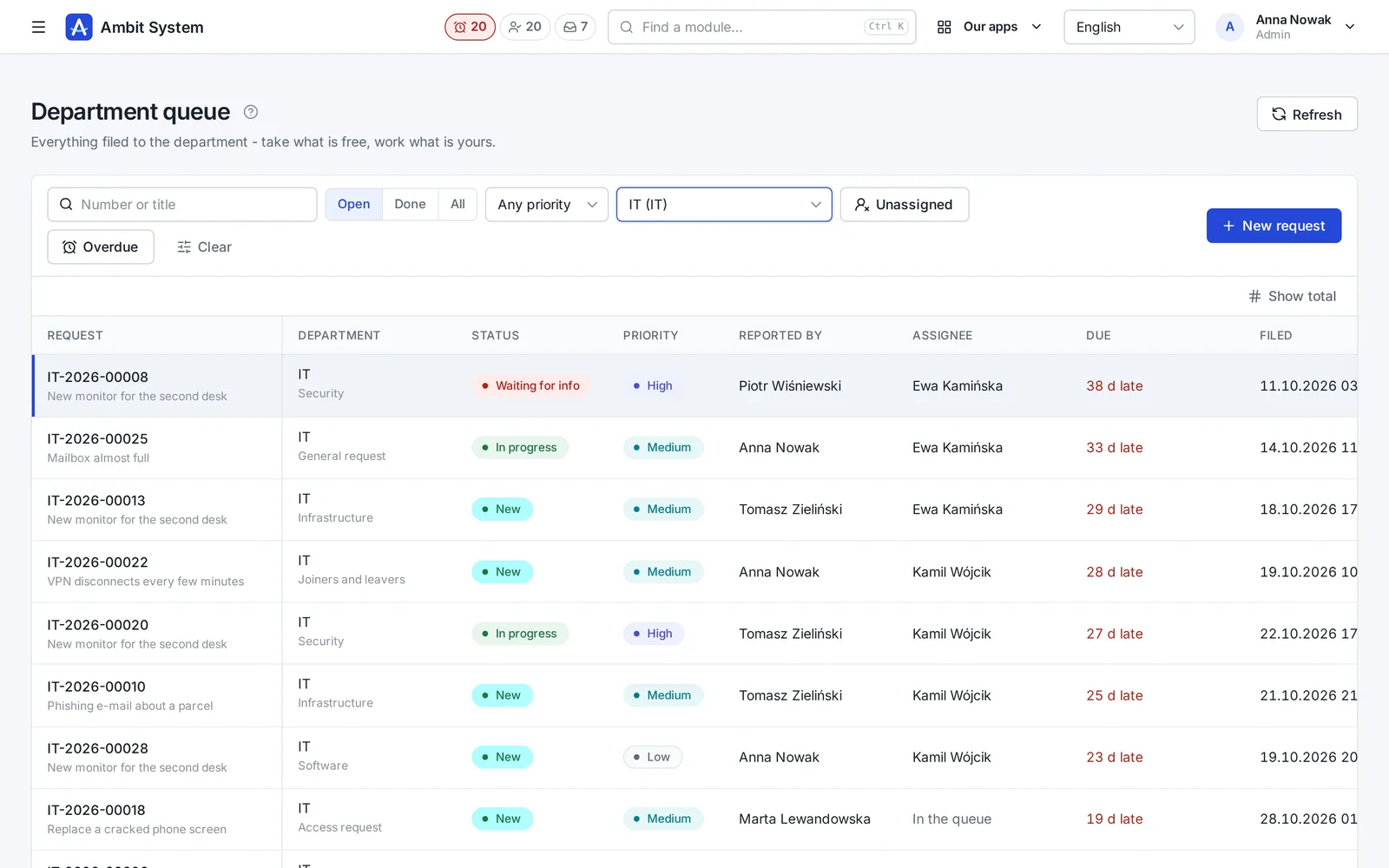
The Service Desk's department queue with request numbers, statuses and due times.
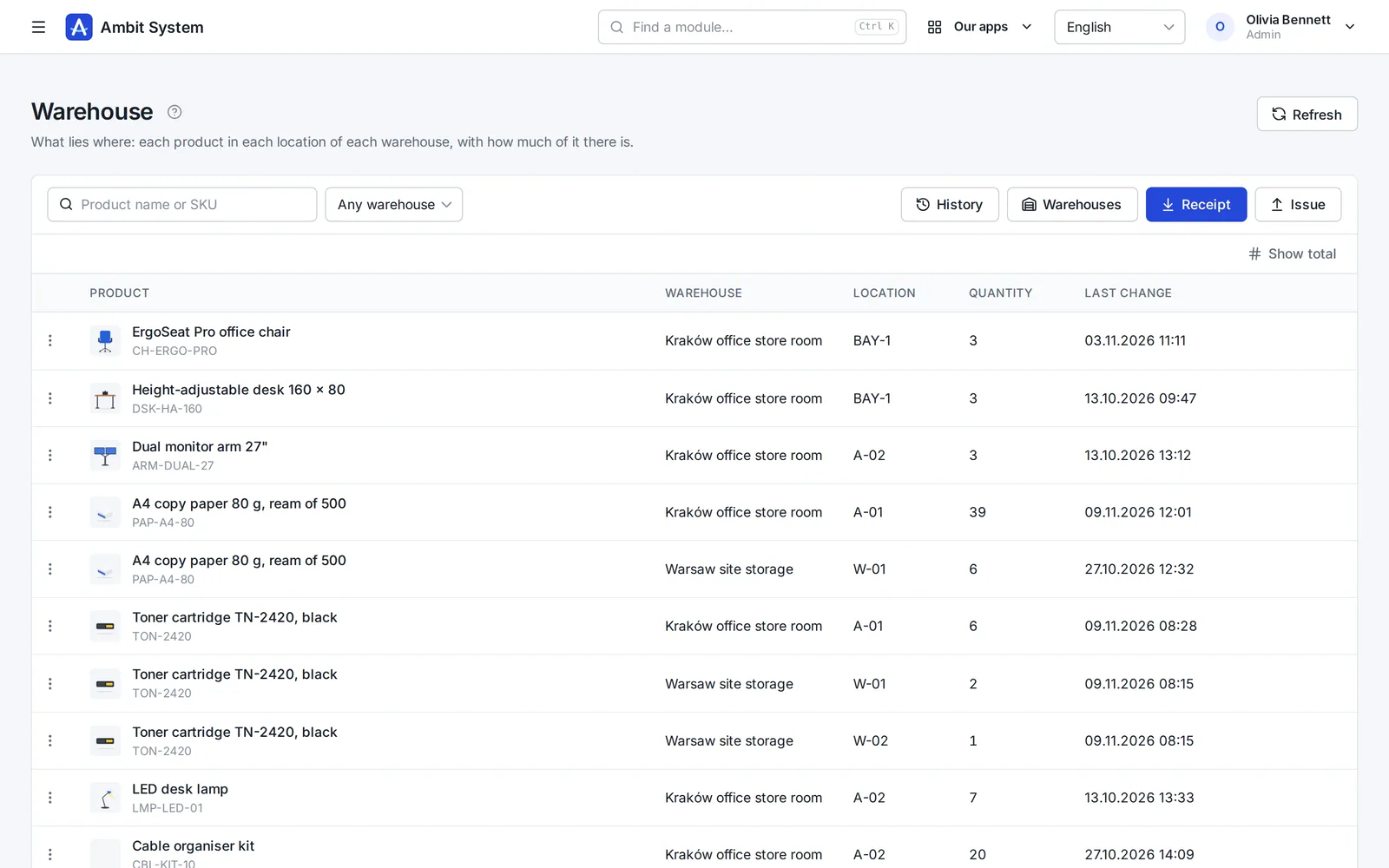
Warehouse stock: products per location with their quantities.
  • 5,000users in one organization
  • 1 priceper company, not per user
  • EUdata in a Warsaw data centre
  • 4interface languages: EN, PL, DE, FR
  • Livedemo, no sign-up

Why one system

Ten tools cost more than their invoices.

What happens in a company that runs on separate apps and spreadsheets - and what changes when the same data serves every team.

With separate toolsWith Ambit System
DataThe same people and clients typed into each app; nobody knows which list is current.One organization: users, departments and client companies shared by every module.
History“Who changed this?” - and no trace of it.Every change stored with its author and time, and never overwritten.
Hand-offsRequests and approvals forwarded by e-mail and chat.The org chart names the head: a request reaches the department's queue, hours reach the right approver.
AppsA separate login, set of roles and export for every tool.One sign-in with two-factor codes, one set of roles, one export of everything.
CostA fee per seat that grows with every hire.One price for the organization, up to 5,000 users - only modules change it.

One platform

Modules on shared data, not separate products.

Every module works inside the same organization: the same people, roles, departments and history. Adding one moves no data.

The product

Real screens, real modules.

Each module on a screenshot of the panel as it is today. Open its page for every screen, or try it in the demo.

  1. Organization

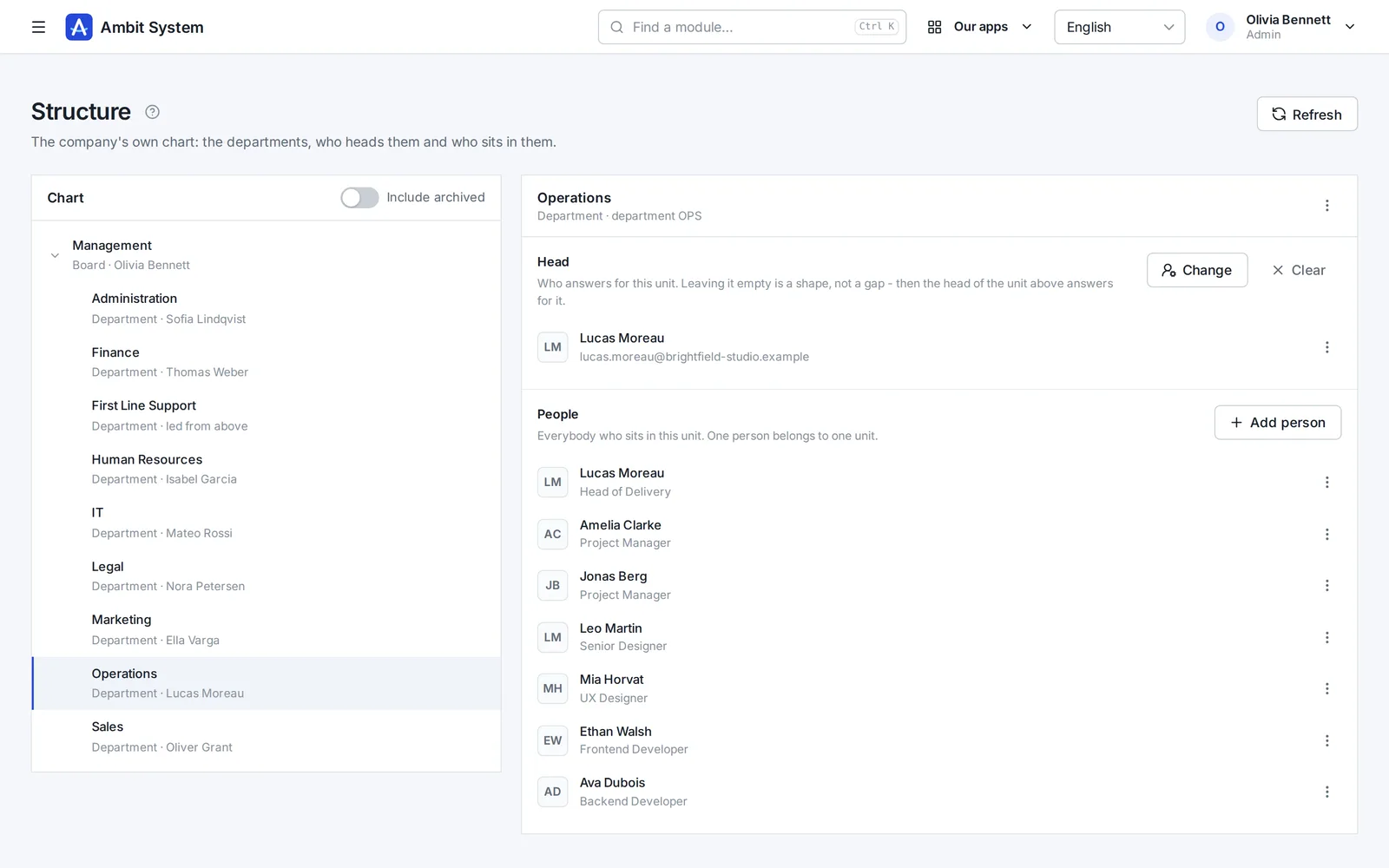
    Your company's shape - and its people's hours

    The org chart, the people and their access, the companies you trade through, and working time approved by the head the chart names.

    • An org chart of departments and sections, each with its head
    • Users with roles and teams, imported from a spreadsheet
    • Monthly time sheets approved by the person's head, ready for payroll
    The org chart: departments and sections with their heads and people.
    Sample data
  2. Service Desk

    Requests that reach the right desk - and get done

    No more "I sent you an e-mail last week". Every request to IT, HR, finance or the office has a number, a person who has it and a due time.

    • A portal where staff pick what they need and answer a few questions
    • A queue per department: unassigned, overdue, due within 12 hours
    • A conversation, files and the full history on the request itself
    The Service Desk's department queue: requests with number, status, priority and due time.
    Sample data
  3. Sales

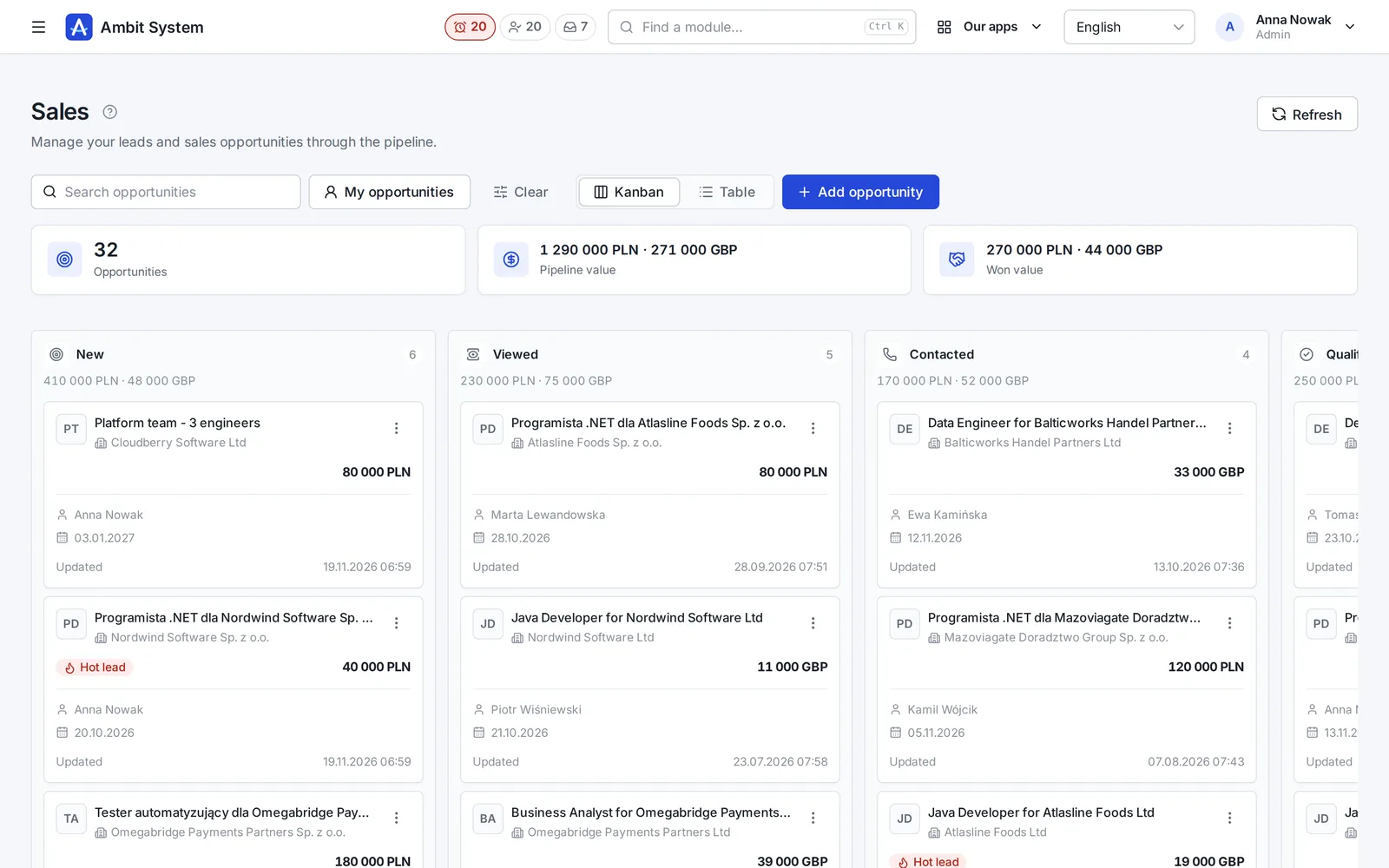
    Every deal on one board - and the next step always planned

    Clients and tasks come with every plan. The Sales module adds the pipeline: deals with their value, activities, the next step and the offers made for them.

    • A pipeline board from New to Won, with the value of every column
    • Calls, e-mails and meetings logged on the deal
    • Offers with a number and a PDF, made from the deal
    The sales pipeline board: deals in stages with their value and close date.
    Sample data
  4. Products and Warehouse

    What you keep, where it lies, and how much of it is left

    A product catalogue of your own, and a simple warehouse on top of it: every receipt, issue, transfer and correction saved with who, when and the quantity before and after.

    • Products with SKU, brand, manufacturer, weight and pictures
    • Stock per warehouse and location, never below zero
    • A history nobody edits, and a check that rebuilds the stock from it
    Warehouse stock: products per location with quantities.
    Sample data
  5. Equipment and Fleet

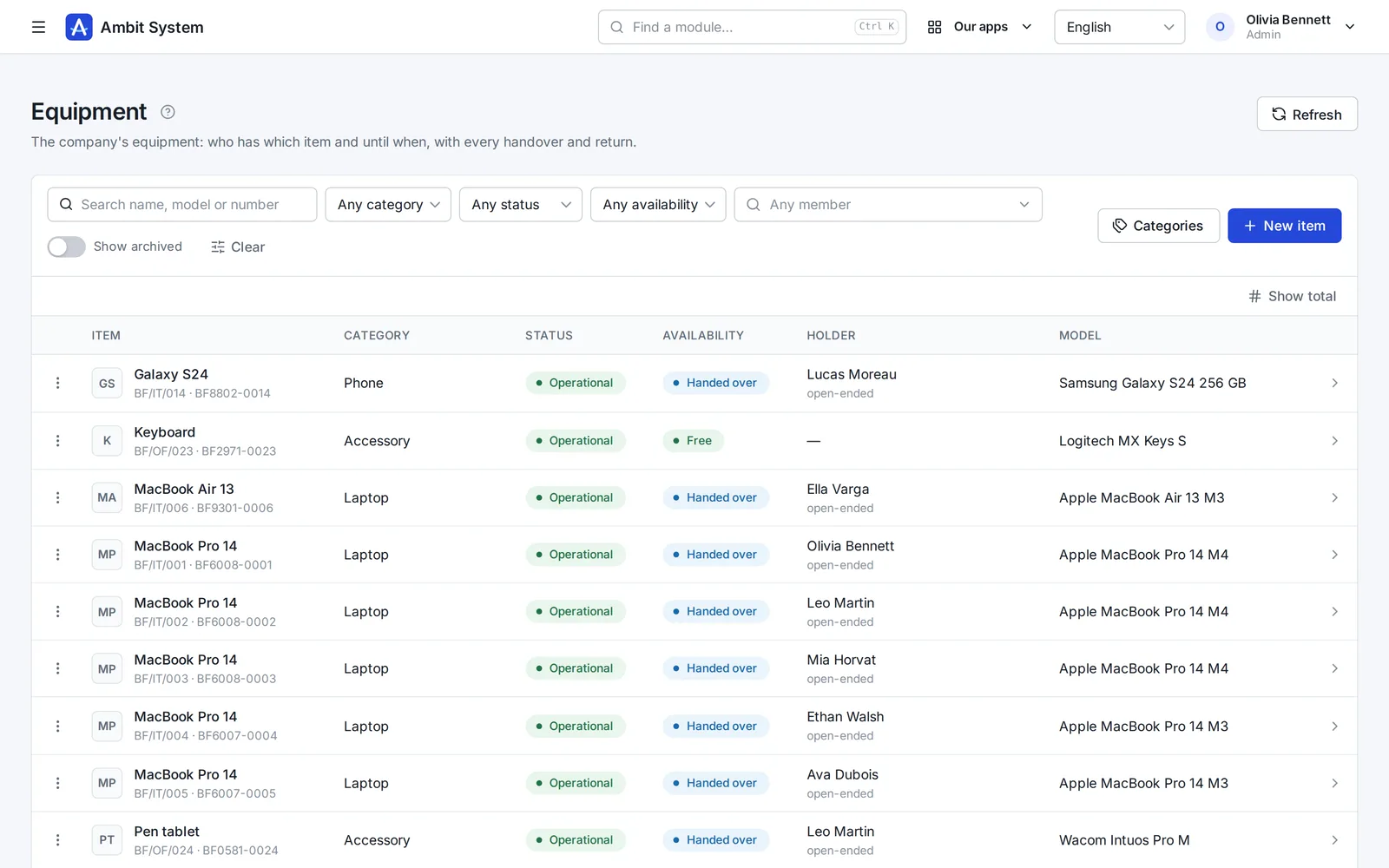
    Know who has which laptop - and which car

    The company's things one piece at a time and its cars, each with its status, holder and the history of every handover.

    • Laptops, phones, tools and clothing with serial and inventory numbers
    • Company cars with their status, repair shop and leasing
    • Handovers and returns, with the condition, mileage and fuel on record
    The equipment register: items with category, status and holder.
    Sample data
  6. KSeF and settlement documents

    Every cost in one place - from KSeF and from outside it

    Purchase invoices arrive from KSeF on their own; foreign invoices, policies and bills go next to them, each with its due date.

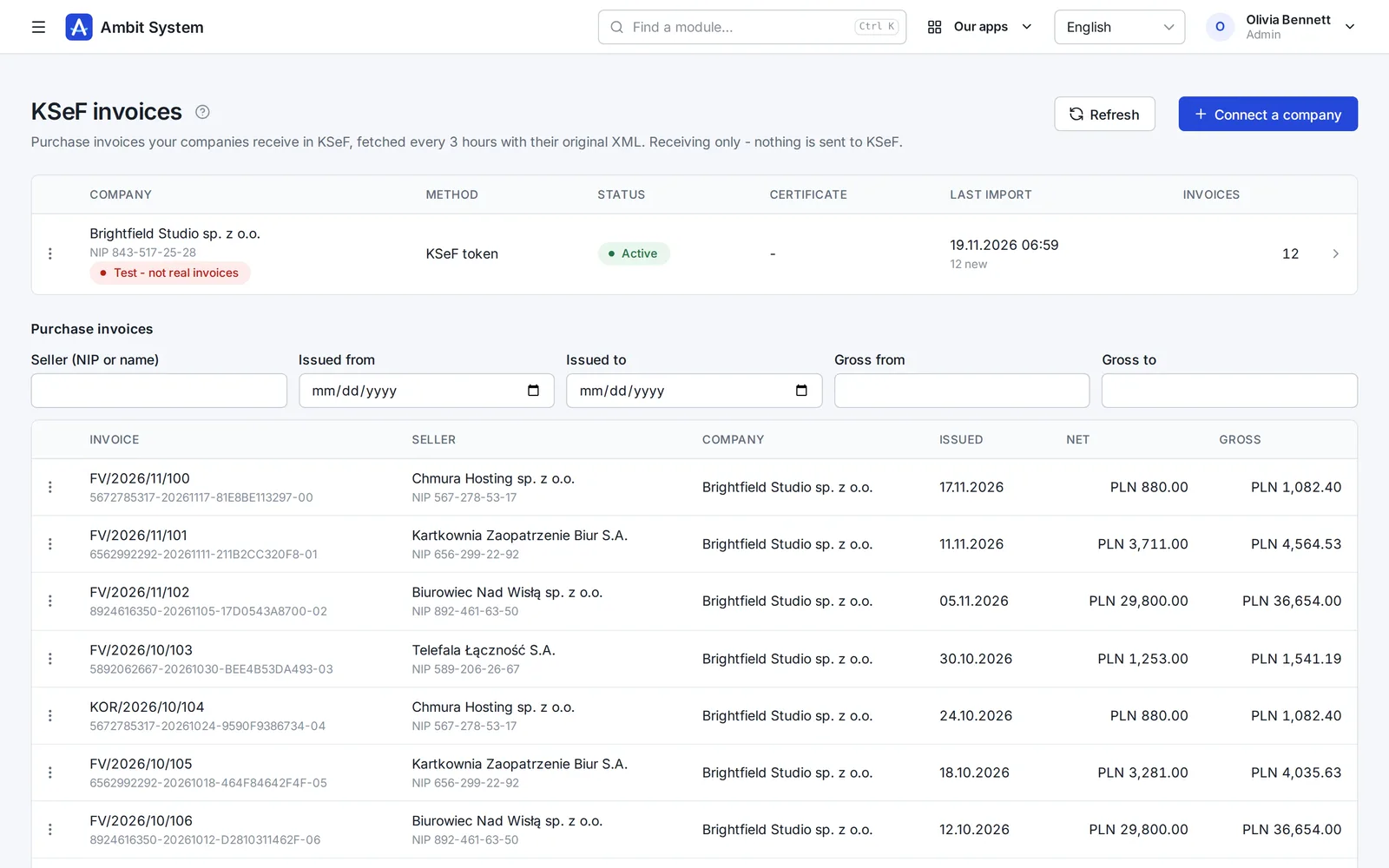
    • Purchase invoices fetched from KSeF every 3 hours, with the original XML
    • Costs outside KSeF with their files, due dates and a paid flag
    • A reminder the day before a payment is due
    KSeF purchase invoices fetched for a company, with amounts and dates.
    Sample data
  7. Forms

    Surveys and requests your people fill in themselves

    Build a form in the panel, publish it, and every member of your organization finds it under My forms.

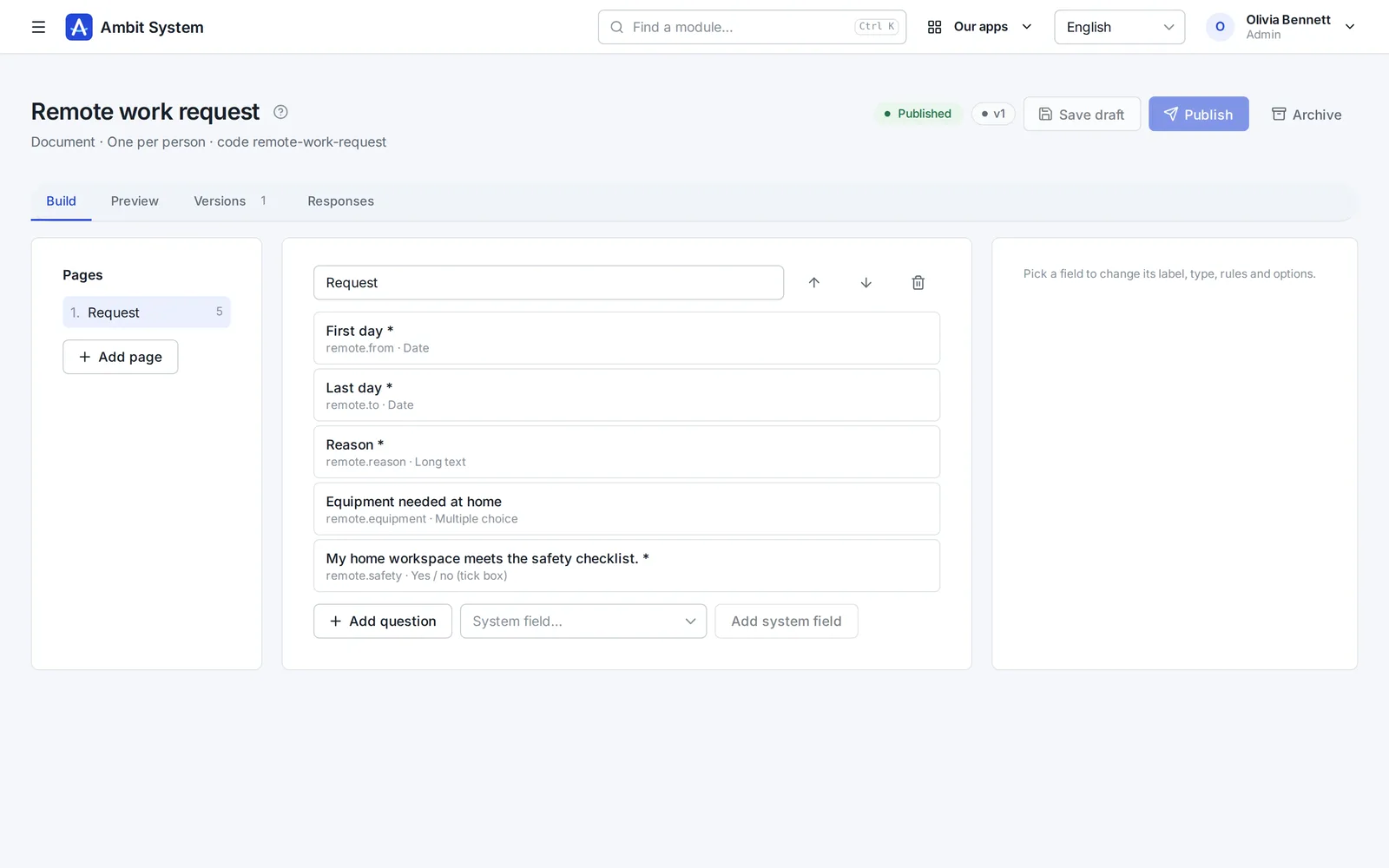
    • Pages, ten kinds of question and the rules for each answer
    • Filled in by each person, or for them by Admin or HR
    • Every response in one list, kept with the version it was given to
    The form builder: pages and questions of a form.
    Sample data
  8. Time tracking

    Hours recorded monthly, approved by the right head

    Employment and monthly time sheets for your own people. The supervisor comes from the org chart - nobody types one in.

    • Employment with its type, hours and rates
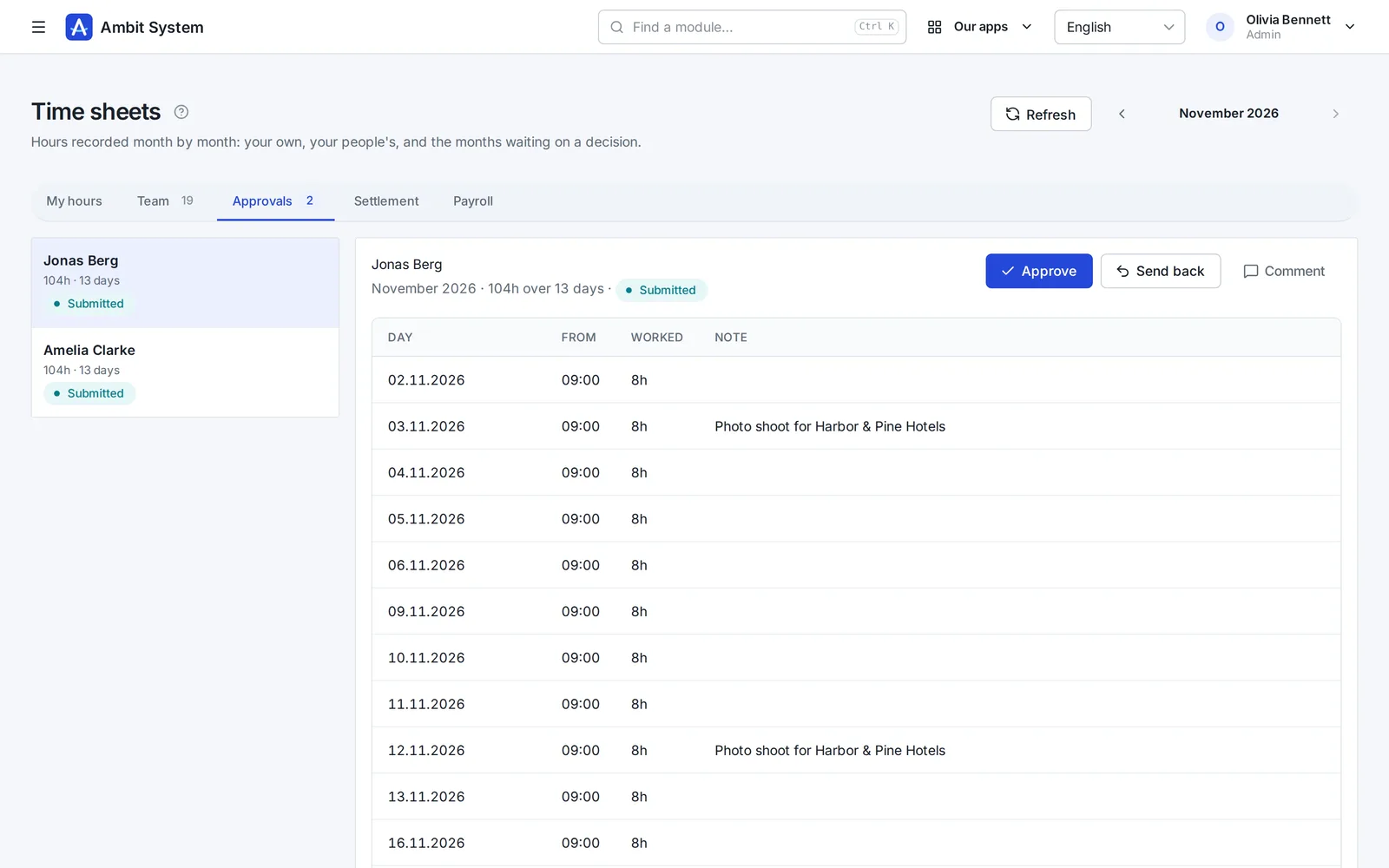
    • A month's time sheet filled in day by day
    • Approval by the person's head from the org chart
    • A payroll list for the month and an export of the settled month
    Time sheets waiting for the head's approval.
    Sample data

Modules working together

One request, four modules, one history.

An example of how a laptop reaches a new employee. Every screen below exists today; the steps between them are done by people, in one system instead of five.

  1. Service Desk

    The employee files a request

    On the portal: “Request hardware”, what is needed and why. It gets a number and lands in the IT queue.

  2. Service Desk

    The department decides

    The IT queue's people take it, ask questions in the conversation and set its status. The decision stays on the request.

  3. Warehouse

    The warehouse issues the item

    An issue from a location, with the request's number as its document number. Stock before and after is recorded.

  4. Equipment

    The item is handed over

    The laptop is handed to the employee with a planned return date. It shows under their equipment.

  5. History

    Everything stays on record

    Request, movement and handover - each with who and when, in the same organization.

Rellenar con IA

Un primer borrador de la oferta, escrito para que lo revise.

En el borrador de una oferta comercial, un botón escribe la introducción, las condiciones y líneas propuestas - nombre, unidad y cantidad - a partir del cliente, la oportunidad y unas palabras sobre lo que necesita el cliente. En la versión de RR. HH. también redacta anuncios y descripciones de puesto y traduce anuncios. En el wiki escribe o mejora una página a partir de sus notas, y en SDD esboza el alcance y los criterios de aceptación de una especificación.

Qué hace

  • Rellena un borrador vacío o mejora lo que ya está escrito; Deshacer devuelve lo que había
  • Lo que escribe llega al formulario para leerlo y corregirlo - no se guarda nada hasta que usted guarda
  • De 1 a 3 créditos por relleno, según la longitud; una respuesta rechazada o vacía no cuesta nada
  • Créditos del paquete mensual de IA, o de paquetes comprados una vez que no caducan

Lo que nunca hace

  • No fija precios, tipos de IVA ni descuentos - una línea con precio queda como se escribió
  • No lee datos de candidatos ni de empleados - solo lo que usted rellena - el cliente y la oportunidad, la página del wiki o el proyecto SDD - y su nota
  • No es un chat: un botón, un formulario, una respuesta

Pricing

One price per company. Not per user.

10 people or 5,000 - the amount stays the same. It changes only when you add modules, and you see it before you talk to anyone.

  • Up to 5,000 users and 5 million CRM clients
  • Monthly, or yearly at a discount
  • No fixed term, cancel any time, export all your data

BASIC from

…/ mes sin IVA

  • 10 usuarios…
  • 100 usuarios…
  • 1000 usuarios…
  • 5000 usuarios…

Security

Your data is protected at every step.

A selection of what is built in - the full list, described the way it works, is on the security page.

  • Two-factor sign-in
  • Single sign-on
  • Switching an account off works at once
  • Permissions by role
  • Every organization's data is kept apart
  • Candidates' data under the GDPR
  • Export of all data
  • The event log
  • Data in the European Union
  • Service status in public
  • SLA: a critical failure fixed within 3 hours
  • A daily database backup
Security and continuity

Two versions

For any company - and a version of its own for staffing agencies.

The same platform, the same security and one price per company. The HR version adds what an agency needs.

Ambit System

Service companies, production and firms with a fleet: start with BASIC and add the modules you need.

  • The org chart, people and time tracking
  • Requests, equipment, cars and the warehouse
  • CRM, offers, KSeF invoices
Explore modules

Ambit HR for agencies

Staffing and recruitment agencies: from the client and recruitment through postings, housing and hours to the pro forma - every module included.

  • Recruitment, candidates and interviews
  • Projects, workers, postings and housing
  • Hours at clients and pro formas
See the HR version
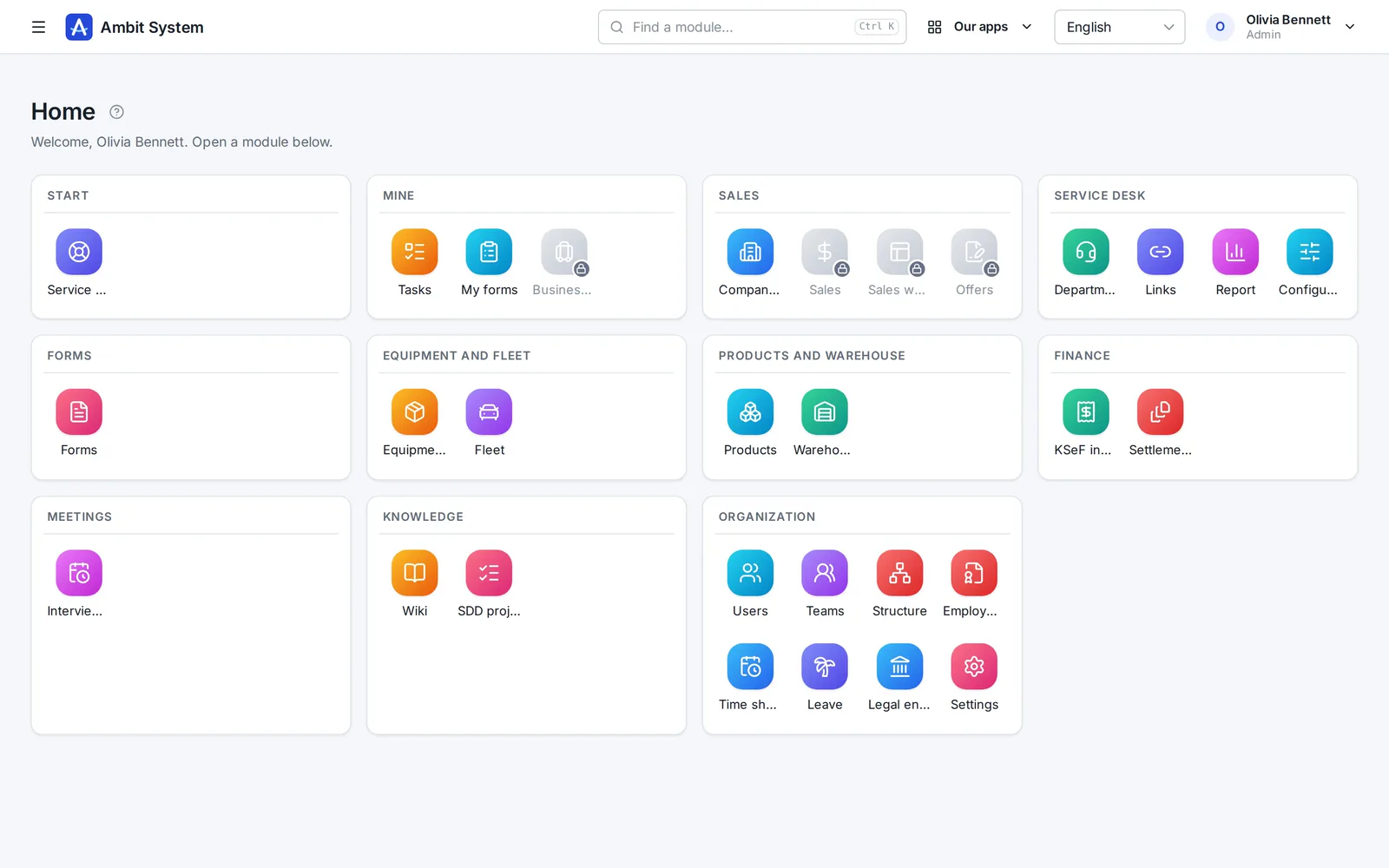
The home screen of the HR version with recruitment, projects, workers and housing modules.

Preguntas

Antes de que preguntes

¿Pago por cada usuario?

No. El precio es por toda la organización: hasta 5000 usuarios y 5 millones de clientes en el CRM.

¿En qué moneda pago?

Las empresas de Polonia pagan en eslotis; las de los demás países, en euros. Paddle emite la factura con el IVA de tu país.

¿Qué es Paddle.com y cómo funciona el pago?

Paddle.com es la empresa que vende nuestro sistema en nuestro nombre; la usan muchas empresas de software. El pago solo es posible a través de Paddle.com: no firmamos contratos aparte ni emitimos facturas propias. Pagas allí con tarjeta, PayPal, Apple Pay o Google Pay, y tu organización está lista en cuanto se completa el pago. La factura con el IVA de tu país la emite Paddle. La suscripción se renueva sola cada mes o cada año hasta que la canceles: con el enlace del correo de Paddle o escribiéndonos, y el sistema sigue funcionando hasta el final del periodo pagado.

¿En qué idiomas está el sistema?

El panel en el que trabaja tu equipo está en inglés, polaco, alemán y francés. Esta página está en tu idioma para que te resulte más fácil conocerlo.

¿Dónde están mis datos?

En la Unión Europea, en un centro de datos en Varsovia.

¿Hay un contrato de encargo del tratamiento (RGPD)?

Sí. El contrato de encargo del tratamiento forma parte de las condiciones (sección 12) y se aplica desde la compra, sin nada aparte que firmar. Tus datos están en la Unión Europea, en un centro de datos de Varsovia.

¿Puedo añadir un módulo más adelante?

Sí. Añades módulos cuando quieras; tu organización y sus datos se quedan donde están.

¿Podemos tener nuestro propio entorno separado?

No. Cada organización trabaja en la plataforma compartida, con sus datos separados de los de los demás.

¿Qué pasa con nuestros datos si dejáis de ofrecer Ambit System?

Tu administrador puede pedir una exportación en cualquier momento. Preparamos todo lo que tiene la organización - el historial de cada cambio, los datos actuales y los archivos - como un único archivo ZIP en un formato abierto (JSON), y enviamos por correo un enlace de descarga. Nada te ata.

¿Tenéis SSO, un SLA o una certificación como ISO 27001?

Un SLA, sí: una avería crítica - el sistema no disponible o una función clave que no funciona para nadie - se resuelve en 3 horas (8:00-22:00, hora de Polonia), y una de la noche por la mañana, antes de las 11:00. Todos los días, también fines de semana y festivos. Está en las condiciones (sección 10), no solo en una página web. Comprobamos el sistema desde fuera cada minuto y su estado es público en status.ambitsys.eu. El SSO, sí: su equipo puede iniciar sesión con Microsoft 365, Google Workspace o Keycloak (vea la siguiente pregunta). La ISO 27001 aún no la tenemos, y no fingimos lo contrario: está en la hoja de ruta de la página Seguridad y continuidad.

No tenemos un dominio de correo de empresa - ¿podemos usarlo igualmente?

No. Te registras con el correo de tu empresa y tu equipo inicia sesión con direcciones de ese dominio. ¿Aún no tenéis dominio propio? Os ayudamos a configurarlo. Escríbenos

¿Puede mi equipo iniciar sesión con Microsoft 365 o Google Workspace?

Sí. Un administrador conecta por su cuenta el inicio de sesión de su empresa - Microsoft 365, Google Workspace, Keycloak u otro proveedor OpenID Connect - en Ajustes, sin nuestra ayuda; los pasos para cada proveedor están en la página. Su equipo inicia sesión con su cuenta de trabajo desde el enlace propio de su organización. Solo entran las personas que usted añadió, salvo que permita crear una cuenta en el primer inicio de sesión para direcciones de los dominios de correo de su empresa.

¿Cómo funcionan los créditos de IA?

«Rellenar con IA» cuesta de 1 a 3 créditos por relleno, según la longitud de lo que escribe; una respuesta que la IA rechazó, o sin nada útil, no cuesta nada. Los créditos llegan de dos formas: el paquete mensual de IA añade 100 cada mes, y lo que sobra caduca al final de ese mes; los paquetes de 100 comprados una vez en el panel no caducan nunca - en cualquier plan, incluida la versión de RR. HH. Primero se gastan los créditos del mes. Un administrador ve el saldo y el uso de los últimos 30 días en la página del plan.
See what your company can run on one system.

The demo opens at once: a sample company with data in every module. No sign-up, no password.