Operační systém firmy

Celá vaše firma. Jeden propojený systém.

Spravujte lidi, zákazníky, provoz, vybavení, dokumenty a procesy na jedné platformě. Začněte tím, co potřebujete, a rozšiřujte s růstem firmy.

Bez registrace a bez hesla. Ukázková firma, hotová data, všechny moduly.

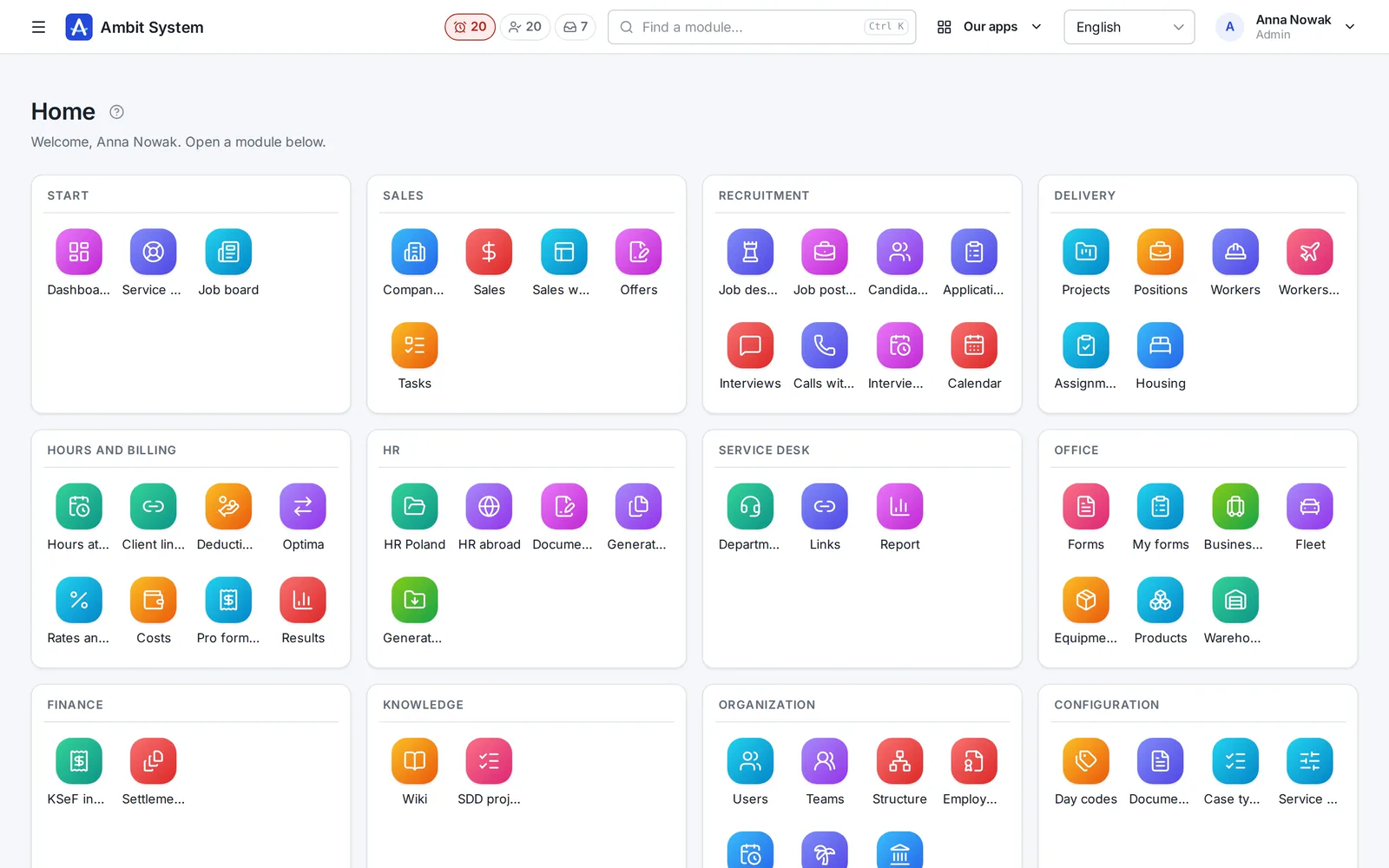
Úvodní obrazovka panelu Ambit System: dlaždice modulů seskupené podle oblastí - prodej, Service Desk, formuláře, vybavení a vozový park, produkty a sklad, finance, znalosti a organizace.
The real panel on sample data
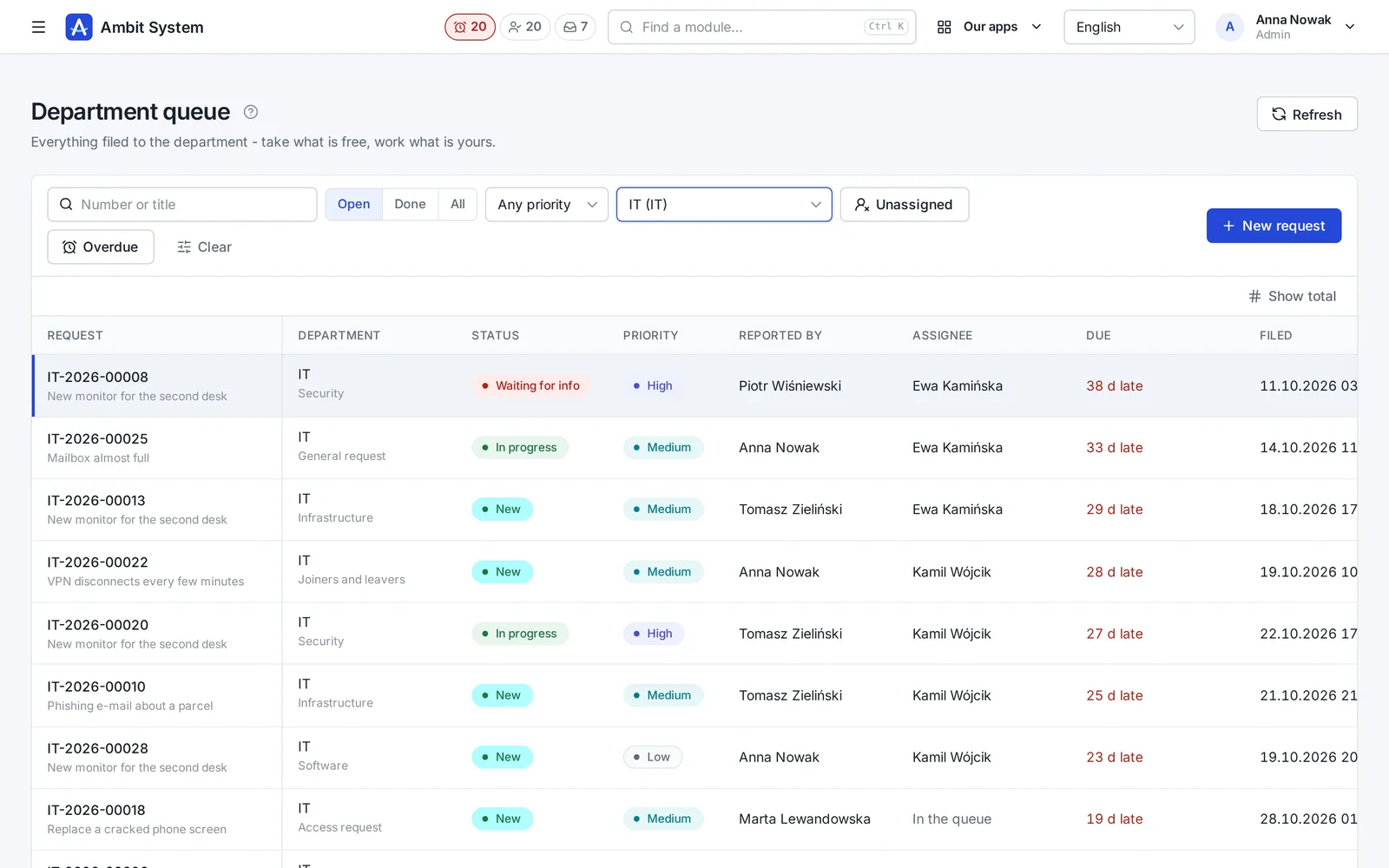
The Service Desk's department queue with request numbers, statuses and due times.
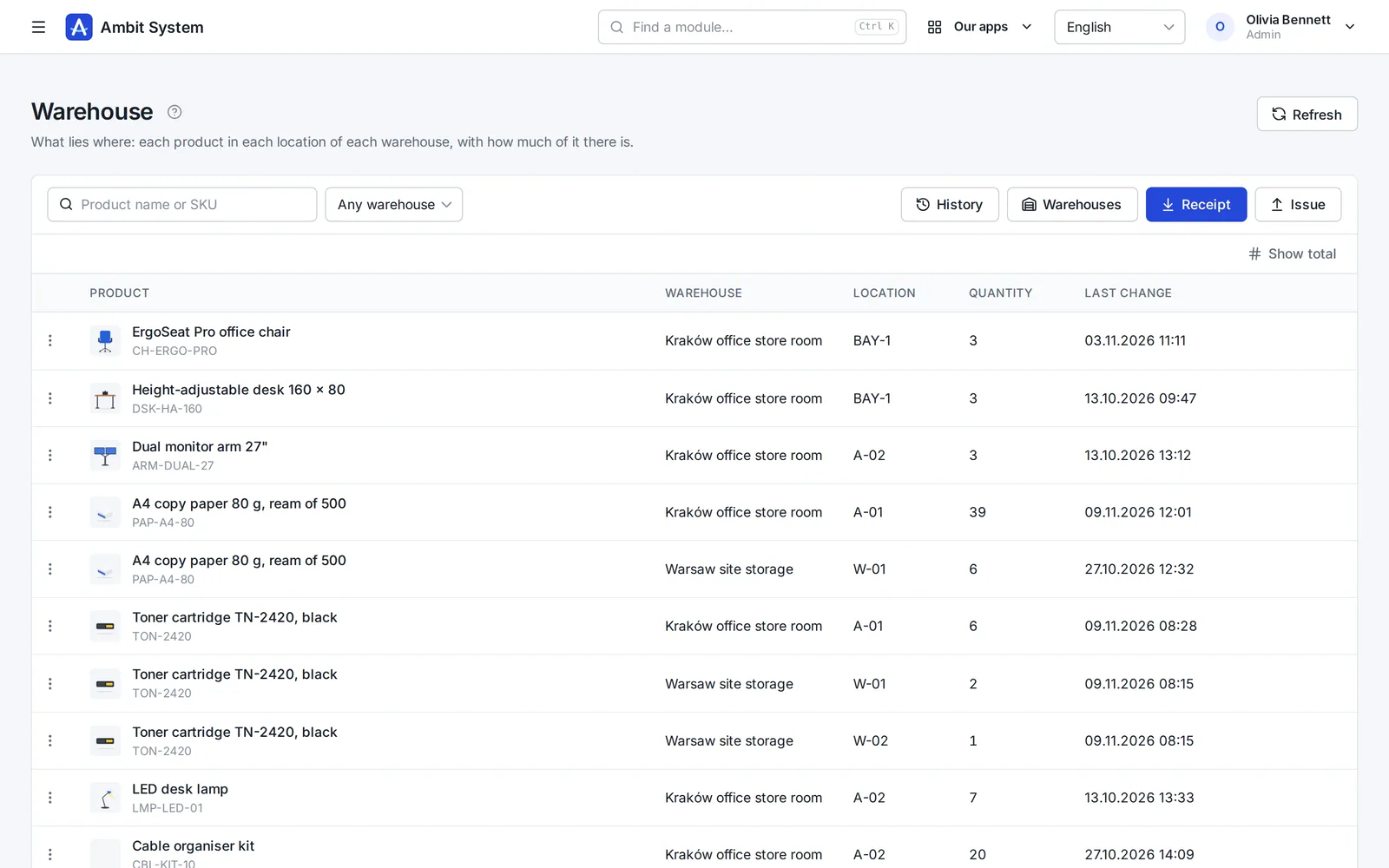
Warehouse stock: products per location with their quantities.
  • 5,000users in one organization
  • 1 priceper company, not per user
  • EUdata in a Warsaw data centre
  • 4interface languages: EN, PL, DE, FR
  • Livedemo, no sign-up

Why one system

Ten tools cost more than their invoices.

What happens in a company that runs on separate apps and spreadsheets - and what changes when the same data serves every team.

With separate toolsWith Ambit System
DataThe same people and clients typed into each app; nobody knows which list is current.One organization: users, departments and client companies shared by every module.
History“Who changed this?” - and no trace of it.Every change stored with its author and time, and never overwritten.
Hand-offsRequests and approvals forwarded by e-mail and chat.The org chart names the head: a request reaches the department's queue, hours reach the right approver.
AppsA separate login, set of roles and export for every tool.One sign-in with two-factor codes, one set of roles, one export of everything.
CostA fee per seat that grows with every hire.One price for the organization, up to 5,000 users - only modules change it.

One platform

Modules on shared data, not separate products.

Every module works inside the same organization: the same people, roles, departments and history. Adding one moves no data.

The product

Real screens, real modules.

Each module on a screenshot of the panel as it is today. Open its page for every screen, or try it in the demo.

  1. Organization

    Your company's shape - and its people's hours

    The org chart, the people and their access, the companies you trade through, and working time approved by the head the chart names.

    • An org chart of departments and sections, each with its head
    • Users with roles and teams, imported from a spreadsheet
    • Monthly time sheets approved by the person's head, ready for payroll
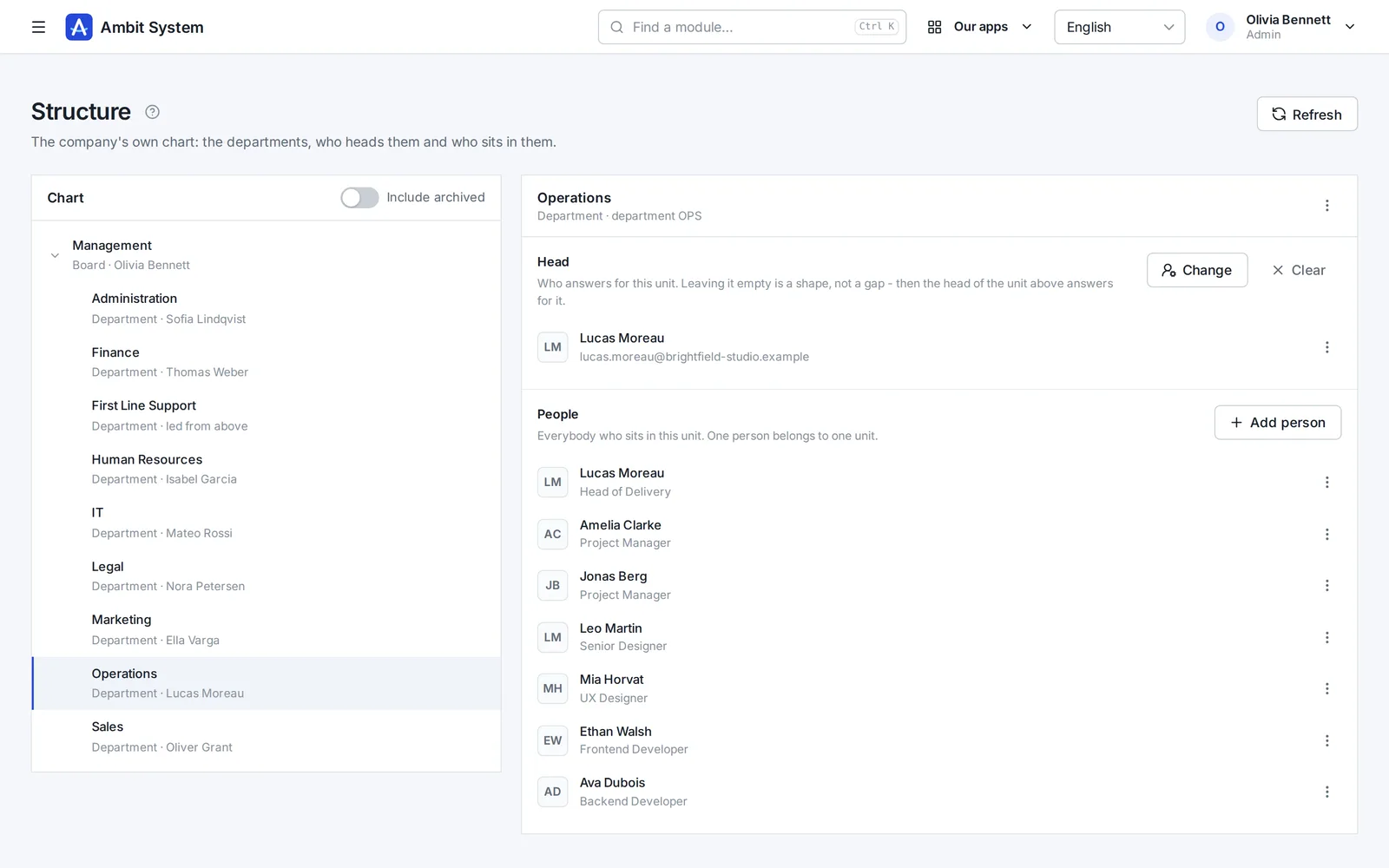
    The org chart: departments and sections with their heads and people.
    Sample data
  2. Service Desk

    Requests that reach the right desk - and get done

    No more "I sent you an e-mail last week". Every request to IT, HR, finance or the office has a number, a person who has it and a due time.

    • A portal where staff pick what they need and answer a few questions
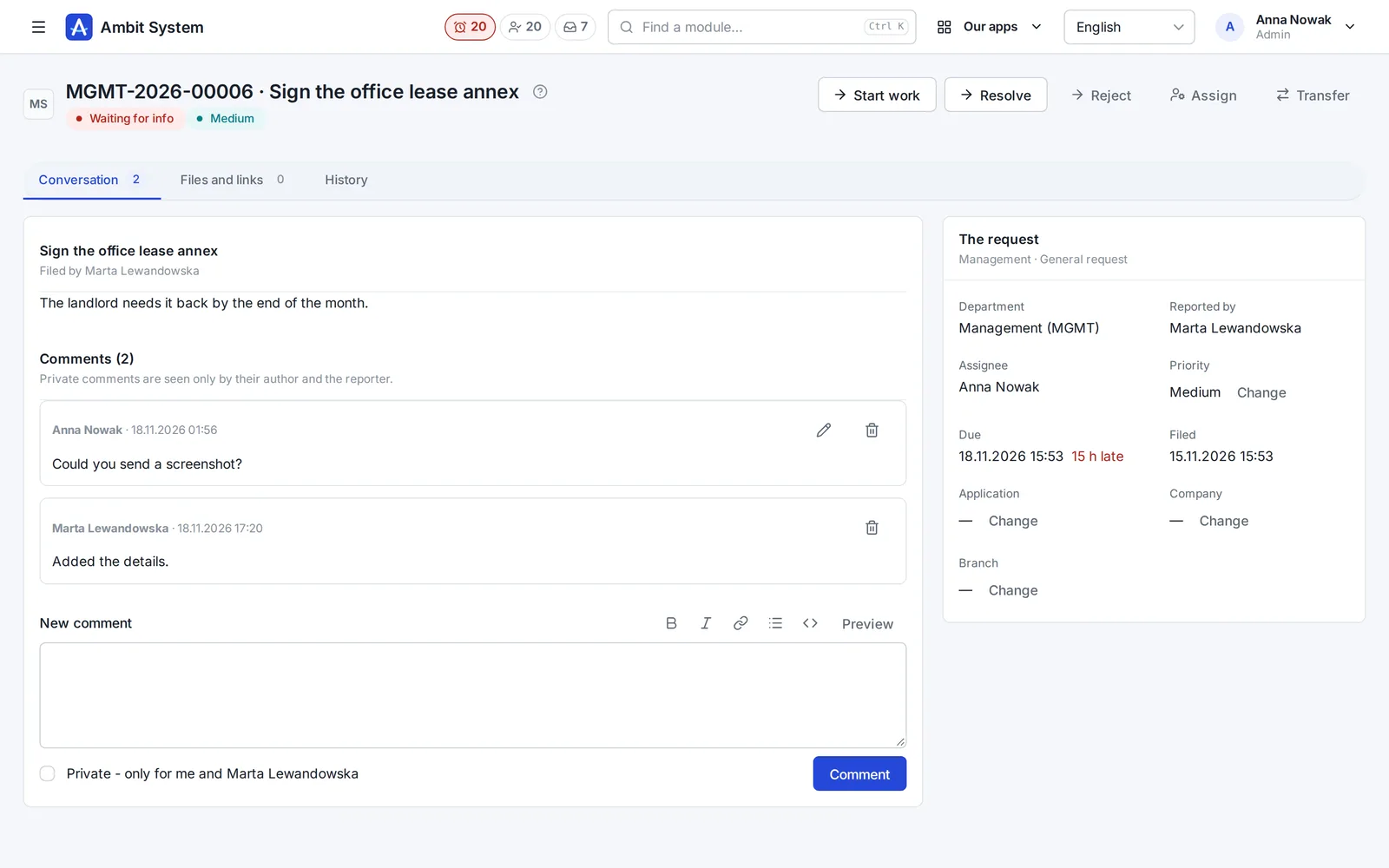
    • A queue per department: unassigned, overdue, due within 12 hours
    • A conversation, files and the full history on the request itself
    The Service Desk's department queue: requests with number, status, priority and due time.
    Sample data
  3. Sales

    Every deal on one board - and the next step always planned

    Clients and tasks come with every plan. The Sales module adds the pipeline: deals with their value, activities, the next step and the offers made for them.

    • A pipeline board from New to Won, with the value of every column
    • Calls, e-mails and meetings logged on the deal
    • Offers with a number and a PDF, made from the deal
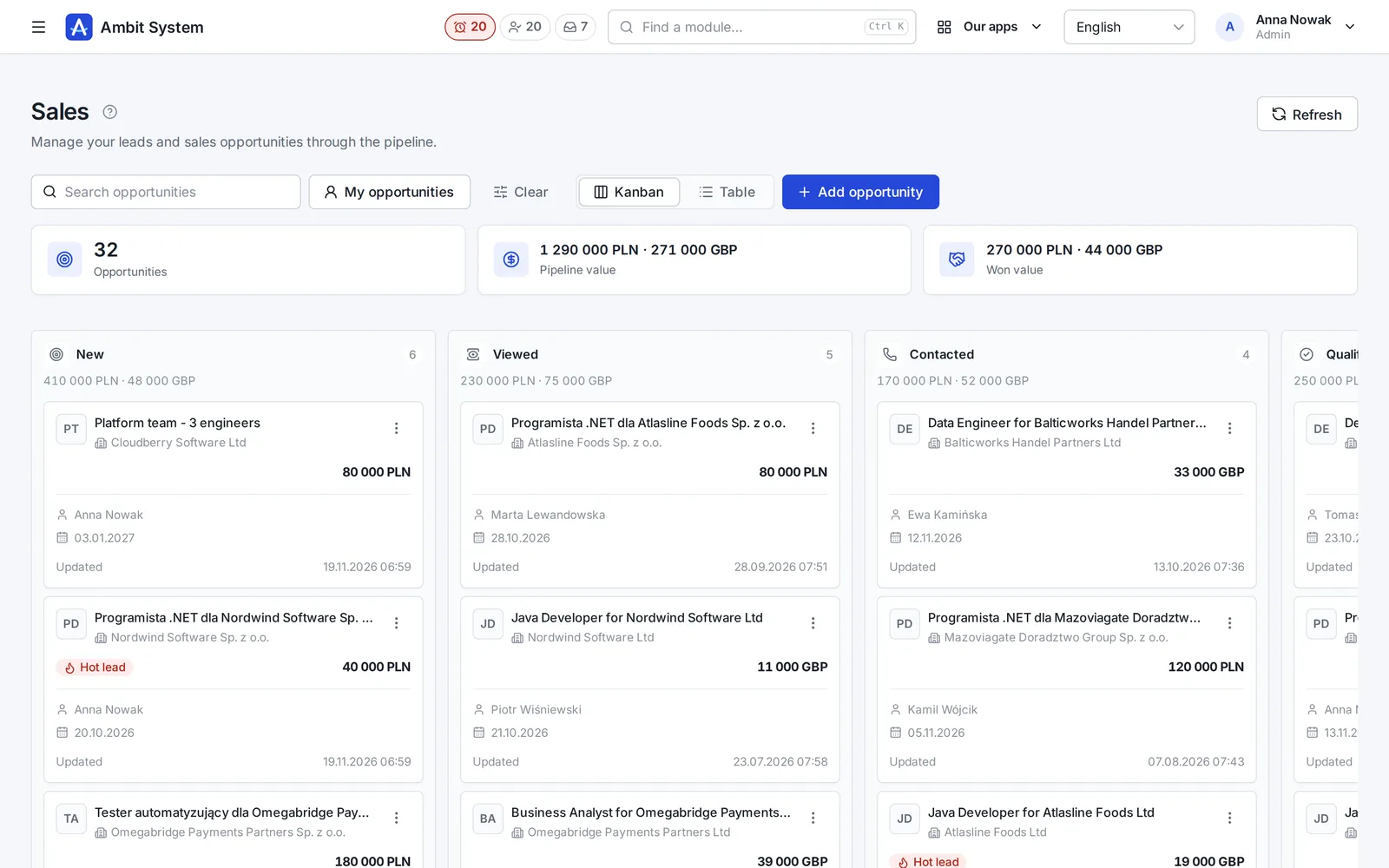
    The sales pipeline board: deals in stages with their value and close date.
    Sample data
  4. Products and Warehouse

    What you keep, where it lies, and how much of it is left

    A product catalogue of your own, and a simple warehouse on top of it: every receipt, issue, transfer and correction saved with who, when and the quantity before and after.

    • Products with SKU, brand, manufacturer, weight and pictures
    • Stock per warehouse and location, never below zero
    • A history nobody edits, and a check that rebuilds the stock from it
    Warehouse stock: products per location with quantities.
    Sample data
  5. Equipment and Fleet

    Know who has which laptop - and which car

    The company's things one piece at a time and its cars, each with its status, holder and the history of every handover.

    • Laptops, phones, tools and clothing with serial and inventory numbers
    • Company cars with their status, repair shop and leasing
    • Handovers and returns, with the condition, mileage and fuel on record
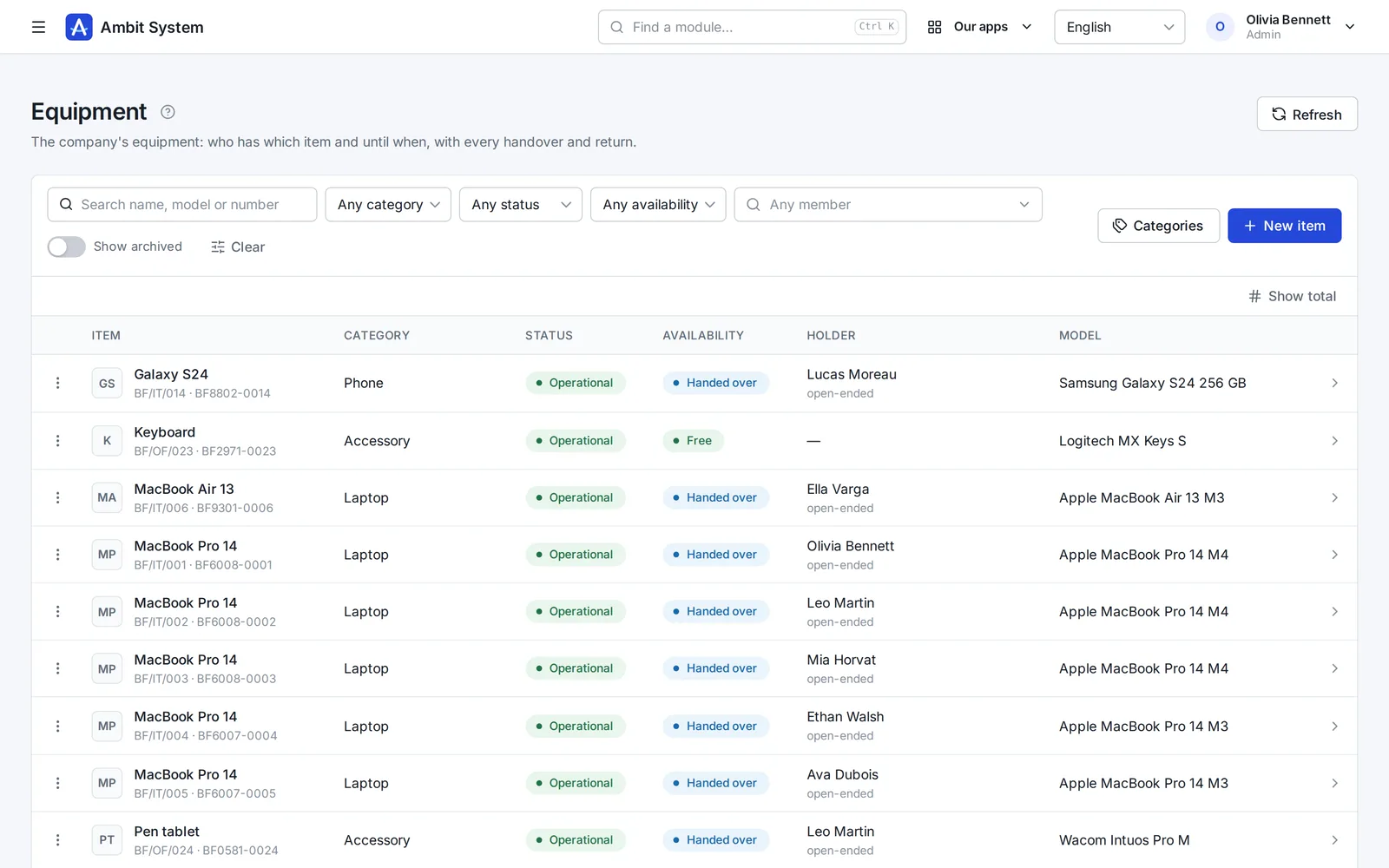
    The equipment register: items with category, status and holder.
    Sample data
  6. KSeF and settlement documents

    Every cost in one place - from KSeF and from outside it

    Purchase invoices arrive from KSeF on their own; foreign invoices, policies and bills go next to them, each with its due date.

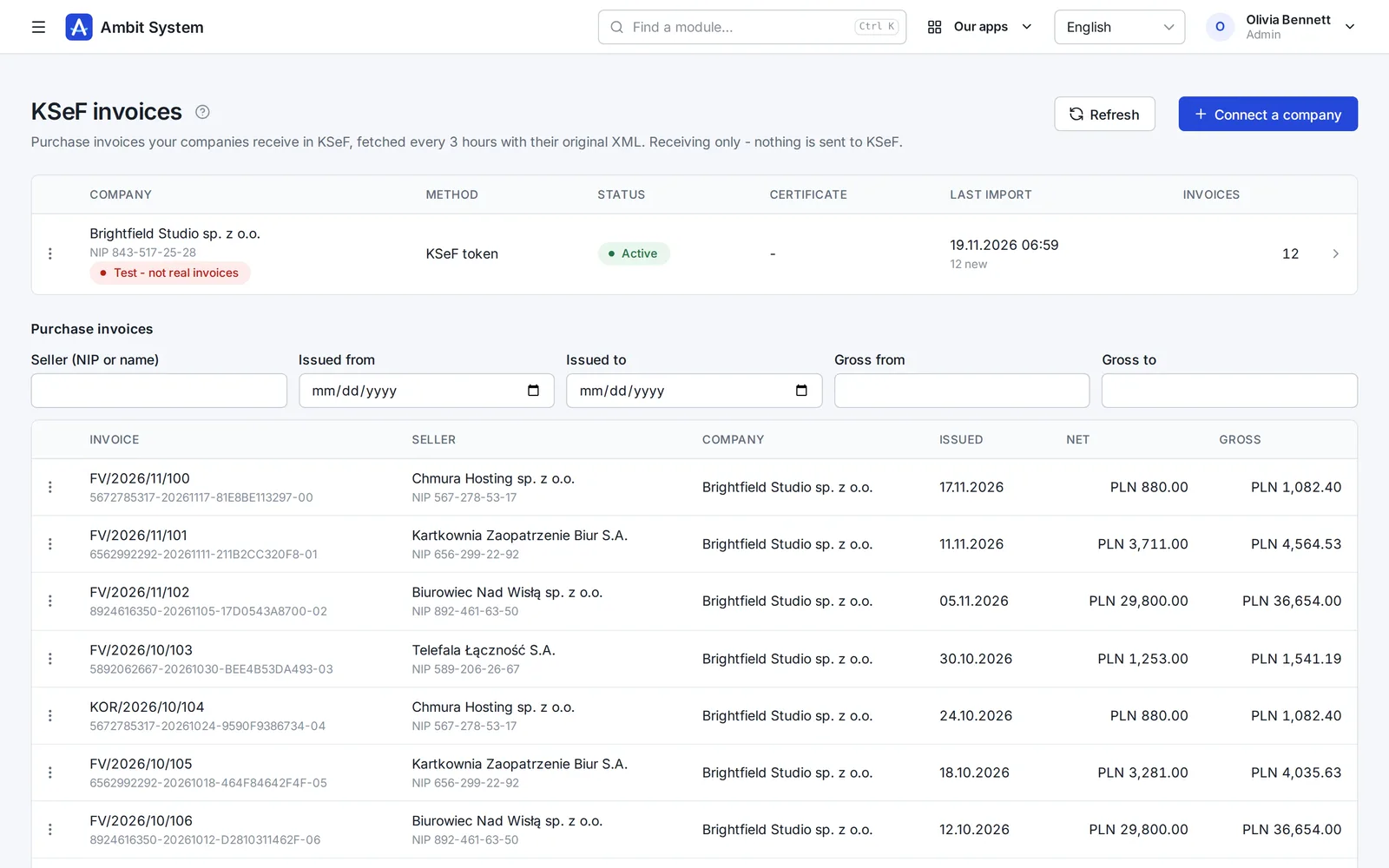
    • Purchase invoices fetched from KSeF every 3 hours, with the original XML
    • Costs outside KSeF with their files, due dates and a paid flag
    • A reminder the day before a payment is due
    KSeF purchase invoices fetched for a company, with amounts and dates.
    Sample data
  7. Forms

    Surveys and requests your people fill in themselves

    Build a form in the panel, publish it, and every member of your organization finds it under My forms.

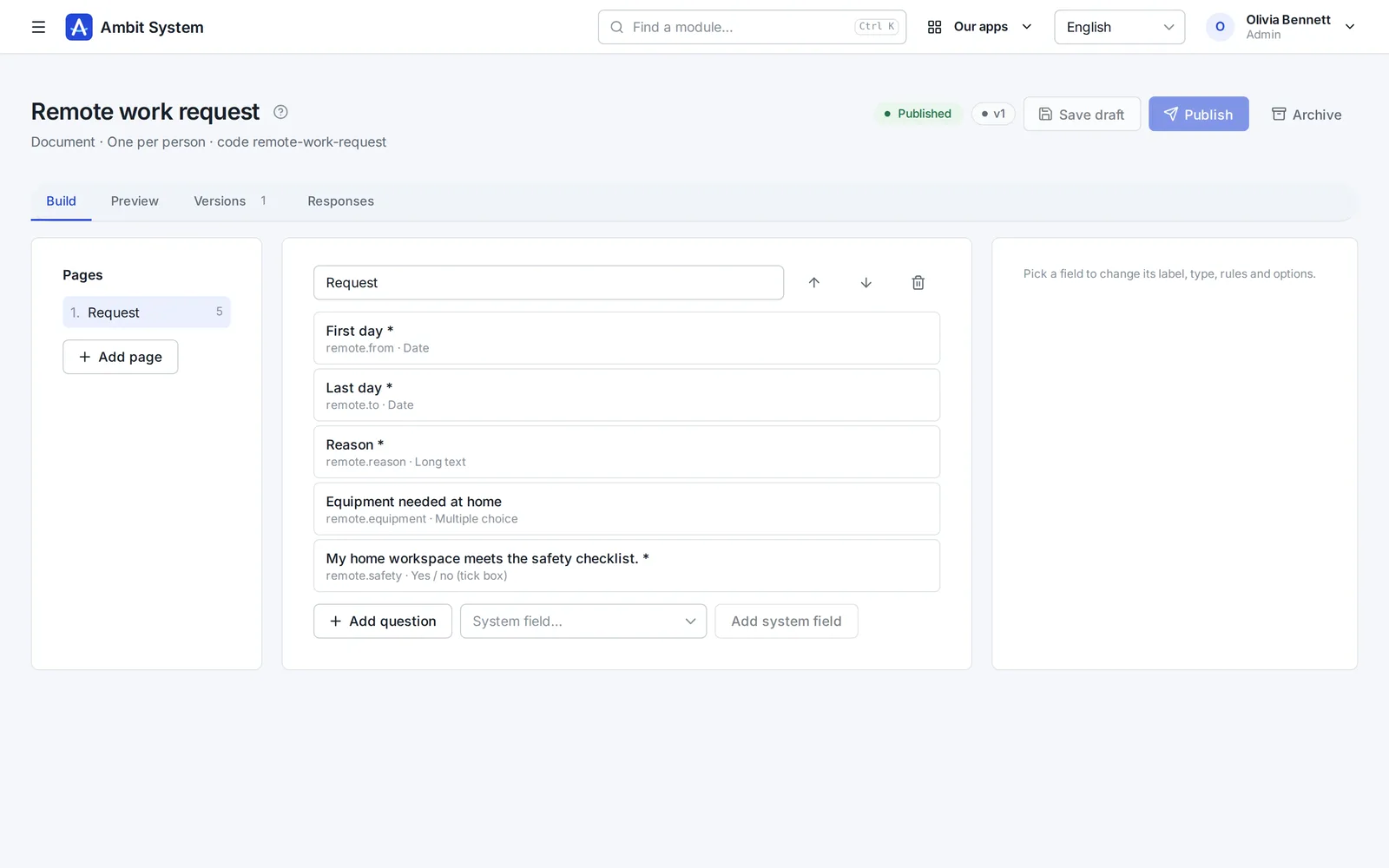
    • Pages, ten kinds of question and the rules for each answer
    • Filled in by each person, or for them by Admin or HR
    • Every response in one list, kept with the version it was given to
    The form builder: pages and questions of a form.
    Sample data
  8. Time tracking

    Hours recorded monthly, approved by the right head

    Employment and monthly time sheets for your own people. The supervisor comes from the org chart - nobody types one in.

    • Employment with its type, hours and rates
    • A month's time sheet filled in day by day
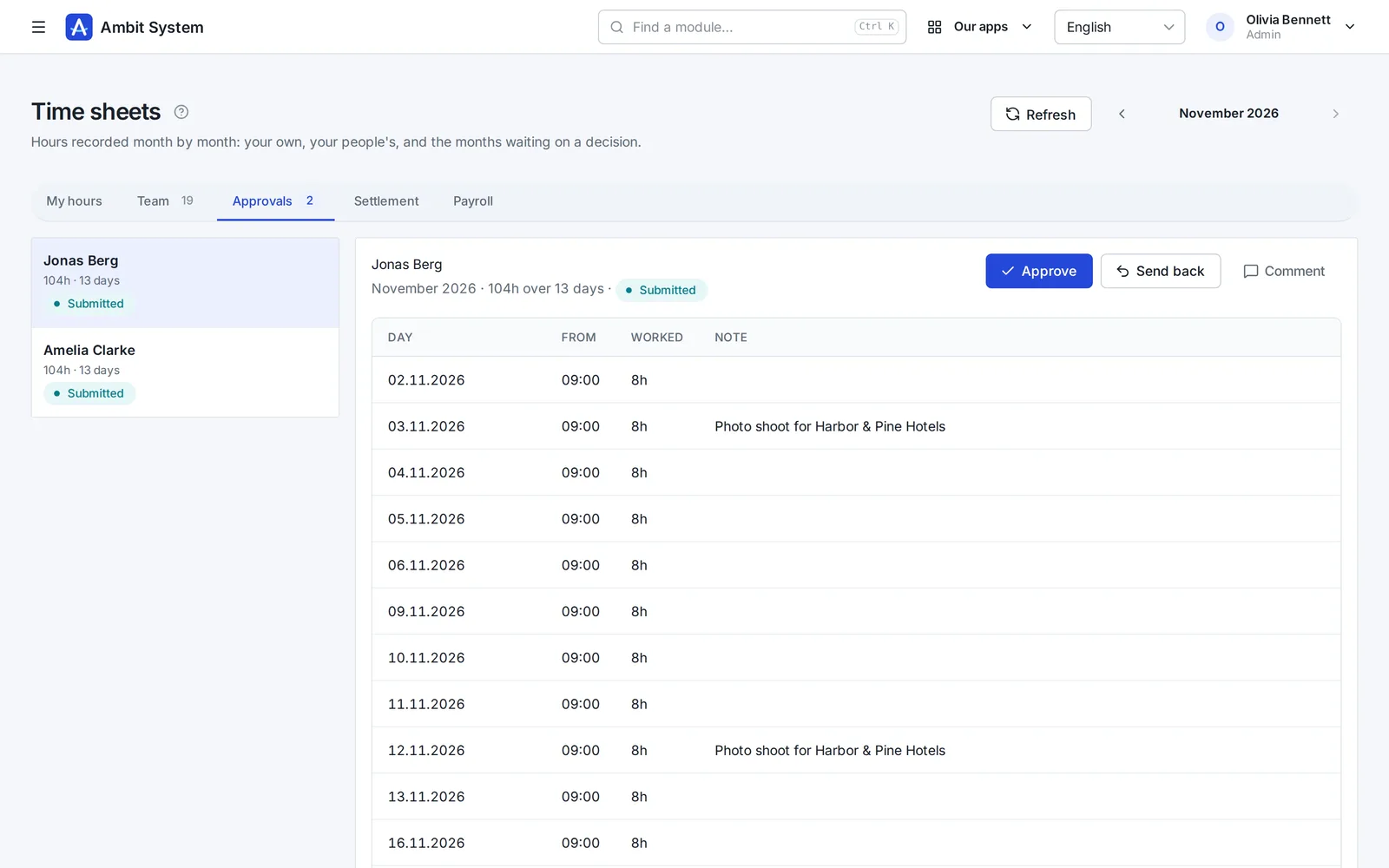
    • Approval by the person's head from the org chart
    • A payroll list for the month and an export of the settled month
    Time sheets waiting for the head's approval.
    Sample data

Modules working together

One request, four modules, one history.

An example of how a laptop reaches a new employee. Every screen below exists today; the steps between them are done by people, in one system instead of five.

  1. Service Desk

    The employee files a request

    On the portal: “Request hardware”, what is needed and why. It gets a number and lands in the IT queue.

  2. Service Desk

    The department decides

    The IT queue's people take it, ask questions in the conversation and set its status. The decision stays on the request.

  3. Warehouse

    The warehouse issues the item

    An issue from a location, with the request's number as its document number. Stock before and after is recorded.

  4. Equipment

    The item is handed over

    The laptop is handed to the employee with a planned return date. It shows under their equipment.

  5. History

    Everything stays on record

    Request, movement and handover - each with who and when, in the same organization.

Vyplnit pomocí AI

První verze nabídky, napsaná ke kontrole.

V konceptu obchodní nabídky jedno tlačítko napíše úvod, podmínky a navržené položky - název, jednotku a množství - podle klienta, obchodní příležitosti a pár slov o tom, co klient potřebuje. Ve verzi HR píše i inzeráty a popisy pozic a překládá inzeráty. Ve wiki napíše nebo vylepší stránku z vašich poznámek a v SDD navrhne rozsah a akceptační kritéria specifikace.

Co dělá

  • Vyplní prázdný koncept nebo vylepší, co už je napsané; Zpět vrátí, co tam bylo
  • Co napíše, přijde do formuláře k přečtení a opravě - nic se neuloží, dokud neuložíte
  • 1 až 3 kredity za vyplnění, podle délky; odmítnutá nebo prázdná odpověď nestojí nic
  • Kredity z měsíčního AI balíčku, nebo z jednou koupených balíčků, které nepropadají

Co nikdy nedělá

  • Nestanoví ceny, sazby DPH ani slevy - položka s cenou zůstane, jak byla zadána
  • Nečte data uchazečů ani zaměstnanců - jen to, co vyplňujete - klienta a příležitost, stránku wiki nebo projekt SDD - a vaši poznámku
  • Není to chat: jedno tlačítko, jeden formulář, jedna odpověď

Pricing

One price per company. Not per user.

10 people or 5,000 - the amount stays the same. It changes only when you add modules, and you see it before you talk to anyone.

  • Up to 5,000 users and 5 million CRM clients
  • Monthly, or yearly at a discount
  • No fixed term, cancel any time, export all your data

BASIC from

…/ měsíc bez DPH

  • 10 uživatelů…
  • 100 uživatelů…
  • 1 000 uživatelů…
  • 5 000 uživatelů…

Security

Your data is protected at every step.

A selection of what is built in - the full list, described the way it works, is on the security page.

  • Two-factor sign-in
  • Single sign-on
  • Switching an account off works at once
  • Permissions by role
  • Every organization's data is kept apart
  • Candidates' data under the GDPR
  • Export of all data
  • The event log
  • Data in the European Union
  • Service status in public
  • SLA: a critical failure fixed within 3 hours
  • A daily database backup
Security and continuity

Two versions

For any company - and a version of its own for staffing agencies.

The same platform, the same security and one price per company. The HR version adds what an agency needs.

Ambit System

Service companies, production and firms with a fleet: start with BASIC and add the modules you need.

  • The org chart, people and time tracking
  • Requests, equipment, cars and the warehouse
  • CRM, offers, KSeF invoices
Explore modules

Ambit HR for agencies

Staffing and recruitment agencies: from the client and recruitment through postings, housing and hours to the pro forma - every module included.

  • Recruitment, candidates and interviews
  • Projects, workers, postings and housing
  • Hours at clients and pro formas
See the HR version
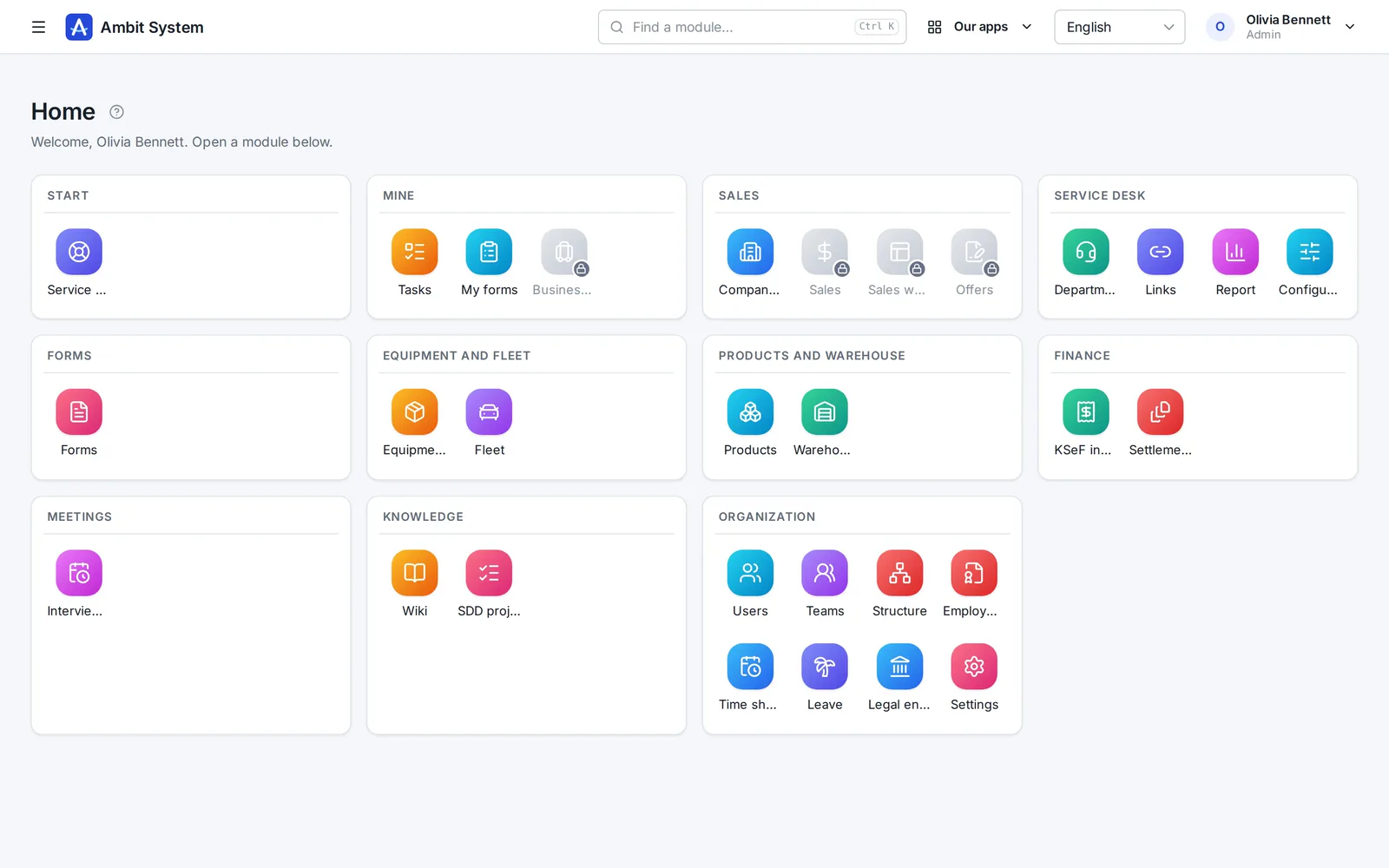
The home screen of the HR version with recruitment, projects, workers and housing modules.

Otázky

Než se zeptáte

Platím za každého uživatele?

Ne. Cena je za celou organizaci: až 5 000 uživatelů a 5 milionů klientů v CRM.

V jaké měně platím?

Firmy z Polska platí ve zlotých, firmy ze všech ostatních zemí v eurech. Fakturu s DPH vaší země vystavuje Paddle.

Co je Paddle.com a jak probíhá platba?

Paddle.com je firma, která prodává náš systém naším jménem - používá ji mnoho softwarových firem. Platit lze jen přes Paddle.com - samostatné smlouvy neuzavíráme a vlastní faktury nevystavujeme. Platíte u ní kartou, přes PayPal, Apple Pay nebo Google Pay a vaše organizace je připravená hned po zaplacení. Fakturu s DPH vaší země vystavuje Paddle. Předplatné se samo obnovuje každý měsíc nebo každý rok, dokud ho nezrušíte: odkazem v e-mailu od Paddle nebo zprávou nám, a systém běží do konce zaplaceného období.

V jakých jazycích je systém?

Panel, ve kterém pracuje váš tým, je v angličtině, polštině, němčině a francouzštině. Tato stránka je ve vašem jazyce, abyste ho snáz poznali.

Kde jsou moje data?

V Evropské unii, v datovém centru ve Varšavě.

Existuje smlouva o zpracování osobních údajů (GDPR)?

Ano. Smlouva o zpracování je součástí obchodních podmínek (oddíl 12) a platí od nákupu, bez samostatného podpisu. Vaše data jsou v EU, v datovém centru ve Varšavě.

Můžu modul přidat později?

Ano. Moduly přidáváte kdykoli; vaše organizace a její data zůstanou na místě.

Můžeme mít vlastní, oddělené prostředí?

Ne. Každá organizace pracuje na společné platformě a její data jsou oddělena od dat ostatních.

Co se stane s našimi daty, pokud Ambit System ukončíte?

Administrátor si může kdykoli vyžádat export. Připravíme vše, co organizace má - historii každé změny, aktuální data i soubory - jako jeden soubor ZIP v otevřeném formátu (JSON) a pošleme e-mailem odkaz ke stažení. Nic vás nesvazuje.

Máte SSO, SLA nebo certifikaci jako ISO 27001?

SLA ano: kritickou poruchu - systém nedostupný nebo klíčová funkce nefunkční pro všechny - odstraníme do 3 hodin (8:00-22:00 polského času), noční poruchu ráno do 11:00. Každý den, i o víkendech a svátcích. Je to v obchodních podmínkách (článek 10), ne jen na webu. Systém kontrolujeme zvenčí každou minutu a jeho stav je veřejně na status.ambitsys.eu. SSO ano: vaši lidé se mohou přihlašovat přes Microsoft 365, Google Workspace nebo Keycloak (viz další otázka). ISO 27001 zatím nemáme a nepředstíráme opak - je v plánu rozvoje na stránce Bezpečnost a kontinuita.

Nemáme firemní e-mailovou doménu - můžeme systém přesto používat?

Ne. Registrujete se firemní e-mailovou adresou a vaši lidé se přihlašují adresami v této doméně. Ještě nemáte vlastní doménu? Pomůžeme vám ji nastavit. Napište nám

Může se můj tým přihlašovat přes Microsoft 365 nebo Google Workspace?

Ano. Administrátor sám v Nastavení připojí přihlašování vaší firmy - Microsoft 365, Google Workspace, Keycloak nebo jiného poskytovatele OpenID Connect - bez naší pomoci; kroky pro každého poskytovatele jsou na stránce. Vaši lidé se přihlašují pracovním účtem přes vlastní odkaz vaší organizace. Dovnitř se dostanou jen lidé, které jste přidali, pokud nepovolíte založení účtu při prvním přihlášení pro adresy z e-mailových domén vaší firmy.

Jak fungují AI kredity?

„Vyplnit pomocí AI“ stojí 1 až 3 kredity za vyplnění, podle délky toho, co napíše; odpověď, kterou AI odmítla, nebo bez ničeho použitelného, nestojí nic. Kredity přicházejí dvěma cestami: měsíční AI balíček přidá každý měsíc 100 a co zbude, na konci toho měsíce propadá; balíčky po 100 koupené jednou v panelu nepropadají nikdy - v každém plánu, i ve verzi HR. Nejdřív se čerpají měsíční kredity. Administrátor vidí zůstatek a využití za posledních 30 dní na stránce plánu.
See what your company can run on one system.

The demo opens at once: a sample company with data in every module. No sign-up, no password.